
Last Updated on August 29, 2026 by Caleb Warren
Disclosure: As an Amazon Associate, we earn from qualifying purchases. If you click a link on this page and make a purchase, we may receive a small commission at no extra cost to you.
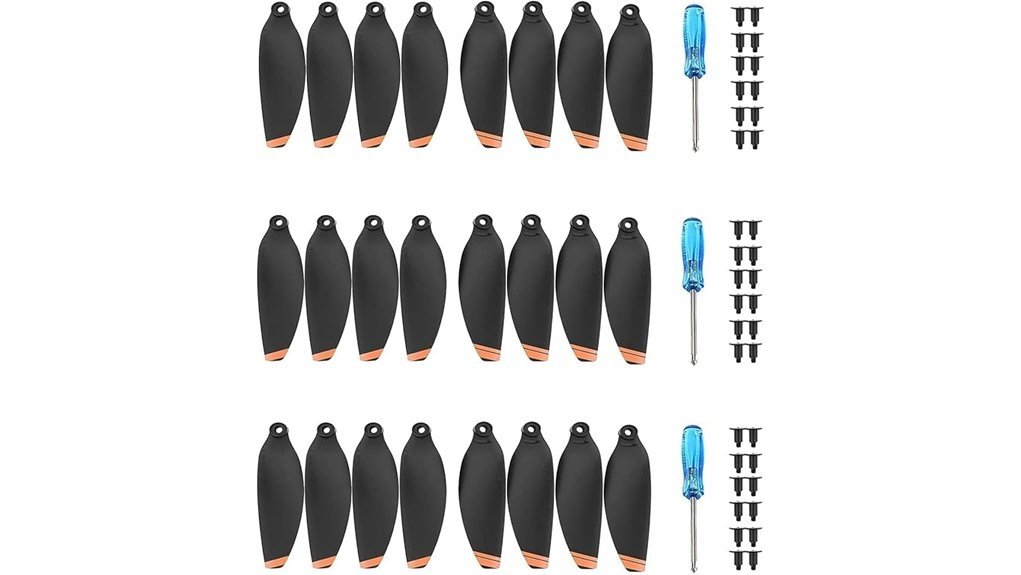
Replacing damaged propellers on a DJI Mini-series drone sounds simple, but compatibility and correct installation matter more than the number of spare blades in the box. The YETEETH 24-piece replacement propeller set gives you a large supply of orange blades for the DJI Mini 4K, Mini 2, Mini 2 SE, and Mini SE, along with replacement screws and screwdrivers. It is a third-party replacement kit rather than an official DJI propeller pack, which makes it better suited to buyers who value quantity and convenience over using OEM parts. This review explains its compatibility, package contents, installation requirements, practical strengths, and limitations so you can decide if it fits your drone maintenance needs.
Quick Verdict
Rating: 8/10, Recommended with caveats
Best For: DJI Mini 4K, Mini 2, Mini 2 SE, and Mini SE owners who want a large supply of inexpensive replacement blades and mounting hardware.
Bottom Line: You get 24 replacement propeller blades, 36 screws, and three screwdrivers in one compact kit. The main tradeoff is that these are aftermarket YETEETH parts, not official DJI OEM propellers, so buyers who want factory-original components may prefer DJI’s own replacement set.
| Specification | Detail |
|---|---|
| Brand | YETEETH |
| Model | YS20210422 |
| Product Type | Aftermarket drone replacement propellers |
| Propeller Quantity | 24 blades |
| Included Hardware | 36 screws and 3 screwdrivers |
| Color | Orange |
| Compatibility | DJI Mini 4K, Mini 2, Mini 2 SE, and Mini SE |
| Amazon-Listed Dimensions | 2 × 0.75 × 5 inches |
| Amazon-Listed Item Weight | 1.76 ounces for the listed item, not each individual propeller |
| Best Use | Keeping spare replacement blades and hardware available for compatible Mini-series drones |
What Is the YETEETH Mini 2 Propeller Set?
This product is a third-party replacement blade kit designed for several compact DJI drones. The current 24-piece orange version includes 24 propeller blades, 36 replacement screws, and three screwdrivers, giving you considerably more spare hardware than a small OEM replacement pack.
The important distinction is branding. These blades fit selected DJI drones, but they are made by YETEETH rather than DJI. That distinction matters if you prefer factory-original components or want to follow an OEM-only replacement policy for your aircraft.
Before You Buy: Confirm the exact model printed on your drone before ordering. This set is intended for the DJI Mini 4K, Mini 2, Mini 2 SE, and Mini SE. Do not assume that every DJI Mini model uses the same propellers or mounting screws.
Who Should Buy It?
Best For
- Owners of a DJI Mini 4K, Mini 2, Mini 2 SE, or Mini SE who want spare blades on hand.
- Frequent flyers who would rather keep multiple replacement blades and screws in their drone case.
- Budget-conscious owners comfortable using compatible third-party replacement parts.
Skip If
- You specifically want genuine DJI OEM propellers.
- Your drone is a different Mini-series model that is not listed as compatible.
- You want a tool-free propeller system, because installation still involves mounting screws.
Design and Build
The Amazon listing describes these blades as low-noise replacement propellers with orange coloring. Their compact form is intended to match the mounting arrangement used by the compatible Mini-series aircraft.
The original article described the propellers as weighing 1.76 ounces each, but that interpretation is incorrect. The current Amazon product details show 1.76 ounces as the listed item weight. Treat that figure as a product-level listing measurement rather than the weight of one blade.
You should also be cautious with the term “quick-release.” The Amazon title uses that wording, but DJI Mini 2-style propellers attach with screws. You still need to remove and install screws correctly, so this is not the same type of tool-free twist-lock system found on some larger drones.
Compatibility and Fit
Compatibility is the most important buying factor. The 24-piece version is listed for the DJI Mini 4K, DJI Mini 2, DJI Mini 2 SE, and DJI Mini SE. Those models share compatible Mini 2-style replacement propeller hardware.
Do not buy solely because your aircraft has “Mini” in its name. DJI has produced several Mini generations with different propellers and screw requirements. Check your aircraft model and its manual before installing any replacement blade.
Pro Tip: Keep a small labeled bag in your drone case for unused blades, screws, and the supplied screwdriver. That prevents tiny mounting screws from getting mixed with hardware for another drone or accessory.
Package Contents and Spare Parts
The large quantity is this kit’s clearest advantage. You receive 24 propeller blades, 36 screws, and three screwdrivers according to the product listing. That gives you a useful supply of replacement hardware rather than only enough parts for one minor repair.
Extra screws are particularly useful because propeller screws are small and easy to misplace during maintenance. Still, having many spares does not mean you should reuse questionable parts. If a screw is damaged, stripped, or fails to secure a blade correctly, replace it rather than forcing it back into the motor.
Installation Process and Maintenance Tips
Power the aircraft completely off before working around the motors or propellers. Remove the damaged blades carefully with the appropriate screwdriver and keep track of which motor and propeller orientation you are working on.
DJI Mini 2-style aircraft use marked and unmarked propellers that correspond with marked and unmarked motors. Match the replacement blades to the correct motor position rather than installing blades based only on appearance. The two blades mounted on one motor should also form the correct matched pair.
After installation, confirm that every screw is properly seated and that each blade moves normally without visible deformation. Do not fly if you see cracks, warping, obvious impact damage, or loose mounting hardware.
Common Installation Mistakes to Avoid
- Installing a marked blade in a position intended for an unmarked blade.
- Mixing different propeller types or manufacturers on the aircraft.
- Replacing only one damaged blade without checking its paired blade and mounting hardware.
- Reusing a screw that has damaged threads or a stripped head.
- Flying immediately without confirming that all blades and screws are secure.
Always follow the instructions supplied with the replacement set and your DJI aircraft manual. Correct propeller orientation is essential for safe lift and stable control.
Performance and Flight Experience
The product is marketed as a low-noise replacement set, but you should not expect replacement blades alone to transform the aircraft’s flight time, wind resistance, or overall performance. Those outcomes depend on blade condition, installation quality, battery condition, weather, aircraft weight, and other factors.
The practical goal of replacement propellers is simpler: restore normal operation after a blade becomes damaged, bent, chipped, or otherwise unsuitable for flight. A fresh, correctly installed set can help avoid the vibration and imbalance that damaged propellers may cause.
Because these are aftermarket blades, pilots who are especially sensitive to noise, balance, or factory-spec performance may prefer genuine DJI propellers. For casual maintenance and keeping several inexpensive spares available, the YETEETH kit offers a different value proposition.
How It Performs in Real Use
For Routine Replacement
The kit makes the most sense when one of your existing propellers develops visible wear or damage. Having 24 spare blades means you do not have to order another small package each time you need a replacement, provided you install the correct matching blades.
For Travel and Field Use
Spare propellers are easy to justify on a trip because a minor propeller strike can otherwise end a flying session. The compact blades, screws, and included screwdrivers can be stored in your drone case so replacement parts are available away from home.
For Occasional Flying
If you fly only a few times per year, 24 blades may be more than you realistically need. In that situation, a smaller genuine DJI pack may be worth comparing, especially if OEM components are your priority.
For Frequent Flying
More active pilots are more likely to appreciate the larger spare supply. Regular pre-flight inspection remains necessary, though, because having many replacements does not reduce the importance of checking every installed propeller before takeoff.
Compatibility and Safety
Propellers are flight-critical parts. A blade that is installed on the wrong motor, damaged, loose, or badly matched can affect aircraft behavior. Inspect your blades and screws before each flight, particularly after contact with branches, walls, the ground, or another obstacle.
Do not bend a propeller back into shape and assume it is safe. Replace blades that show cracks, warping, corrosion, significant wear, or impact damage. If you are unsure about installation or your aircraft behaves abnormally after replacing the propellers, stop flying and review the DJI manual or seek qualified support before another flight.
Pros and Cons
Pros
- Includes 24 replacement propeller blades.
- Comes with 36 screws and three screwdrivers.
- Compatible with four specified DJI Mini-series models.
- Large spare supply is convenient for travel or frequent flying.
- Orange blades provide an easy visual distinction from many standard gray replacement blades.
Cons
- These are third-party YETEETH parts, not official DJI OEM propellers.
- Compatibility is limited to the specifically listed Mini-series aircraft.
- Despite “quick-release” wording in the listing, installation still requires screws and a screwdriver.
Is It Worth the Price?
This set is best viewed as a quantity-focused replacement option. You are getting a large group of spare blades and hardware rather than paying primarily for DJI branding. That can make it strong value for the price if you fly frequently, travel with your drone, or simply want multiple replacement parts ready in your case.
The value is less compelling if you rarely replace propellers or strongly prefer factory-original flight components. In that case, buying a smaller genuine DJI propeller package may be a better fit even if you receive fewer spare blades.
How It Compares to Alternatives
Official DJI Mini 2 propellers are the clearest alternative if OEM parts are your priority. DJI’s own replacement propellers are designed for the Mini 4K, Mini 2 SE, Mini 2, and Mini SE, but the official package contains far fewer spare blades than this 24-piece YETEETH set.
Master Airscrew’s Mini 2/SE/2 SE/4K Stealth propellers are another third-party option aimed more at performance-oriented buyers, with a smaller set and manufacturer-specific noise and efficiency claims. The YETEETH package makes more sense when your priority is having a large number of basic replacement blades and mounting hardware rather than buying a specialized upgrade set.
Frequently Asked Questions
Are these genuine DJI Mini 2 propellers?
No. The linked product is a YETEETH aftermarket replacement set designed for compatible DJI Mini-series drones. Choose official DJI propellers instead if you specifically require OEM parts.
Which DJI drones are compatible with this set?
The current 24-piece listing names the DJI Mini 4K, Mini 2, Mini 2 SE, and Mini SE. Verify the exact model of your aircraft before installing any replacement propeller.
How many propellers and screws are included?
The 24-piece orange variant is listed with 24 propeller blades, 36 screws, and three screwdrivers. Keep unused hardware separated and labeled so it does not get mixed with parts for another drone.
Does each propeller weigh 1.76 ounces?
No. Amazon lists 1.76 ounces as the item weight for the product listing, not the weight of each blade. The original version of this review incorrectly applied that figure to individual propellers.
Are these propellers really quick-release?
The Amazon product title uses “quick-release,” but these Mini-series blades are attached with screws. You still need a suitable screwdriver and must install each marked or unmarked blade in the correct position.
When should you replace a Mini 2 propeller?
Replace a propeller if you find cracks, significant wear, warping, corrosion, impact damage, or mounting problems. DJI recommends checking propellers and screws before each flight and replacing damaged components rather than continuing to fly with them.
Who should skip this replacement set?
Skip it if your aircraft is not one of the listed compatible models or if you only want genuine DJI replacement parts. It may also be excessive for an occasional flyer who needs only one small replacement set.
The Bottom Line
The YETEETH 24-piece replacement propeller kit is a practical choice when you own a compatible DJI Mini 4K, Mini 2, Mini 2 SE, or Mini SE and want plenty of spare blades, screws, and installation tools. Its main strength is the generous quantity, while its main limitation is that you are choosing third-party components rather than genuine DJI OEM propellers. Buyers who value spare-part quantity should consider it, while OEM-only pilots should compare DJI’s official replacement propellers instead.
Ready to Buy?
Check the latest price, selected variant, compatibility, and package details before you decide.
