
Last Updated on July 31, 2026 by Caleb Warren
Disclosure: As an Amazon Associate, we earn from qualifying purchases. If you click a link on this page and make a purchase, we may receive a small commission at no extra cost to you.
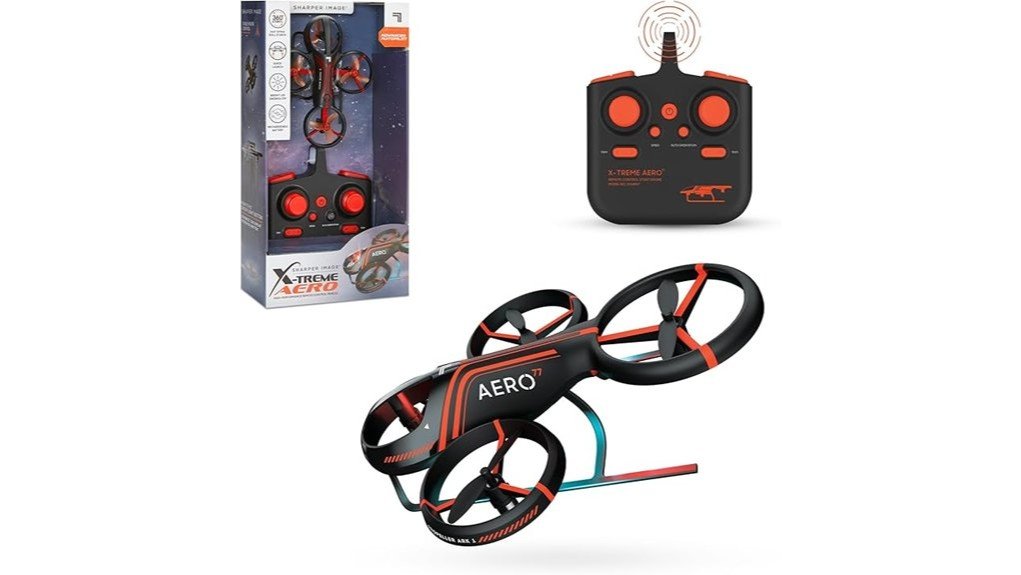
A small stunt drone should be easy to control, tough enough for beginner mistakes, and simple to recharge. The Sharper Image X-Treme Aero Mini Drone, model 1016967, checks many of those boxes with assisted takeoff and landing, gyro stabilization, bright LEDs, and dedicated stunt controls. Its biggest tradeoff is endurance: the manual lists about five minutes of flight after roughly 50 minutes of charging. This review will help you decide whether its compact indoor design is a good match for short practice sessions and casual flying.
Quick Verdict
Rating: 7/10, recommended with caveats
Best For: Beginners who want a compact indoor drone for basic hovering, LED flying, and push-button stunts.
Bottom Line: The X-Treme Aero Mini Drone makes takeoffs, landings, and flips approachable in a clear indoor space. The short flight time, lack of a camera, and indoor-only guidance limit its appeal for longer or outdoor sessions.
| Specification | Detail |
|---|---|
| Brand | Sharper Image |
| Model | 1016967, also identified in the manual as X-Treme Aero Stunt |
| Product type | Compact remote-control stunt drone |
| Dimensions | 4.6 x 3.7 x 1.5 inches |
| Weight | 0.96 ounce, about 27.22 grams |
| Color and material | Black plastic body |
| Control connection | 2.4 GHz remote control |
| Advertised control range | Up to 150 feet |
| Flight time | Approximately 5 minutes per full charge |
| Charge time | Approximately 50 minutes through USB-C |
| Remote batteries | 3 AAA 1.5V batteries, not included |
| Flight assistance | Auto takeoff, assisted landing, auto orientation, gyro stabilization, and trim controls |
| Stunt controls | Turn, maneuver, and directional flip functions |
| Lighting | LED underglow with 9 built-in lights |
| Included items | Drone, remote control, USB-C charging cable, and 4 replacement propellers |
| Camera or app | No built-in camera and no smartphone control app |
| Recommended setting | Indoor use in a clear, open area, with adult supervision for children |
What Is the Sharper Image X-Treme Aero Mini Drone?
The Sharper Image X-Treme Aero Mini Drone is a palm-sized remote-control aircraft designed for basic hovering, directional flight, and preset stunts. It uses a dedicated 2.4 GHz controller rather than a phone, so you do not need an app, Wi-Fi connection, or account before flying.
Model 1016967 is aimed at beginners who want straightforward controls and visual effects instead of photography features. The package includes the drone, remote, USB-C charging cable, and four replacement propellers. Its low weight makes it responsive, but it also means you need a calm, uncluttered indoor area to keep it under control.
Who Should Buy It?
Best For
- First-time pilots who want auto takeoff, assisted landing, and a low-speed mode.
- Families looking for a compact indoor activity with adult supervision.
- Buyers who care more about LEDs and stunts than cameras or app features.
Skip If
- You want a camera, live video, smartphone controls, or GPS features.
- You need long flights, because the listed flight time is about five minutes per charge.
- You mainly plan to fly outdoors, since the model manual specifies indoor use.
Before You Buy: Some retail descriptions call this an indoor and outdoor toy, but the model 1016967 instruction manual says indoor use only. Follow the manual and product packaging, and do not fly near people, pets, fragile objects, moisture, or spinning fans.
Design and Build Quality
At 4.6 x 3.7 x 1.5 inches and about 0.96 ounce, the X-Treme Aero Mini Drone is easy to store and light enough to react quickly to control inputs. The black plastic body keeps the aircraft compact, while the included replacement propellers give you a practical backup for one of the parts most likely to take damage.
The lightweight build is useful for indoor hovering, but it is not the same as impact-proof construction. Inspect the body and propellers before each flight, stop using the drone if you see cracks or damage, and have an adult replace propellers. The manual also warns against moisture and extreme temperatures.
Flight Performance and Beginner Controls
The drone starts in low-speed mode, which gives you a more manageable response while learning. Pressing the flight button can launch it automatically to roughly 3.3 to 4.9 feet, where it hovers. The same button supports assisted landing, while the left joystick can handle manual takeoff, altitude, rotation, and landing.
Auto orientation is especially useful when you lose track of which end of the drone is facing forward. In this mode, the drone responds according to its position relative to the remote, so pushing the right joystick forward sends it away from you. Gyro stabilization and trim buttons help correct drifting, although you may still need to recalibrate after a bump or hard landing.
The advertised 150-foot control radius sounds generous for such a small drone, but range should not be your main goal indoors. Keep the aircraft in sight and practice at low altitude in a clear room. A large open indoor area gives you more time to correct a mistake before reaching a wall.
Stunt Capabilities and Control
Dedicated turn, maneuver, and flip buttons make the stunt functions easier to access than joystick-only combinations. You select the stunt control, then press the right joystick in a direction to trigger the move. This setup lets a beginner try spins and directional flips without memorizing a long sequence.
Stunts still need enough open space and altitude. Do not attempt a flip close to the floor, ceiling, furniture, or another person. Start with normal hovering and steering, then add stunts after you can hold a stable position and land consistently.
Pro Tip: Use low-speed mode for your first flights, launch from a flat surface, and practice hovering below head height. After an impact, place the drone level and recalibrate the gyroscope before trying another stunt.
Battery Life and Charging
The built-in rechargeable battery takes approximately 50 minutes to charge through the included USB-C cable and provides about five minutes of flight. That ratio is the main limitation of the X-Treme Aero. It works best as a short-session toy rather than a drone you can fly continuously for an afternoon.
A red charging light stays on during charging and turns off when the battery is full. The drone cannot operate while connected to the charger. Low-battery alerts include rapidly flashing blue and red LEDs on the aircraft and a repeating beep from the remote, giving you a cue to land rather than continue a stunt.
The remote requires three AAA 1.5V batteries, which are not included. Add those batteries to your purchase plan so the drone is ready to pair after its first charge.
Lighting and Visual Appeal
Nine built-in LEDs and a bright underglow make the drone easy to spot in a dim indoor room. The lights also make spins and flips more visible, which is part of the appeal if you want a toy drone focused on spectacle rather than recording video.
The LEDs are useful for orientation and low-battery alerts, but they do not make a dark room safe by themselves. Keep enough room lighting to see furniture, walls, people, pets, and the full flight path.
Setup Tips Before First Use
- Charge the drone fully. Connect the included USB-C cable and wait until the red charging light turns off.
- Install three AAA batteries in the remote. Match the polarity marks and secure the battery cover.
- Choose a level launch area. Clear nearby breakables, loose paper, cords, pets, and people from the flight path.
- Pair the controls. Turn on the remote and drone, then move the left joystick up and down quickly.
- Begin in low-speed mode. Practice takeoff, hovering, gentle turns, and assisted landing before using flip controls.
- Recalibrate after a hard landing. Place the drone on a level surface and follow the gyroscope reset steps in the manual.
Keep the instructions nearby during your first sessions. The control layout includes separate buttons for speed, auto orientation, trimming, turns, maneuvers, flips, and flight assistance, so a quick manual check can solve many early control problems.
How It Performs in Real Use
For First-Time Indoor Practice
The automatic launch, hover behavior, low-speed default, and assisted landing reduce the number of inputs you need to manage at once. You still need room to correct drift, so a clear family room, recreation room, or similar open indoor area is better than a narrow hallway or crowded bedroom.
For Short Stunt Sessions
Preset spins, maneuvers, and flips give the drone more entertainment value than a basic hover-only toy. The five-minute battery limit means you should practice one skill at a time. A few stable takeoffs followed by one or two stunts is more realistic than a long routine.
For Low-Light Flying
The LED underglow makes the aircraft easier to follow and gives each rotation a bright visual effect. Keep normal room lighting on so you can still judge distance from walls and objects. The LEDs improve visibility, but they do not replace a safe flight area.
After Minor Crashes or Drift
Beginner flights often include bumps. The included replacement propellers help with simple blade damage, while trim controls and gyroscope recalibration can correct drifting after an impact. If the body or propellers look cracked, worn, or broken, stop flying instead of relying on calibration alone.
Safety and Maintenance
The propellers are small and fast-moving, so adult supervision is required and you should never touch the blades while they spin. Do not fly toward people, animals, or fragile objects. The product contains small parts and is not suitable for children under three years old.
Keep the drone dry, avoid extreme temperatures, and turn both the drone and remote off when you finish. Store the aircraft where the propellers will not be bent or pressed under other items. Before each flight, check that every propeller is secure and that the body has no cracks.
If a propeller needs replacement, an adult should match the letter on the new blade to the position shown in the manual. Installing the wrong propeller in the wrong position can prevent stable lift.
Pros and Cons
Pros
- Compact 4.6-inch body is easy to store and use in a clear indoor area.
- Auto takeoff, assisted landing, low-speed mode, and auto orientation support beginners.
- Turn, maneuver, and flip buttons provide several stunt options.
- Nine LEDs and underglow improve visibility and visual appeal.
- USB-C cable and four replacement propellers are included.
Cons
- Approximately five minutes of flight requires frequent charging.
- No camera, video recording, GPS, or smartphone app control.
- The manual specifies indoor use, which limits where you can fly.
Is It Worth the Price?
The X-Treme Aero Mini Drone sits in the budget toy-drone category and offers strong value when your priority is simple indoor flight. You get a dedicated remote, assisted controls, multiple stunts, bright lighting, USB-C charging, and spare propellers without paying for camera hardware or app development.
It is worth considering for a beginner who will enjoy several short flights rather than one long session. It is not the best fit if flight time, outdoor use, photography, or phone-based controls matter more than push-button stunts and LED effects.
How It Compares to Alternatives
The Sky Viper DASH Nano is another compact beginner drone worth comparing if you want a widely available nano-style option. The Sharper Image Thunderbolt Jet X Mini Drone may appeal more if you prefer a different aircraft shape and an automatic-hover-focused design.
The X-Treme Aero Mini Drone makes the most sense when you want dedicated stunt buttons, nine LEDs, auto orientation, and replacement propellers in the box. Buyers seeking a camera or longer battery life should move beyond basic toy drones and compare models built for video and extended flight.
Frequently Asked Questions
How long does the X-Treme Aero Mini Drone fly?
The model 1016967 manual lists approximately five minutes of flight from a full charge. Charging takes about 50 minutes, so this drone is best for short practice or stunt sessions.
Can you fly this drone outdoors?
The instruction manual specifies indoor use only, even though some retail descriptions mention outdoor use. Follow the manual and choose a clear indoor area away from people, pets, fans, moisture, and fragile objects.
Does it have a camera or connect to a smartphone?
No. The X-Treme Aero Mini Drone has no built-in video recorder and does not use a smartphone control app. You operate it with the included 2.4 GHz remote.
What batteries does the remote need?
The remote requires three AAA 1.5V batteries. They are not included, so you need to supply them separately before pairing and flying the drone.
What comes in the box?
The package includes the X-Treme Aero Mini Drone, remote control, USB-C charging cable, and four replacement propellers. A landing pad is not listed among the model 1016967 manual contents.
Is it suitable for children?
The manual requires adult supervision and warns that the small parts are not for children under three. Check the age guidance on your product packaging and supervise setup, flying, charging, and propeller replacement.
What should you do if the drone drifts?
Use the directional trim buttons to correct steady drifting. If the problem begins after an impact, place the drone on a level surface, reset the gyroscope, and pair the drone and remote again if needed.
Who should skip this mini drone?
Skip it if you want aerial photos, live video, GPS, app control, outdoor flight, or long battery life. It is designed as a compact indoor stunt toy with brief flight sessions.
The Bottom Line
The Sharper Image X-Treme Aero Mini Drone is a sensible beginner pick for short indoor flights, bright LED effects, and easy-access stunts. Buy it if assisted controls and compact storage matter most, but skip it if you need a camera, outdoor capability, or more than about five minutes of flight per charge.
