
Last Updated on September 10, 2026 by Daniel Globe
Disclosure: As an Amazon Associate, we earn from qualifying purchases. If you click a link on this page and make a purchase, we may receive a small commission at no extra cost to you.
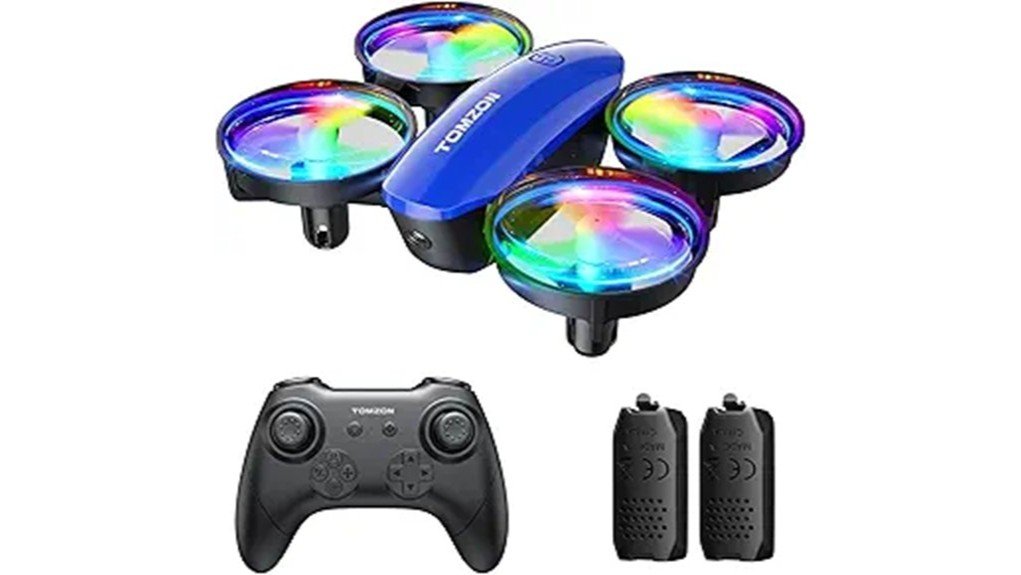
A small drone can be easier to learn on than a larger camera model, but beginner-friendly controls matter more than flashy extras. The TOMZON A23 Mini Drone focuses on simple flying with one-key takeoff, altitude hold, headless mode, propeller guards, LED lights, and two rechargeable flight batteries. Its lightweight 31 g design makes it better suited to indoor rooms and calm outdoor conditions than windy open areas. This review explains where the A23 works well, what its 30 m control range and lack of a camera mean for you, and whether its features match the way you plan to fly.
Quick Verdict
Rating: Recommended with caveats
Best For: Beginners, supervised young pilots, indoor practice, and buyers who want simple stunt functions without a camera.
Bottom Line: The TOMZON A23 combines simple controls, propeller guards, two batteries, and several fun flight modes in a very light package. Its main tradeoffs are the 30 m maximum remote distance, limited wind resistance, and the absence of a camera.
TOMZON A23 Key Specifications
| Specification | Detail |
|---|---|
| Brand | TOMZON |
| Model | A23 |
| Product type | Mini remote-control quadcopter |
| ASIN | B0C65SVDXX |
| Takeoff weight | 31 g |
| Control frequency | 2.4 GHz |
| Maximum remote distance | 30 m |
| Drone battery | 3.85V 380mAh rechargeable modular battery |
| Included flight batteries | 2 |
| Listed flight time | 18 minutes total |
| Remote batteries | 3 AAA batteries, not included |
| Camera | No |
| Beginner functions | One-key takeoff/landing, altitude hold, headless mode, calibration, speed adjustment |
| Stunt functions | 360° flip, rotation, orbit/circle flight, Throw to Go |
| Safety features | Propeller guards and emergency-stop control |
| Included accessories | Remote control, two modular batteries, USB charging cable, spare propellers, and user manual |
What Is the TOMZON A23 Mini Drone?
The TOMZON A23 is a small, camera-free RC drone designed around basic flight practice and simple tricks. Instead of asking you to manage an app, video feed, GPS, or photography controls, it keeps the experience focused on the handheld remote and core flight movements.
That approach makes sense for a first drone. One-key takeoff helps you get airborne without manually balancing the throttle during launch, while altitude hold helps the drone maintain height once it is in the air. Headless mode can also make early steering less confusing because you do not have to constantly judge which side of the drone is facing forward.
The A23 also adds functions that give you something to try after basic hovering becomes comfortable. These include 360-degree flips, automatic rotation, orbit flight, Throw to Go, speed adjustment, and LED lighting.
Who Should Buy It?
Best For
- First-time pilots who want one-key takeoff and altitude hold.
- Families looking for a small drone for supervised indoor practice.
- Buyers who want flips, rotation, LED lights, and simple flying rather than aerial photography.
Skip If
- You specifically want a camera, FPV video, or aerial photos.
- You need long-range outdoor flying beyond the listed 30 m control distance.
- You expect a lightweight mini drone to handle strong wind well.
Before You Buy: The A23 is not a camera drone. Its strengths are basic controls and recreational flying, so choose another model if recording photos or video is one of your main goals.
Controls and Beginner-Friendly Features
One-Key Takeoff and Altitude Hold
One-key takeoff removes one of the more awkward steps for a first-time pilot. After you pair and calibrate the drone, pressing the takeoff control lets the A23 rise automatically instead of requiring you to carefully increase throttle from the floor.
Altitude hold is equally useful while learning. It helps the A23 maintain a relatively steady height, giving you more time to concentrate on forward, backward, left, and right movement. You still need to make corrections, but you have fewer controls competing for your attention at once.
Headless Mode
Headless mode is intended to make directional control easier when you lose track of the drone’s front and rear orientation. This can be useful with a small quadcopter because its orientation becomes harder to judge as it moves farther away.
It is still worth learning normal orientation rather than relying on headless mode every time. Understanding the drone’s direction gives you better control as your flying skills improve.
Flips, Rotation, Orbit Flight, and Throw to Go
The A23 is not limited to hovering. The remote includes a 360-degree flip function, rotation control, and orbit flight. Amazon also lists Throw to Go, which gives you another way to begin a flight.
These functions add variety once you can maintain a stable hover. Practice them with plenty of open space around the drone so a wrong input does not send it into furniture, people, pets, or fragile objects.
LED Lights
The built-in LED lighting adds visual interest and can make the drone easier to see and orient in dimmer indoor conditions. The lights should not be treated as a substitute for keeping the aircraft in sight, especially outdoors.
Battery Life and Flight Performance
The A23 package includes two modular rechargeable flight batteries. Amazon lists a combined flight time of about 18 minutes, giving you a second battery to swap in rather than ending the session after the first pack is depleted.
The manual identifies the flight battery as a 3.85V 380mAh pack. Actual time in the air can vary with speed, flips, repeated altitude changes, battery condition, temperature, and other conditions, so the listed figure is better treated as a product specification than a guaranteed session length.
The remote control uses three AAA batteries, which are separate from the rechargeable drone batteries. Having those AAA batteries ready before the first flight avoids an easy setup delay.
With a takeoff weight of just 31 g, the A23 is very light. That helps keep it manageable for indoor practice, but the same low weight means wind can push it around more easily outside. Calm conditions are the better choice when you take it outdoors.
Pro Tip: Charge both flight batteries before your session and start outside only in calm conditions. A lightweight mini drone is easier to learn when you are not constantly correcting for wind.
Propeller Guards and Flight Safety
The A23 has guards around its propellers. These guards can help reduce direct contact between a spinning propeller and nearby objects during minor bumps, which is useful when you are still learning precise control.
Propeller guards do not make the drone crash-proof or remove the need for supervision. TOMZON’s instructions advise keeping a safe distance from people, pets, wires, and other obstacles. You should also keep the drone within sight and avoid touching the propellers or moving parts while they are spinning.
The remote includes an emergency-stop function for situations in which normal control is not enough. Use it as a safety feature rather than a normal landing method because an emergency stop can cause the drone to drop.
For outdoor use, choose open space and suitable weather, and follow the drone rules that apply where you live. Strong wind, rain, extreme temperatures, roads, power lines, crowds, and other hazards are poor conditions for a small beginner drone.
How It Performs in Real Use
For First Indoor Flights
An open indoor room is one of the A23’s most practical learning environments. Its small size, altitude hold, one-key takeoff, and propeller guards let you focus on gentle directional movements without immediately dealing with wind.
Clear the area before launching. Ceiling fans, hanging lights, pets, people, breakable decorations, and tight spaces can quickly turn a simple practice flight into a collision.
For Calm Outdoor Practice
The A23 can be used outdoors, but its 31 g weight makes weather selection important. In calm conditions, you can take advantage of more open space for wider turns and longer straight movements.
The manual specifies a maximum remote distance of 30 m. Staying comfortably inside that limit gives you more margin for maintaining control and visual orientation.
For Learning Tricks
Once basic takeoff, hovering, turning, and landing feel comfortable, the flip and rotation controls add a second stage to the learning process. They give you something entertaining to practice without requiring a camera or mobile app.
Use extra space when trying these functions. A trick can change the drone’s position quickly, and a larger safety area makes mistakes less costly.
For Short Family Flying Sessions
Two rechargeable batteries are useful when several people want a turn. Instead of waiting for the same battery to recharge after every session, you can keep a second charged pack ready.
Children should still be supervised. The drone has spinning propellers, rechargeable batteries, and a remote-control range large enough to require responsible operation.
Setup Tips Before Your First Flight
Start by charging the flight batteries with the supplied USB charging cable. Install three AAA batteries in the remote control, paying attention to the correct polarity.
Place the A23 on a flat, level surface before pairing and calibration. According to the operating instructions, you power on the drone and remote, move the left throttle stick up and then down to pair them, and perform calibration while the aircraft remains level.
Check the propellers and guards before each session. If a propeller needs replacement, match the replacement marked A or B with the corresponding motor position. Installing the wrong propeller type in a position can prevent normal flight.
Begin with slow, small control inputs. Practice takeoff, hover, forward and backward movement, gentle turns, and landing before moving to flips or faster modes. This gives you a better feel for how quickly the A23 responds.
Pros and Cons
Pros
- One-key takeoff and altitude hold reduce the learning load for beginners.
- Two rechargeable flight batteries provide a listed 18 minutes of total flight time.
- Propeller guards add useful protection during beginner bumps.
- Headless mode, speed adjustment, flips, rotation, and orbit flight provide room to practice new skills.
- 31 g takeoff weight makes it compact and easy to handle for indoor practice.
Cons
- There is no camera, so it is not suitable for aerial photography or FPV flying.
- The manual lists a maximum remote-control distance of only 30 m.
- Its very light build makes calm weather preferable for outdoor flying.
Is It Worth the Price?
The TOMZON A23 makes the most sense when your priority is a simple recreational drone rather than a photography platform. You get two flight batteries, propeller guards, altitude hold, headless mode, one-key takeoff, LED lighting, and several stunt functions in one beginner-focused package.
Its value is less convincing if you expect features found on more advanced drones. There is no camera, GPS, or long-range flight system, and the manual’s 30 m maximum control distance confirms that this is designed for relatively close recreational flying.
Because prices change, compare the current selling price with other small beginner drones before you order. The A23 is worth considering when easy controls and simple indoor fun matter more to you than imaging or long-distance flight.
How It Compares to Alternatives
If a camera is important, the TOMZON A23W is the more relevant model to compare because the standard A23 reviewed here is camera-free. If you want another TOMZON toy-drone option with different play features, the TOMZON A24 is also worth comparing.
The standard A23 makes the strongest case when you want to keep the controls simple and spend your time learning takeoff, hovering, direction changes, and tricks rather than managing a video feed.
Frequently Asked Questions
Is the TOMZON A23 suitable for beginners?
Yes. TOMZON markets the A23 for beginners, and functions such as one-key takeoff, altitude hold, headless mode, calibration, and speed adjustment are designed to simplify early flights. New pilots should still practice gradually in a clear area.
Can children use the TOMZON A23?
The product is marketed for kids and beginners, but the verified information does not establish a specific age threshold for every buyer. Children should use the drone with appropriate adult supervision and follow the product instructions.
How long does the TOMZON A23 fly?
Amazon lists an 18-minute flight time for the A23, and the package includes two modular rechargeable batteries. Actual time can vary with flying style, battery condition, temperature, and how often you use higher-power maneuvers.
How far can the TOMZON A23 fly from the controller?
The A23 manual specifies a maximum remote distance of 30 meters. You should stay inside the specified range, maintain visual contact with the drone, and leave extra margin rather than treating 30 m as a target distance.
Does the TOMZON A23 have a camera?
No. The standard A23 listing reviewed here is a camera-free mini drone. It is intended for recreational flying and tricks rather than aerial photography or FPV video.
Can you fly the A23 indoors?
Yes, indoor practice is one of the more practical uses for this lightweight mini drone. Choose an open space away from people, pets, ceiling fans, wires, furniture, and breakable objects.
What batteries does the TOMZON A23 use?
The drone uses a 3.85V 380mAh modular rechargeable battery, and two flight batteries are included. The remote control requires three AAA batteries, which are not included.
Are replacement parts available, and what warranty does it have?
The supplied package includes spare propellers, and TOMZON provides support information in its documentation. A specific warranty period was not verified, so check the current seller information, product packaging, or TOMZON support before relying on a particular warranty term.
The Bottom Line
The TOMZON A23 Mini Drone is a sensible starter option when you want easy controls, two batteries, propeller guards, LED lighting, and simple stunt functions in a very lightweight drone. It is best for close-range recreational practice, especially indoors or outdoors in calm conditions, while buyers who need a camera, longer control range, or stronger outdoor performance should choose a different model.
