
Last Updated on August 29, 2026 by Caleb Warren
Disclosure: As an Amazon Associate, we earn from qualifying purchases. If you click a link on this page and make a purchase, we may receive a small commission at no extra cost to you.
Your first mini drone should be easy to control, forgiving when you make a mistake, and fun enough that you want to keep practicing. The Holy Stone Mini Drone HS210 focuses on those basics with altitude hold, headless mode, protected propellers, multiple speed settings, and three rechargeable batteries. It is best treated as a compact indoor training and recreational drone rather than a photography platform. This review explains where the HS210 works well, where its small size creates limits, and who will get the most value from it.
Quick Verdict
Rating: 8/10
Best For: Kids with supervision, first-time pilots, and anyone who wants inexpensive indoor flight practice before moving to a larger camera drone.
Bottom Line: The HS210 combines beginner-friendly controls, full propeller protection, and three batteries in a very compact package. Its main tradeoff is that it is designed for short-range recreational flying, not stable outdoor use or serious photo and video work.
| Specification | Detail |
|---|---|
| Brand | Holy Stone |
| Model | HS210 |
| Product type | Mini remote-control quadcopter |
| Color reviewed | Blue |
| Dimensions | About 3.15 × 3.15 × 1.18 inches (80 × 80 × 30 mm) |
| Listed weight | 50 g on the current Amazon specification table; Holy Stone has published lower drone-only weights for HS210 versions |
| Flight time | Up to 7 minutes per battery, up to about 21 minutes across three batteries |
| Battery | Three rechargeable 3.7V 250mAh lithium-polymer drone batteries |
| Charging time | Approximately 40 to 60 minutes |
| Control range | About 50 m / 164 ft outdoors in unobstructed conditions |
| Beginner functions | Altitude Hold, Headless Mode, speed adjustment, one-key start/landing |
| Stunt functions | 3D flips, Toss to Launch, Circle Fly, Auto Rotation |
| Safety features | Full propeller guards, low-battery warning, motor protection |
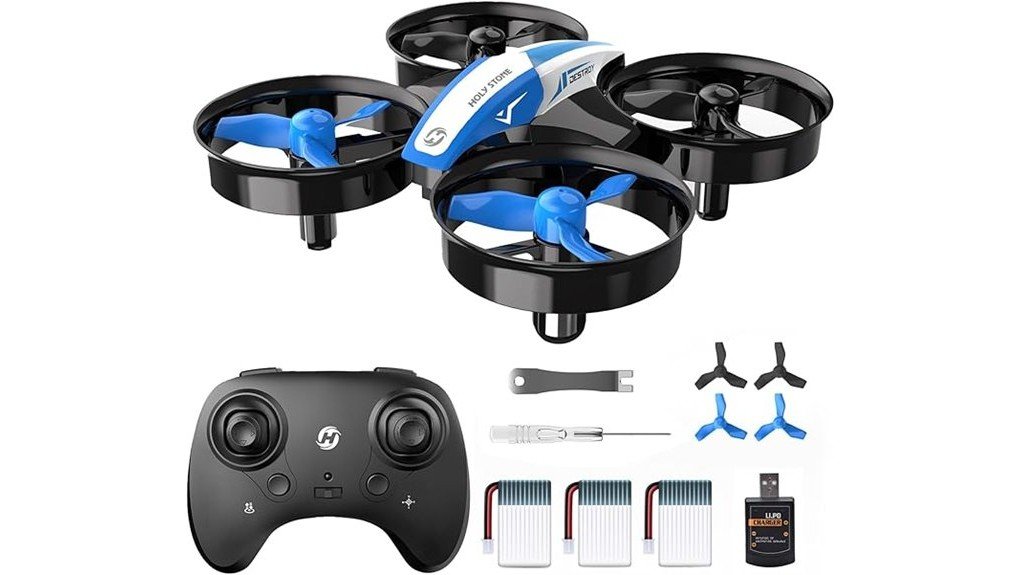
| Typical package | Drone, transmitter, three drone batteries, USB charger, four spare propellers, screwdriver, propeller tool, and instructions. Package configuration can vary by sales channel. |
What Is the Holy Stone Mini Drone HS210?
The Holy Stone HS210 is a palm-size remote-control quadcopter aimed at beginners and recreational indoor flying. At roughly 80 mm square, it takes up little storage space and is easier to use in a living room or play area than a full-size outdoor drone.
You control it with the included transmitter rather than relying on a smartphone for basic flight. Its main selling points are simple hovering assistance, direction-friendly controls, protected propellers, playful stunt modes, and three swappable batteries that reduce the downtime you would get from a single-battery toy drone.
Before You Buy: Do not choose the HS210 mainly for photography. The current Amazon page contains conflicting camera-related metadata, but Holy Stone’s HS210 information and the listing’s main title and feature descriptions position this model as a simple mini flight drone. If FPV viewing or 1080p recording is important to you, compare a dedicated camera model such as the HS210P or HS420 instead.
Who Should Buy It?
Best For
- You are learning basic takeoff, hovering, turning, and landing skills.
- You want a small drone for indoor family play or supervised practice.
- You prefer three batteries and simple transmitter controls over app-based features.
Skip If
- You want dependable outdoor performance in wind.
- You need GPS, automatic return-to-home, or long-distance flying.
- You are mainly shopping for an FPV or photography drone.
Controls and Beginner-Friendly Features
Altitude Hold
Altitude Hold helps the HS210 stay near its current height when you release the throttle. You still need to steer and correct its position, but the feature reduces the amount of constant throttle work required while you learn basic orientation.
Headless Mode
Headless Mode makes directional control relative to the pilot’s orientation established during pairing rather than the direction the front of the drone is pointing. This can make early practice less confusing when the small airframe turns and you lose track of its nose.
It is still worth learning normal orientation as your skills improve. Headless Mode is most useful as a training aid, not a replacement for understanding how a quadcopter moves.
Speed Modes and Flight Tricks
You can adjust the flight speed as your confidence grows. Starting at the lower setting gives you more time to react indoors, while faster modes make the HS210 more responsive once you are comfortable with the controls.
For recreational flying, the drone also supports 3D flips, Circle Fly, Auto Rotation, and Toss to Launch. These features give you something to practice beyond basic hovering and landing without requiring a smartphone app.
Battery Life and Charging
The HS210 includes three rechargeable drone batteries. Amazon’s current A+ specifications list approximately 7 minutes of flight per battery, while the listing promotes up to about 21 minutes total when you use all three packs.
That does not mean you get 21 uninterrupted minutes from one charge. You need to land and swap batteries between flights. Charging is listed at roughly 40 to 60 minutes, so having three packs is useful when several people want turns or when you are practicing repeatedly.
Pro Tip: Learn hovering and landing with the lowest comfortable speed setting before spending battery power on repeated flips. The HS210 manual also notes that 360-degree flips perform better when the battery has a strong charge.
Flight Performance and User Experience
The HS210’s small frame is well suited to close-range practice. Altitude Hold takes some workload away from the throttle, while the protected propellers make minor indoor bumps less intimidating than they would be with exposed blades.
The advertised control distance is around 50 m / 164 ft in unobstructed outdoor conditions. In practical use, this drone makes more sense much closer to you, where you can clearly see its orientation and maintain a controlled practice area.
You should also set expectations around wind. Holy Stone describes the HS210 as suitable for outdoor flying when conditions are calm, but its tiny, lightweight design is primarily at home indoors. Even modest wind can make a very small quadcopter harder to position accurately.
How It Performs in Real Use
For First Indoor Flights
A clear living room or similar open indoor space is where the HS210’s beginner features make the most sense. Altitude Hold helps you focus on steering, and Headless Mode can reduce orientation mistakes during your first sessions.
For Kids and Family Flying
The propeller guards create a useful physical barrier around the spinning blades, and the small size keeps the drone manageable. Younger children should still fly with adult supervision, and you should keep faces, hair, pets, fragile objects, and fingers away from the propellers.
For Learning Tricks
Once you can hover, turn, and land consistently, the built-in flips, Circle Fly, and Auto Rotation give you more ways to practice. You get the most value from these modes after you have enough open space to recover from a maneuver without hitting furniture.
For Calm Outdoor Practice
You can take the HS210 outdoors in calm conditions, but you should not treat its stated maximum range as a target. Keep it close, maintain a clear line of sight, and stop flying if wind begins pushing the drone faster than you can comfortably correct.
Setup Tips Before Your First Flight
- Start in an open area: Move breakable objects and give yourself room on every side of the drone.
- Pair carefully: Follow the supplied instructions when binding the transmitter and drone.
- Calibrate before flying: Holy Stone recommends gyro calibration before takeoff to help the drone start from a level reference.
- Use the slower speed first: A lower response rate is easier to manage when you are learning.
- Practice landing early: Do not wait until the battery warning to learn how the landing control feels.
- Pair multiple drones separately: If several HS210 units are being used together, power on and pair each drone and transmitter separately to reduce control confusion.
Safety and Durability
The HS210 surrounds its propellers with guards, which can reduce direct contact with the blades and can also help protect the propellers during light bumps. Holy Stone also lists motor protection that can stop the motors when the drone meets an obstacle.
The low-battery warning gives you a cue to bring the drone down before power is exhausted. You should still supervise young pilots, follow the charging instructions, inspect the propellers after crashes, and remove hair or debris if a motor or propeller stops turning freely.
For outdoor use, avoid windy conditions and keep the drone within sight. For indoor use, give it enough clearance from ceiling fans, lamps, windows, pets, and people. Propeller guards improve protection, but they do not make careless flying risk-free.
What Buyers Tend to Like
The HS210’s appeal is straightforward: you get a small aircraft that lets you practice real stick control without starting with an expensive GPS or camera drone. The three-battery setup also addresses one of the biggest frustrations with tiny toy drones, short individual flight sessions.
Its limitations are equally clear. Each battery still provides only a short session, its tiny body is sensitive to wind, and advanced pilots may outgrow the simple feature set. Those tradeoffs are reasonable if your goal is learning and indoor recreation rather than long-range flight.
Pros and Cons
Pros
- Three rechargeable batteries provide up to about 21 minutes of total advertised flight time.
- Altitude Hold and Headless Mode make early practice easier.
- Full propeller guards are useful for indoor beginner flying.
- Multiple speed settings let you increase responsiveness as your skills improve.
- 3D flips, Circle Fly, Toss to Launch, and Auto Rotation add recreational variety.
Cons
- Each individual battery provides only a short flight session.
- The lightweight mini design is not ideal for windy outdoor conditions.
- You should choose another model if camera or FPV features are a priority.
Is It Worth the Price?
The HS210 makes the most sense as an entry-level toy-class drone. Its value comes from giving you a complete basic flying setup with a transmitter, three rechargeable batteries, protected propellers, spare blades, and several beginner flight modes.
You get the best value if your goal is to practice control skills indoors before spending more on an FPV or GPS model. It is less compelling if you already fly drones comfortably or if photography, GPS positioning, automatic return, or better wind resistance is high on your list.
How It Compares to Alternatives
If you want to move from basic flight practice to a small camera drone, the Holy Stone HS210P is a more suitable comparison because it adds a 1080p adjustable camera, Wi-Fi FPV viewing, app functions, and optical-flow positioning. The Holy Stone HS420 is another compact option with 1080p FPV capability and app-based camera features.
The original HS210 still makes more sense if you prefer a simpler learning experience with fewer camera and app distractions. You can focus on takeoff, hovering, orientation, turning, tricks, and landing before deciding whether you need FPV features.
Frequently Asked Questions
Can the Holy Stone HS210 be flown indoors?
Yes. Indoor flying is one of the HS210’s strongest use cases because of its compact size, altitude hold, and propeller guards. Give yourself an open area away from people, pets, ceiling fans, glass, and fragile objects.
How long does the HS210 fly on one battery?
The current Amazon A+ specifications list up to about 7 minutes per battery. Because the package includes three drone batteries, total advertised flight time can reach roughly 21 minutes with battery swaps.
Does the Holy Stone HS210 have a camera?
You should not buy the standard HS210 expecting a camera-focused experience. Camera-related metadata currently appears in part of Amazon’s structured specifications, but Holy Stone’s standard HS210 materials and the listing’s main features describe it as a basic mini flight drone. Consider the HS210P or HS420 if FPV video is important to you.
Can you fly the HS210 outdoors?
Yes, but calm conditions are important. Holy Stone advises outdoor use when there is no wind, and the HS210’s very small frame is much easier to control indoors than in breezy conditions.
Is the HS210 suitable for children?
It is designed as a beginner-friendly mini drone and includes guarded propellers. Holy Stone recommends adult supervision for younger children, especially while they are learning takeoff, landing, charging, and safe indoor control.
What should you do if the HS210 will not fly correctly?
Start by placing it on a level surface, checking the battery, pairing the transmitter again, and performing the recommended gyro calibration. Also inspect the propellers for hair, debris, damage, or anything that prevents them from spinning freely.
Who should skip the Holy Stone HS210?
Skip it if you primarily need GPS navigation, automatic return-to-home, strong wind resistance, long flight times, or serious camera features. The HS210 is better suited to short, close-range beginner practice and recreational indoor flying.
The Bottom Line
The Holy Stone HS210 is a practical choice if you want a compact beginner drone for learning basic control, indoor practice, and simple flight tricks. Its three batteries, altitude hold, headless mode, speed settings, and propeller guards are useful strengths, while short per-battery flight time and limited outdoor capability remain the main compromises.
If your priority is straightforward flight practice rather than FPV photography, the HS210 earns its 8/10 recommendation. If you want a camera, GPS, or stronger outdoor performance, you should move to a more advanced model instead.
