
Last Updated on July 31, 2026 by Caleb Warren
Disclosure: As an Amazon Associate, we earn from qualifying purchases. If you click a link on this page and make a purchase, we may receive a small commission at no extra cost to you.
Choosing a camera drone is difficult when impressive resolution claims do not always translate into professional-looking footage. The Ruko F11PRO 2 gives you a sturdy folding design, a 3-axis gimbal, GPS-assisted flight, and two batteries, but its fully automatic camera has clear limits. This review explains the verified specifications, setup demands, real-world strengths, and buying tradeoffs. It is best viewed as a beginner-friendly recreational drone, not a substitute for a serious camera platform.
Quick Verdict
Rating: 7/10, recommended with caveats
Best For: Beginners and casual pilots who value stable flight, a complete two-battery kit, and simple automated modes.
Bottom Line: The F11PRO 2 is well built, easy to control, and capable of smooth 4K/30fps video in favorable light. Its 357 g weight, lack of obstacle avoidance, and limited camera controls make it less appealing for travelers or demanding aerial photographers.
| Specification | Detail |
|---|---|
| Brand | Ruko |
| Model | F11PRO 2 |
| Product type | Foldable GPS camera drone |
| Takeoff weight | 357 g (12.6 oz) |
| Folded size | 6.5 × 3.54 × 2.56 inches, without propellers |
| Unfolded size | 13.78 × 15.16 × 2.56 inches, without propellers |
| Photo and video | JPEG photos up to 5700 × 3200; MP4 video up to 3840 × 2160 at 30fps on a microSD card |
| Stabilization | 3-axis brushless gimbal |
| Live view | 1280 × 720 at 25fps |
| Rated transmission distance | Up to 10,000 feet in an interference-free environment |
| Flight battery | 3200mAh Li-ion; up to 35 minutes per battery; two batteries included |
| Battery charge time | About 2.5 hours, depending on charging power |
| Navigation | GPS, GLONASS, barometer, and optical flow positioning |
| Smart functions | One-key takeoff and landing, Return to Home, GPS Follow, orbit, route planning, cruise control, night mode, and 5× digital zoom |
| Wind rating | Level 5 manufacturer rating |
| Storage | microSD up to 128GB, card not included |
| App | Ruko Mini app and a compatible smartphone |
| Remote ID | Built-in Remote ID module |
| Water resistance | Not waterproof |
| Package contents | Drone, two batteries, rechargeable remote, carrying case, charging cable, extra propellers, screwdriver, screws, gimbal cover, and manual; wall charger not included |
What Is the Ruko F11PRO 2?
The Ruko F11PRO 2 is a folding camera drone designed for recreational pilots who want GPS support and stabilized video without learning manual camera settings. It records 4K/30fps video to a microSD card and captures JPEG photos at up to 5700 × 3200 pixels, commonly marketed as 6K.
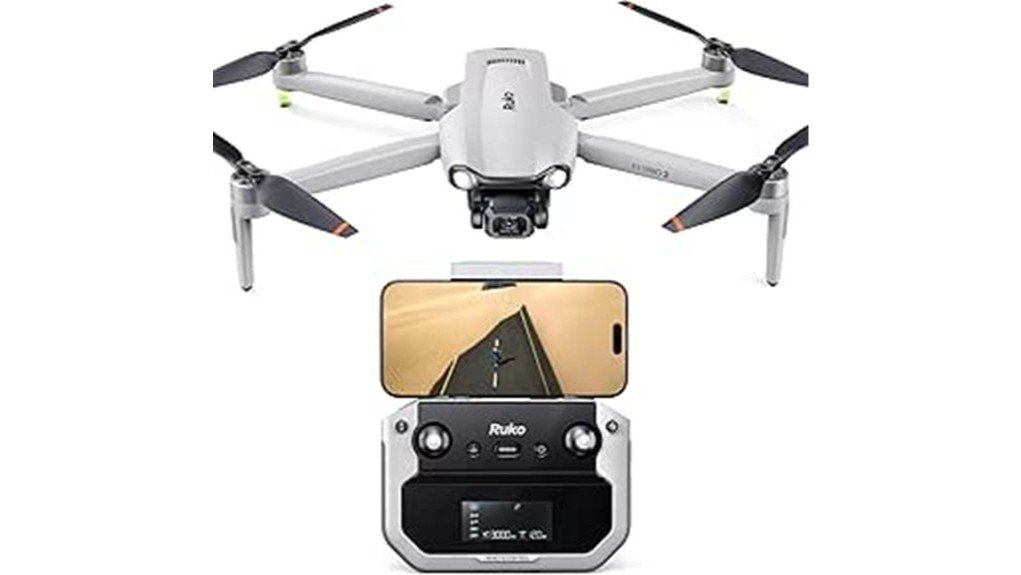
The bundle includes two flight batteries, a rechargeable controller, a fitted carrying case, spare propellers, charging accessories, and a gimbal cover. You still need a compatible smartphone, the Ruko Mini app, a microSD card for full-resolution recording, and a suitable USB power adapter because a wall charger is not included.
Who Should Buy It?
Best For
- First-time GPS drone pilots who want one-key takeoff, landing, and Return to Home.
- Casual users who prefer a complete two-battery kit and a protective carrying case.
- Hobbyists who value stable, gimbal-smoothed 4K video more than manual camera control.
Skip If
- You need a sub-250 g drone for simpler travel and registration requirements.
- You want obstacle avoidance or detailed exposure, color, and white-balance controls.
- Your main priority is professional photo quality in difficult light.
Before You Buy: The F11PRO 2 weighs 357 g, so recreational pilots in the United States must register it with the FAA and follow Remote ID rules. It has built-in Remote ID, but it does not provide obstacle avoidance and it is not waterproof.
Design and Build Quality
The F11PRO 2 uses a compact folding layout that measures 6.5 × 3.54 × 2.56 inches when packed. The arms fold against the body, and the included case keeps the drone, controller, batteries, and small accessories together for transport.
Its 357 g weight is light enough to carry without much trouble, but it is heavier than it first appears. The metal camera housing and well-fitted gimbal give the front assembly a more substantial feel than many entry-level drones. Independent hands-on reviews also describe the overall build as one of Ruko’s stronger designs.
The controller includes a phone holder and basic flight information, while the Ruko Mini app provides the camera view and automated flight controls. The layout is approachable, but you should still read the manual and complete every calibration step before your first outdoor flight.
Camera Performance
The camera records 3840 × 2160 video at 30fps to a microSD card and captures JPEG stills up to 5700 × 3200. The 3-axis brushless gimbal is the main strength because it reduces visible shake and keeps video steadier during normal forward flight and gentle turns.
The resolution numbers need context. The camera is fully automatic, so you cannot adjust shutter speed, aperture, white balance, or advanced color settings. In good daylight, it can produce usable recreational footage, but independent testing found that images may look soft or hazy compared with stronger camera drones.
Night mode and 5× digital zoom are included, but both have limits. Digital zoom crops the image rather than adding optical detail, and low-light footage is constrained by the small camera system and automatic processing. Treat night mode as a convenience feature for bright city scenes or twilight, not proof of professional low-light performance.
Pro Tip: Record to a fast, compatible microSD card instead of relying on the 720p phone preview. Fly in bright, even light and use slow, smooth stick inputs to get the most from the 3-axis gimbal.
Flight Features and Modes
GPS and GLONASS positioning help the drone hold its location outdoors and support Return to Home. Ruko also lists barometric altitude hold and optical flow positioning, which can assist stability closer to the ground or when satellite positioning is limited.
The automated modes include GPS Follow, orbit flight, route planning, cruise control, and one-key takeoff and landing. These tools reduce the amount of constant stick input required, but they do not replace active supervision. You must keep the aircraft in sight, confirm the return altitude, and stay ready to take manual control.
Ruko rates the transmission distance at up to 10,000 feet in a clear, interference-free environment. That is a laboratory-style maximum, not a promise of safe operating range. Local airspace rules, visual-line-of-sight requirements, buildings, trees, wireless interference, and battery reserve usually set a much shorter practical limit.
Battery Life and Charging
Each 3200mAh battery is rated for up to 35 minutes, giving the two-battery kit a claimed total of 70 minutes. Real flight time is normally lower because wind, temperature, speed, Return to Home settings, recording, and the need to land with a safe reserve all reduce usable time.
Published hands-on testing has reported roughly 25 to 30 minutes per battery under real conditions. That is still enough for practice sessions and several short camera flights, especially because you can swap batteries in the field. Each battery takes about 2.5 hours to charge depending on the power source, so charging both before a trip requires planning.
The rechargeable controller is rated for up to four hours of operation and takes about 3.5 hours to recharge. A wall charger is not included, so confirm that you have an appropriate USB power adapter before the first charging session.
User Experience and Ease of Use
Beginner Mode, one-key takeoff, one-key landing, GPS position hold, and Return to Home reduce the workload for a new pilot. The drone also includes automatic return behavior for low battery or signal loss, although you should never depend on automation as your only safety plan.
Initial setup is more involved than unfolding the arms and pressing a button. You need to charge the batteries, install the Ruko Mini app, connect the phone and controller, check the Remote ID information, format a compatible microSD card, and complete compass or gyroscope calibration when prompted.
The camera’s automatic operation keeps the app simple, but it also limits creative control. This tradeoff suits casual pilots who want to capture a quick view without learning exposure settings. More experienced photographers may find the point-and-shoot camera restrictive.
How It Performs in Real Use
For First Flights
Use a large, open area with light wind, no people nearby, and no overhead obstacles. Beginner Mode and GPS hold make basic hovering easier, but the drone’s lack of obstacle sensors means trees, wires, walls, and branches remain your responsibility.
For Travel and Scenic Video
The folding body and fitted case make the kit easier to carry in a car or checked travel setup. The 357 g weight may create extra registration or destination-specific requirements, so check airline battery rules and local drone laws before packing it for a trip.
For Family Events and Casual Clips
The gimbal can produce smooth wide shots in good daylight, and automated orbit or follow modes can help create simple movement. Use these modes only in a clear area and with the subject’s permission, because the drone cannot detect and avoid unexpected obstacles.
For Serious Aerial Photography
The F11PRO 2 is less convincing when image quality is the main goal. The automatic camera, limited dynamic range, soft detail, and absence of advanced exposure controls give you fewer ways to manage bright skies, shadows, or low light.
Setup Tips Before First Use
- Charge everything first: Charge both flight batteries and the remote before leaving home. Do not assume the included units arrive ready to fly.
- Install storage: Insert a compatible microSD card up to 128GB if you want full-resolution photos and 4K video recorded onboard.
- Update and pair: Install the Ruko Mini app, pair the aircraft and remote, and verify that the live view and GPS status are working.
- Inspect the aircraft: Check the propellers, folding arms, battery latch, gimbal cover, and camera movement before every takeoff.
- Set a safe return altitude: Choose a Return to Home height that clears nearby obstacles while remaining within applicable flight limits.
- Practice close: Start with short flights near your takeoff point until you understand braking distance, battery behavior, and the app controls.
Safety, Registration, and Weather Limits
At 357 g, this drone sits above the 250 g threshold used for recreational registration in the United States. Ruko states that the F11PRO 2 has built-in Remote ID, but you still need to register the aircraft when required, add the Remote ID information to your inventory, display the registration number, complete TRUST for recreational use, and follow local airspace rules.
The drone is not waterproof, so do not fly it in rain, mist, or wet snow. Moisture can damage the motors, battery contacts, electronics, and gimbal. Level 5 wind resistance is a manufacturer rating, not a reason to fly in conditions that exceed your skill or leave too little battery for the return trip.
There is no obstacle-avoidance system. Keep a clear visual line of sight, avoid flying over people, and choose a launch area with generous space. Follow the official manual, FAA guidance, and any state, local, park, or property restrictions that apply to your flight.
Pros and Cons
Pros
- Solid folding build with a protective carrying case.
- 3-axis gimbal produces smoother video than unstabilized beginner drones.
- Two 3200mAh batteries provide useful combined flight time.
- GPS, Return to Home, follow, orbit, route planning, and cruise functions.
- Built-in Remote ID and a complete accessory bundle.
Cons
- 357 g weight means it is not a sub-250 g travel-friendly model.
- Fully automatic camera offers little control over exposure or color.
- No obstacle avoidance, no waterproofing, and no wall charger in the box.
Is It Worth the Price?
The F11PRO 2 sits in the mid-range to premium beginner-drone tier, depending on the current seller and bundle. Its strongest value comes from the sturdy airframe, two batteries, fitted case, 3-axis gimbal, long claimed transmission range, and broad set of GPS-assisted flight functions.
It is worth considering when you care more about stable recreational flying and a complete kit than advanced imaging. It is not the best fit when similarly priced alternatives offer a lighter airframe, sharper camera output, stronger subject tracking, or more camera controls.
Amazon showed the matching product page and other-seller availability during this review, while Ruko continued to list the model through its official store. Check the seller, included accessories, return terms, and current product version before ordering because the newer F11PRO 2 Plus is also available.
How It Compares to Alternatives
The Potensic ATOM and DJI Mini 4K are worth comparing when you want a sub-250 g design and stronger emphasis on camera quality. The Holy Stone HS900 is another beginner-focused option that competes on portability and imaging.
The Ruko F11PRO 2 makes the most sense when you prefer its solid build, two-battery package, built-in Remote ID, and GPS feature set. Choose an alternative when lower weight, obstacle-related assistance, refined tracking, or more consistent image quality matters more than the bundle.
How We Evaluated It
We reviewed the current Amazon listing, Ruko’s official technical specifications, product support information, and published hands-on evaluations. We removed claims that could not be supported, including the original 500 g payload statement, 4.4-star rating, 80% low-light statistic, and 90-day warranty claim.
This article does not claim that our editorial team personally flight-tested the reviewed unit. The verdict combines verified manufacturer details with clearly identified limitations reported in independent testing.
Frequently Asked Questions
How long does each Ruko F11PRO 2 battery take to charge?
Ruko lists about 2.5 hours per 3200mAh battery, depending on the charging power. Charge both batteries before a trip because the wall charger is not included and simultaneous charging depends on your own power setup.
Does the drone really fly for 70 minutes?
The 70-minute figure is the combined manufacturer maximum for two batteries rated at up to 35 minutes each. Wind, speed, temperature, recording, and a safe landing reserve reduce actual time, and hands-on testing has reported roughly 25 to 30 minutes per battery.
Do you need to register the Ruko F11PRO 2 with the FAA?
Yes, recreational pilots in the United States generally must register drones weighing 250 g or more, and the F11PRO 2 weighs 357 g. Ruko says the model has built-in Remote ID, but you must still complete the required registration and operating steps.
Can you fly the F11PRO 2 in light rain?
No. Ruko’s support information states that the F11PRO 2 is not waterproof, so even light rain or mist can put the electronics, battery contacts, motors, and gimbal at risk.
Does it have obstacle avoidance?
No obstacle-avoidance system is listed for this model. GPS positioning and Return to Home can assist navigation, but they do not detect trees, wires, buildings, or moving objects.
What microSD card does the Ruko F11PRO 2 support?
Ruko lists support for microSD cards up to 128GB using the FAT32 file system. A card is not included, and onboard recording is required for the full 4K/30fps video files.
Is the 6K camera good for professional work?
The drone can capture JPEG files at up to 5700 × 3200 and 4K/30fps video, but resolution alone does not determine image quality. The fully automatic camera and soft detail reported in independent tests make it better for casual footage than professional production.
What warranty and support are available?
Ruko’s support information lists a one-year official warranty and offers product support and optional care plans. Coverage, returns, and exchanges can differ by seller and region, so confirm the terms shown on the exact Amazon offer before purchase.
The Bottom Line
The Ruko F11PRO 2 is a sensible choice for beginners who want a well-built folding drone, smooth gimbal stabilization, two batteries, and straightforward GPS flight modes. Skip it if you need a sub-250 g aircraft, obstacle avoidance, or camera controls suited to demanding photo and video work.
Its strongest feature is the complete, stable recreational flying package. Its main limitation is that the camera’s automatic processing and image quality do not fully match the ambitious 6K marketing language.
Ready to Buy?
Check the latest price, seller, bundle contents, and product details before you decide.
