
Last Updated on August 3, 2026 by Caleb Warren
Disclosure: As an Amazon Associate, we earn from qualifying purchases. If you click a link on this page and make a purchase, we may receive a small commission at no extra cost to you.
K100Max Mini Drone Review: Is It the Right First Drone for Your Kid?
Buying a first drone for a kid feels riskier than it should. Spend too little and it breaks in a week. Spend too much and you’re handing an 8-year-old a $200 gadget with delicate rotors. The K100Max Mini Drone sits in the low-cost, kid-focused category, and after digging into its specs and feature set, here’s whether it earns a spot under the tree or on a shelf.
Our Verdict
Rating: 7/10 — Recommended with caveats
Best For: Kids 8 and up flying indoors or in a backyard for short sessions, with parents who don’t mind swapping batteries mid-play.
Bottom Line: The 720P camera, blade guards, and one-button controls make it genuinely beginner-friendly, but the 14-minute total flight time across two batteries means playtime gets interrupted often.
| Specification | Detail |
|---|---|
| Brand / Model | K100Max Mini Drone |
| Weight | 25 grams (Black variant) |
| Camera | 720P HD, manually adjustable lens angle, SD card support |
| Battery Life | 2 lithium polymer batteries, 7 minutes each (14 minutes total) |
| Maximum Range | 100 meters |
| Safety Features | Blade guards, LED lights, headless mode |
| Recommended Age | 8 years and up |
| Colors | Black, Gray |
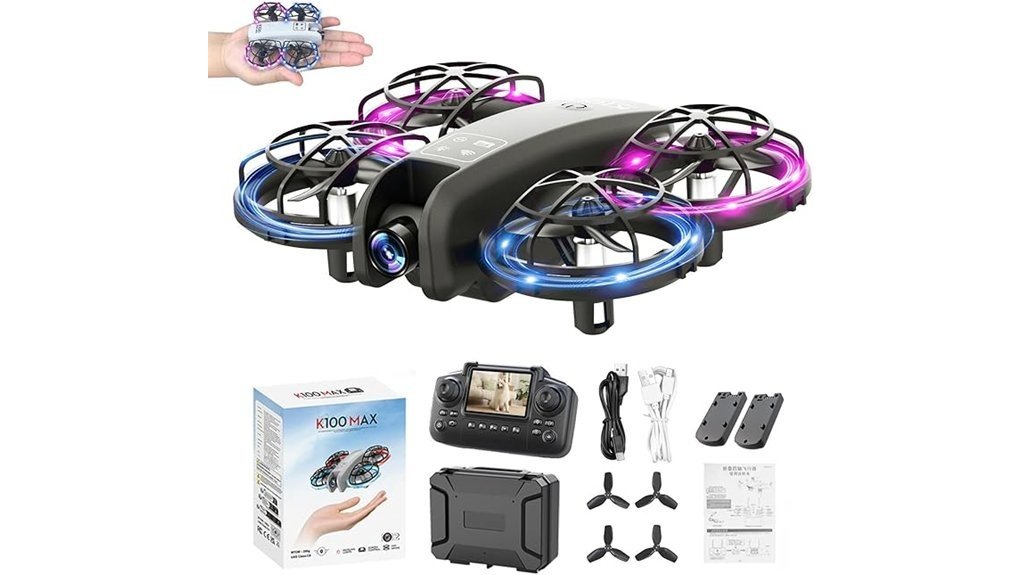
| In the Box | 1 drone, 1 remote controller, 2 batteries, 2 blade guards, 8 spare propellers |
What Is the K100Max Mini Drone?
The K100Max Mini Drone is an entry-level quadcopter built specifically for kids and first-time flyers. It sits at the budget end of the camera-drone category, competing with other sub-30-gram toy drones rather than hobbyist quadcopters. At 25 grams, it’s light enough that a crash into a wall or couch cushion rarely does damage.
Its main selling point is the combination of a 720P HD camera with real-time video streaming to the included screen remote and a fully guarded rotor design. That pairing is what separates it from cheaper drones that skip either the camera or the safety hardware. You get live video on the controller screen without needing a phone or app.
Setup is about as simple as it gets: charge the batteries, snap on the blade guards, and press one button to take off. There’s no pairing process, no app download, and no calibration menu to dig through, which matters when the end user is 8 years old.
Who It’s For
- Kids aged 8 and up who want to fly indoors or in a fenced backyard, not open fields
- Parents looking for a sub-$40 gift drone rather than a serious hobby purchase
- Beginners who want live video on a screen without setting up a phone app
Who Should Skip It
- Anyone wanting flight sessions longer than 7 minutes without stopping to swap batteries
- Buyers who need outdoor range beyond 100 meters or wind resistance for open spaces
- Photography-focused users who want more than basic 720P footage
Feature Breakdown
Design and Build
At 25 grams, the K100Max is light enough to fly indoors without much concern for furniture or walls. The included blade guards wrap around all four rotors, which is the main reason this drone is marketed to kids rather than a general audience.
It comes in Black or Gray, and the body itself is compact enough to fit in one hand. Built-in LED lights let it glow in low light, which the manufacturer frames as a night-flight feature, though it’s really more of a visibility and fun factor for indoor dusk flying than a serious low-light flight aid.
Camera and Footage
The 720P HD camera streams live to the included screen remote, and the lens angle adjusts manually rather than through a motorized gimbal. That’s a meaningful limitation: you set the angle before flight and can’t reposition it mid-flight the way you could on a drone with remote tilt control.
Footage saves to an SD card (not included in the base listing details captured here), and the manufacturer notes that deleting files requires removing the card and using a computer with a card reader, since there’s no in-app delete function. For a beginner drone, 720P is adequate for casual clips but won’t hold up well when viewed on a large screen.
Flight Controls and Stability
One-button takeoff and landing removes the steepest part of the learning curve for new pilots. Headless mode is also included, which keeps the controls oriented to the pilot’s perspective rather than the drone’s, so kids don’t have to mentally track which way the nose is pointing.
The drone can also perform 360° flips, a feature aimed squarely at younger users who want a “trick” to show off. Upgraded motors are mentioned in the flight system, and the 100-meter range cap is enforced as a safety tip by the manufacturer to prevent kids from flying it out of visual range and losing control.
Battery and Charging
This is the drone’s clearest weak point. Two batteries are included, each rated for about 7 minutes of flight, for 14 minutes of total airtime per charge cycle. In practice, that means a play session gets interrupted at least once to swap batteries, and then again once both are drained and need recharging.
For a young pilot who’s just getting comfortable with the controls, 7-minute increments aren’t unreasonable, since attention spans at that age rarely run much longer anyway. But parents expecting a full afternoon of uninterrupted flying should plan around the recharge downtime.
How It Performs in Real Use
Indoors on a Rainy Day
The light 25-gram frame and full blade guards make indoor flying realistic in a way heavier drones aren’t. A living room or hallway gives enough space for basic hovering and slow laps without constant wall bumps turning into broken propellers, thanks to the 8 spare propellers included.
In the Backyard
Outdoors, the 100-meter range and blade guards hold up fine for a fenced yard, though any breeze will push around a drone this light. The 14-minute total flight time works out to roughly two short outdoor sessions before a full battery swap and recharge is needed.
As a First Drone Lesson
Headless mode and one-button takeoff mean a parent can hand this to a kid and have them flying within a couple of minutes, without needing to explain orientation or throttle curves first.
Pros and Cons
Pros
- 720P HD camera with live streaming to the screen remote, no app required
- Full blade guards plus 8 spare propellers reduce the cost of crashes
- One-button takeoff/landing and headless mode simplify the learning curve
- At 25 grams, it’s light enough for safe indoor flying
- LED lights and 360° flips add play value for younger kids
Cons
- Only 14 minutes of total flight time across two batteries per charge cycle
- Manual (not motorized) lens adjustment means no mid-flight camera repositioning
- Deleting SD card footage requires a computer, not an in-app option
Is It Worth the Price?
The K100Max sits in the entry-level tier of kid-focused drones, and its feature set matches that positioning well. You’re getting a live-view camera and real safety hardware (blade guards, spare propellers) at a price point where many competitors skip one or the other.
It’s a worthwhile investment for a first drone specifically because the parts most likely to break, propellers and blade guards, are replaceable and included in multiples. Where the value proposition weakens is battery life: buyers who want longer sessions may need to budget for a third battery separately.
Families prioritizing an easy on-ramp into drone flying over long flight times get the most out of this purchase.
How It Compares to Alternatives
If longer flight time matters more than camera features, the Holy Stone HS190 offers a similarly lightweight, beginner-friendly frame without the live-view camera. For buyers who want a bigger screen and optical flow positioning at a step up in price, the elecci K100 with screen controller adds altitude hold and a brushless motor. The K100Max remains the pick for buyers who specifically want live 720P video on a dedicated screen remote without app setup.
Frequently Asked Questions
What age group is the K100Max Mini Drone suitable for?
The manufacturer recommends it for kids aged 8 and up. The combination of blade guards, headless mode, and one-button controls is built around that age range’s coordination and attention span.
What colors are available for the K100Max Mini Drone?
It comes in Black and Gray. Both versions share the same 720P camera and flight specs; color is purely a cosmetic choice.
How much does the K100Max Mini Drone weigh?
The Black variant weighs 25 grams, making it light enough for safe indoor use and easy for small hands to carry.
What is the drone’s maximum flying range?
The manufacturer caps recommended range at 100 meters and advises against flying beyond that distance, since the drone can lose control signal past that point.
How long does the battery last per charge?
Each of the two included batteries runs about 7 minutes, for 14 minutes of total flight time before both need recharging.
How do I store or delete photos and videos from the drone?
Footage saves directly to an SD card during flight. To delete files, remove the card and connect it to a computer with a card reader, since there’s no in-app delete option.
The Bottom Line
The K100Max Mini Drone earns its 7/10 rating as a low-risk, easy-to-learn first drone for kids 8 and up, backed by real safety hardware and a live-view camera that most drones in this price range skip. The tradeoff is battery life: 14 total minutes per charge cycle means frequent breaks. If that’s an acceptable tradeoff for an easy on-ramp into flying, this is a solid pick; if long, uninterrupted flight time is the priority, look elsewhere.
Ready to Buy?
