
Last Updated on August 29, 2026 by Caleb Warren
Disclosure: As an Amazon Associate, we earn from qualifying purchases. If you click a link on this page and make a purchase, we may receive a small commission at no extra cost to you.
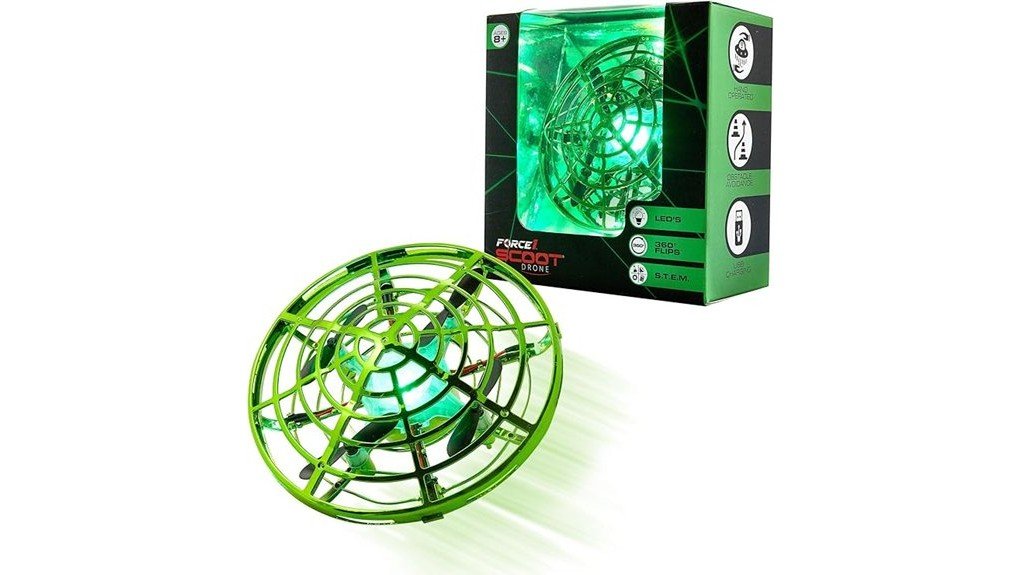
A hand-controlled drone can be easier for a young beginner than a traditional remote-control model, but short battery life and indoor space requirements still matter. The Force1 Scoot Skeet Mini Drone combines motion-sensor control, auto-hover, LEDs, and 360° flips in a protective webbed design intended for ages 8 and up. This review explains what comes with the drone, how the controls work, what its roughly seven-minute playtime means in practice, and why the optional Scoot Skeet blaster should not be confused with an included accessory. It is a fun choice for short indoor flying sessions, but buyers wanting long flight times or conventional remote control should consider other options.
Quick Verdict
Rating: Recommended with caveats
Best For: Kids ages 8+ who want a simple hand-operated indoor drone with stunt features.
Bottom Line: The Scoot Skeet makes basic flying approachable through motion sensors, auto-hover, and a protective shell. Its biggest tradeoff is the short flight time, and the electronic blaster used for the full Scoot Skeet target game is sold separately.
Key Specifications
| Specification | Detail |
|---|---|
| Brand | Force1 |
| Product | Scoot Skeet Mini Drone |
| Product Type | Hand-operated indoor mini drone |
| Reviewed Variant | Green, drone only |
| Recommended Age | 8 years and up |
| Controls | Hand-motion sensors |
| Flight Features | Auto-hover, motion response, obstacle sensing, 360° flips |
| Lighting | Integrated LED lighting and sensors |
| Battery | Internal rechargeable Li-Po battery |
| Playtime | Approximately 7 minutes per full charge |
| Charging Time | About 50 to 60 minutes |
| Included | 1 Scoot Skeet drone and 1 USB charging cable |
| Blaster Compatibility | Compatible with the Scoot Skeet LED blaster, sold separately |
| Protective Design | Webbed shell surrounding the propellers |
| Warranty | Force1 documentation states a limited 90-day warranty, subject to its terms and registration requirements |
What Is the Force1 Scoot Skeet Mini Drone?
The Force1 Scoot Skeet is a small indoor drone that replaces a conventional joystick controller with built-in motion sensors. After launch, the drone can hover and react when your hand approaches its sides or underside. This gives younger users a more direct way to influence direction and height without first learning a remote-control layout.
The green version reviewed here is the single-drone package. It includes the rechargeable drone and USB charging cable. Force1 also designed the drone to interact with its Scoot Skeet LED blaster for an electronic target-style game, but the blaster is not included with this drone-only listing.
Before You Buy: This listing is for one Scoot Skeet drone, not the complete multi-drone shooting-game set. The compatible Scoot Skeet LED blaster is sold separately, so check the package description carefully if the target-game feature is your main reason for buying.
Who Should Buy It?
Best For
- Kids ages 8+ learning basic hand-eye coordination through indoor flying.
- Beginners who prefer gesture-style control instead of a traditional remote.
- Families wanting short, interactive drone sessions in a clear indoor room.
Skip If
- You want long flight sessions without frequent recharging.
- You specifically want precise joystick or remote-control flying.
- You expect the LED blaster to be included with the single-drone package.
Design and Protective Shell
The Scoot Skeet uses a webbed outer shell that surrounds the moving propellers. This design reduces direct exposure to the blades and can also help limit contact between propellers and nearby furniture during normal indoor play.
The shell does not make the drone indestructible or remove the need for supervision. You should still keep fingers away from moving propellers, provide plenty of flying space, and avoid launching near pets, fragile objects, water, stairs, or other hazards.
Motion Control and Flight Performance
The main attraction is its hands-free motion control. Sensors around the drone detect nearby objects and hand movements. When the drone approaches you, placing a hand near its side can influence its direction, while positioning a hand beneath it can encourage it to rise.
Auto-hover reduces some of the work involved in keeping the drone airborne. The drone can also perform 360° flips, giving kids a stunt feature once they become comfortable with basic control.
Motion-controlled drones are less precise than a conventional remote-controlled quadcopter. Their appeal comes from quick interaction rather than carefully planned flight paths. For this reason, the Scoot Skeet makes more sense as an indoor flying toy than as a drone for detailed outdoor maneuvering.
Pro Tip: Start in the largest clear room available and practice basic hovering and hand guidance before trying flips. Fewer nearby obstacles give the sensors more room to respond and make the drone easier for a beginner to understand.
Battery Life and Charging
A full charge provides about seven minutes of playtime. Charging takes roughly 50 minutes according to the product listing, while Force1 documentation describes an approximately 50 to 60-minute charging period. That ratio is the main practical limitation of the Scoot Skeet.
Seven minutes is enough for a quick flying session, but it is short if several children want turns. Because the battery is built into the drone, this is not the same experience as a hobby drone where you can simply swap in another removable flight battery and continue.
The drone charges through its supplied USB cable. Turn the drone off before charging and follow Force1’s battery instructions rather than leaving it connected unattended.
LED Blaster Compatibility
The Scoot Skeet has integrated sensors designed to work with Force1’s compatible LED blaster. With the appropriate Scoot Skeet setup, the blaster can interact with the drone for launch and target-game functions.
That feature can make the toy more competitive when multiple compatible components are available, but remember that the blaster is not included with this single-drone ASIN. Buyers who only want hand-controlled flying can use the drone without purchasing the blaster.
How It Performs in Real Use
For First-Time Indoor Flying
The combination of auto-hover and hand sensing lowers the initial learning barrier. A child does not need to remember throttle, yaw, pitch, and roll controls before getting the drone airborne. The tradeoff is that movement can feel less exact than using a dedicated controller.
For Short Play Sessions
The roughly seven-minute battery life fits quick sessions better than extended play. It can work well as one activity among several, but repeated use means allowing substantial recharge time between flights.
For Practicing Coordination
Guiding the drone with hand position requires the user to watch its movement and react. That gives the toy a coordination element beyond simply pressing a button, although younger users may need time to understand how close their hands should be to the sensors.
For Scoot Skeet Target Play
The integrated LED sensor system adds another mode of play when you pair the drone with the compatible Scoot Skeet blaster. This is most useful for buyers already building a Scoot Skeet set. For a standalone purchase, the drone remains usable as a hand-controlled flying toy.
Setup Tips and Common Mistakes to Avoid
- Charge before the first session: Give the drone a complete charge according to the supplied instructions before expecting a full flight.
- Use a clear indoor area: Move fragile objects, pets, and unnecessary obstacles away from the flight space.
- Allow the drone to initialize: Follow the manual’s startup and calibration guidance before launching.
- Use gentle hand movements: Motion sensors respond to nearby objects, so aggressive swatting or grabbing is unnecessary.
- Stop it correctly: Force1’s instructions describe gently catching the drone and turning it upside down when you want the propellers to stop.
- Do not assume the blaster is included: This ASIN is the drone-only version.
Safety and Battery Care
The protective shell is helpful, but this remains a powered flying toy with rotating propellers and an internal lithium-polymer battery. Force1 states that the drone is intended for users age 8 and older and advises caution around children and animals.
Do not use or charge the drone if the battery area appears swollen, punctured, or damaged. Keep it away from water and extreme heat, and do not leave it charging unattended. Force1 also advises against attempting to remove, disassemble, replace, or repair the internal Li-Po battery yourself.
For younger users, adult supervision is sensible during charging, setup, and early flights. Always follow the instructions supplied with your specific unit because safety guidance takes priority over general tips in a review.
Pros and Cons
Pros
- Hand-motion sensors provide an approachable control method for beginners.
- Auto-hover helps reduce the difficulty of keeping the drone airborne.
- 360° flips add a stunt option once basic control becomes comfortable.
- Webbed shell helps shield the propellers during normal indoor play.
- Compatible with the Scoot Skeet LED blaster for an optional target-game setup.
Cons
- About seven minutes of flight requires frequent charging.
- Hand sensing does not offer the precision of a standard remote controller.
- The compatible Scoot Skeet blaster is not included with this drone-only package.
Is It Worth the Price?
The Scoot Skeet is worth considering if your priority is an easy indoor flying toy rather than a feature-heavy hobby drone. Motion sensing, auto-hover, LEDs, flips, and the protective shell give younger beginners several ways to interact without learning a full remote-control system.
The value is less compelling for anyone who measures a drone mainly by flight duration. With roughly seven minutes of use followed by around 50 to 60 minutes of charging, patience is part of the ownership experience. The separate blaster requirement also matters if you are buying specifically for the Scoot Skeet electronic target game.
How It Compares to Alternatives
The regular Force1 Scoot is worth comparing if you mainly want simple hand-operated indoor flight and do not care about Scoot Skeet blaster compatibility. The Force1 Scoot Pro is another option for buyers interested in a more premium member of the Scoot line with additional lighting effects.
Families wanting more than one drone may also prefer a Force1 Scoot Duo package rather than buying single units individually. The Scoot Skeet makes the most sense when its compatibility with the electronic target-game system is part of the appeal.
Frequently Asked Questions
What age is the Force1 Scoot Skeet Mini Drone designed for?
Force1 identifies the Scoot Skeet for users age 8 and older. Younger beginners may still benefit from adult help with charging, setup, creating a safe flight area, and learning how the motion sensors respond.
Does this Scoot Skeet package include the LED blaster?
No. The green ASIN reviewed here is the drone-only version and includes one rechargeable Scoot Skeet drone plus a USB charging cable. The compatible Scoot Skeet LED blaster is sold separately.
How long does the Force1 Scoot Skeet fly per charge?
Expect approximately seven minutes of play from a full charge under the stated product specifications. Charging takes about 50 minutes, with Force1 documentation indicating roughly 50 to 60 minutes.
Do you need a remote control to fly it?
No traditional handheld flight controller is required. The drone uses motion sensors to react to nearby hands and objects, while auto-hover helps it remain airborne during normal play.
Is the Scoot Skeet meant for indoor or outdoor use?
The product is primarily presented as an indoor flying toy, and Force1’s operating guidance describes using it in a room with plenty of space. Its sensor-based control and small-drone format make a clear indoor environment the more suitable setting.
Does the shell make the drone completely safe to touch?
The webbed shell helps shield the propellers, but you should still avoid putting fingers into the propeller area while the blades are moving. Use the drone according to the manual and supervise younger users during early flights.
How do you stop the Scoot Skeet after flying?
Force1’s operating instructions describe gently catching the drone and turning it upside down to stop it. Avoid grabbing at exposed moving parts, and follow the supplied manual if your unit behaves differently.
Does Force1 provide a warranty for the Scoot Skeet?
Force1’s Scoot Skeet documentation states a limited 90-day warranty and describes limited replacement-parts coverage subject to its conditions. Check the current warranty terms and registration requirements supplied with your purchase before relying on coverage.
The Bottom Line
The Force1 Scoot Skeet Mini Drone is best for kids age 8+ who want quick, interactive indoor flying with hand-motion control, auto-hover, LEDs, and 360° flips. Its protective shell and simple controls improve beginner appeal, but the roughly seven-minute flight time and separately sold LED blaster are important limitations. Skip it if long sessions or precise remote-control flying matter more to you.
Ready to Buy?
Check the latest price, package contents, and product details before you decide.

