
Last Updated on July 31, 2026 by Caleb Warren
Disclosure: As an Amazon Associate, we earn from qualifying purchases. If you click a link on this page and make a purchase, we may receive a small commission at no extra cost to you.
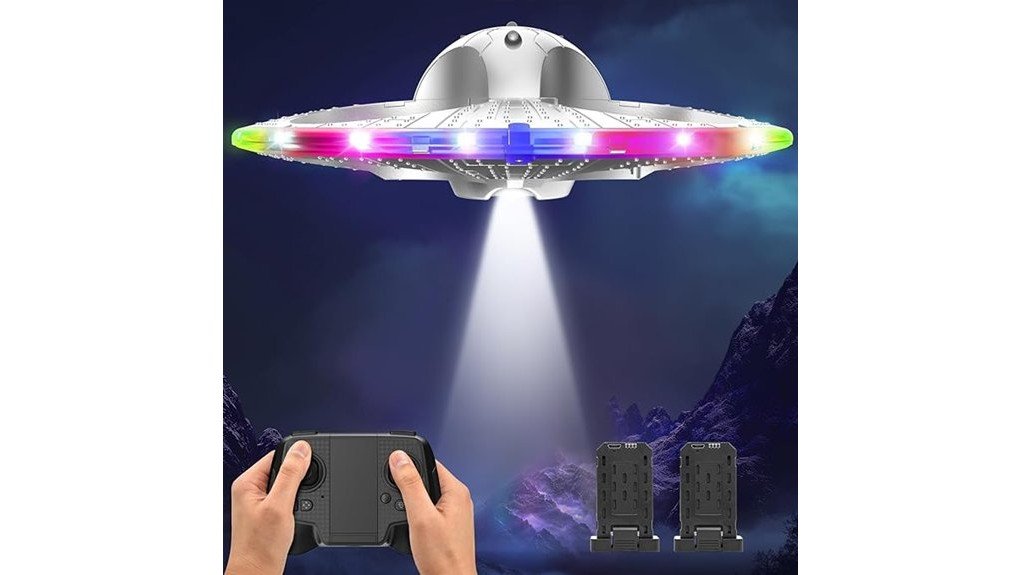
A first drone for a child should be easy to control, forgiving after a bump, and simple enough that the fun does not disappear behind a steep learning curve. The HOLYFUN Foam UFO Drone for Kids, model CA8-UFO, addresses those needs with a lightweight foam frame, enclosed propellers, auto-hover, headless mode, and one-key takeoff and landing. Its colorful LEDs and stunt controls add excitement, while two included batteries provide up to 15 minutes of combined flight time. The main tradeoff is that it remains a lightweight toy-grade aircraft, so it performs best in roomy indoor areas or outdoors when the air is calm.
Quick Verdict
Rating: 8/10, recommended with caveats
Best For: Children and first-time pilots who want a bright, easy-to-control RC flying toy
Bottom Line: The guarded foam design, beginner controls, and four LED modes make this an approachable first drone. Its short combined flight time and light build mean you should treat it as a supervised toy for calm conditions, not as a camera drone or outdoor distance flyer.
Key Specifications
| Specification | Detail |
|---|---|
| Brand | HOLYFUN |
| Model | CA8-UFO |
| Product type | Foam remote-control UFO-style drone |
| Frame size | About 10 inches across |
| Material | Lightweight foam body |
| Propeller protection | Fully enclosed guards |
| Flight controls | One-key takeoff and landing, auto-hover, headless mode, three speed levels |
| Stunts | 360-degree flips, circle flying, and auto rotation |
| Lighting | 24 LEDs, eight colors, and four lighting modes |
| Battery setup | Two rechargeable 3.7V 800mAh lithium-polymer batteries |
| Claimed flight time | Up to 15 minutes combined across both batteries |
| Control system | 2.4GHz remote control |
| Claimed control range | Up to 164 feet in suitable conditions |
| Low-battery notice | Flashing-light alert |
What Is the HOLYFUN Foam UFO Drone?
The HOLYFUN CA8-UFO is a remote-control flying toy shaped like a round UFO. A foam shell surrounds the aircraft, and the propellers sit inside the frame rather than remaining exposed. That design helps protect the propellers from light bumps and reduces direct contact with moving blades.
This model is made for beginners rather than aerial photography or advanced outdoor flying. It has no listed camera, GPS, or app control. Instead, its main appeal comes from simple remote operation, bright lighting effects, and push-button stunts that let a new pilot get moving without learning complex flight settings.
Who Should Buy It?
Best For
- Children learning basic remote-control flight with adult supervision
- Families with a large indoor room, gym, basement, or calm outdoor practice area
- Buyers who value colorful lights, simple controls, and basic stunt functions
Skip If
- You need a camera, GPS positioning, app control, or advanced flight features
- You expect long sessions from one battery set
- Your main flying area is windy, crowded, or filled with fragile objects
Design, Build Quality, and Safety
The drone uses a light foam body instead of a hard exposed frame. Foam can absorb minor contact with walls and furniture better than brittle decorative plastic, but it is not damage-proof. Hard impacts, crushing, moisture, and rough storage can still bend the frame or harm internal parts.
Fully enclosed propeller guards are the most useful safety feature. They create a barrier between fingers and the spinning blades while also helping prevent a propeller from striking a wall directly. Even with those guards, the drone should not be flown toward faces, hair, pets, ceiling fans, glass, or breakable items.
Before You Buy: The listing describes this as a kids’ drone but does not provide a precise age recommendation on the current product page. Check the package instructions, supervise young pilots, and choose a clear flying space that matches the child’s coordination and experience.
Controls and Beginner Flight Features
One-key takeoff and landing reduces the number of control inputs needed at the start and end of a flight. Auto-hover helps the drone hold altitude while the pilot learns forward, backward, left, and right movement. These features do not eliminate the need for practice, but they make the first few sessions less frustrating.
Headless mode is especially useful when the round frame makes the front hard to identify. In this mode, the remote’s directions stay tied to the pilot’s position rather than the drone’s visible nose. Three speed levels let you begin with slower responses and increase sensitivity after basic steering feels comfortable.
The drone can perform 360-degree flips, circle flying, and auto rotation. These moves are best attempted in the center of a large open area because stunt commands can make the aircraft drift. Leave extra space above and around the drone before pressing a stunt button.
LED Lighting and Visibility
The frame contains 24 LEDs in eight colors. Four lighting modes provide constant, alternating, flashing, and gradient effects. The lights make the aircraft easier to follow in a dim room and add a clear visual reward for children who enjoy light-up toys.
Lighting improves visibility, but it does not make outdoor night flying risk-free. Darkness can hide trees, wires, roof edges, and other hazards beyond the illuminated frame. Use the LEDs in a familiar, obstacle-free area rather than treating them as navigation lights for distance flying.
Battery Life, Range, and Low-Battery Alert
The package includes two rechargeable 3.7V 800mAh lithium-polymer batteries. The listing claims up to 15 minutes of combined flight time, so you should expect several short flights rather than one long session. Actual time can vary with speed setting, stunt use, battery condition, and flying conditions.
The 2.4GHz controller has a claimed range of up to 164 feet. That figure is a maximum listing claim, not a target distance for a child. Keeping the drone closer improves orientation and makes it easier to land when the flashing low-battery alert appears.
Pro Tip: Start with the lowest speed in a large indoor space. Mark a simple takeoff zone on the floor, practice hovering and landing first, and save flips for after the pilot can bring the drone back under control.
How It Performs in Real Use
For Indoor Practice
A gym, finished basement, or uncluttered living area gives a new pilot protection from wind. The enclosed propellers and foam frame are helpful around ordinary bumps, but you still need to move lamps, drinks, plants, and fragile decorations out of the flight path.
For Calm Outdoor Flights
The drone can cover more space outdoors, and the claimed 164-foot range gives you room to practice broad turns. Because the body is light, even a mild breeze may push it off course or make hovering less steady. Choose a calm day and stay away from roads, water, trees, roofs, and power lines.
For Low-Light Play
The four LED patterns are most noticeable at dusk or in a dim indoor room. They make the aircraft easier to track at close range and turn a basic flight into a light show. Keep enough room lighting to see walls, furniture, and people clearly.
For Shared Family Use
Three speed settings let family members use different response levels without changing aircraft. A beginner can stay on the slow setting, while a more confident user can select a faster mode for turns and stunts. Set a clear handoff rule so only one person touches the remote while the drone is powered.
Setup and Usage Tips
- Inspect before each flight: Check the foam frame, propeller guards, and propellers for bends, looseness, or debris.
- Use a clear launch area: Place the drone on a flat surface with open space on every side.
- Learn one control at a time: Practice takeoff, hover, gentle steering, and landing before using flips or auto rotation.
- Respond to the low-battery alert: Bring the drone closer and land rather than trying to finish another stunt.
- Let batteries cool: Follow the manual’s charging instructions and allow a warm battery to cool before recharging.
- Store it safely: Keep the drone dry and avoid placing heavy objects on the foam frame.
Compatibility and Safety Notes
This is a self-contained remote-control toy, not an accessory for a phone or gaming system. The listing uses a 2.4GHz remote and does not advertise app control. Confirm that the package includes the remote, both flight batteries, charging equipment, and instructions before the first use.
Lithium-polymer batteries need careful handling. Use only the supplied or manufacturer-approved charging equipment, stop using a battery that swells, leaks, overheats, or has damaged wiring, and follow all package instructions. Keep the aircraft and batteries away from water and excessive heat.
Pros and Cons
Pros
- Foam frame and enclosed propellers suit beginner practice
- One-key takeoff and landing, auto-hover, and headless mode simplify control
- Three speed levels support gradual skill building
- Twenty-four LEDs and four light modes add visibility and visual appeal
- Two included 800mAh batteries reduce downtime between short flights
Cons
- Up to 15 minutes is the combined time for both batteries, not one battery
- Lightweight construction is more affected by wind than heavier outdoor drones
- No listed camera, GPS, or app-based flight features
What to Check Before Ordering
Online ratings and review totals can change, so they should not be the only reason you buy. Focus on the current package description, seller, return terms, and included components. Check recent buyer comments for repeated reports about control response, battery charging, missing parts, and durability rather than relying on one unusually positive or negative review.
The product listing asks buyers to contact support about missing parts or technical problems, but it does not show a clear warranty term in the verified details used for this review. Confirm warranty coverage and replacement-part availability with the seller before ordering if long-term repair support matters to you.
Is It Worth the Price?
The HOLYFUN Foam UFO Drone fits the budget-to-mid-range toy drone category. Its value comes from the complete beginner feature set: guarded propellers, auto-hover, headless mode, three speeds, light effects, stunt buttons, and two flight batteries. That combination can be a smart buy for supervised family play when ease of use matters more than advanced technology.
It is less compelling for a buyer who wants long flight sessions, outdoor wind resistance, a live camera view, GPS return features, or replacement parts with clearly documented availability. Compare the current price with other guarded beginner drones and check exactly what the seller includes before deciding.
How It Compares to Alternatives
A hand-operated flying-ball drone may be simpler for very young users because it does not require a traditional remote, but it offers less precise directional control. A BUSSGO RC helicopter can provide longer listed flight time and a more traditional aircraft shape, while a camera-equipped mini drone is a better match when photos or phone-based viewing are the priority.
The HOLYFUN model makes the most sense when you want a round foam frame, enclosed propellers, bright multicolor lighting, and easy stunt controls in one beginner-focused package.
Frequently Asked Questions
Is the HOLYFUN Foam UFO Drone easy for beginners?
Yes. One-key takeoff and landing, auto-hover, headless mode, and three speed settings reduce the number of skills needed for a first flight. A beginner should still start at low speed in an open area and practice landing before trying stunts.
How long does the drone fly?
The listing claims up to 15 minutes of combined flight time from the two included 3.7V 800mAh batteries. Flight time may be shorter when you use faster speeds, repeated flips, or batteries that are cold, hot, or worn.
Can you fly it indoors?
Yes, a large indoor room is often the easiest place to learn because there is no wind. Clear away fragile items, keep people and pets outside the flight area, and avoid small rooms where the drone cannot recover from a turn.
Can it fly outdoors?
It can fly outdoors in calm conditions, but the lightweight foam body is more sensitive to wind than a heavier drone. Stay well inside the claimed 164-foot range and keep away from roads, water, trees, roofs, and utility lines.
Does it have a camera or phone app?
No camera or app control is listed for this model. It uses a handheld 2.4GHz remote and focuses on basic flight, lighting effects, and stunts rather than photography or live video.
What age is it suitable for?
The current listing describes the age range only as kids and does not provide a precise verified age in the details used here. Follow the package guidance and base the decision on the child’s coordination, ability to follow instructions, and access to adult supervision.
Are replacement parts and warranty coverage included?
The verified listing details do not provide a specific warranty period or a clear replacement-parts catalog. Check the current seller information and contact support before buying if easy access to spare batteries, propellers, guards, or long-term coverage is important.
The Bottom Line
The HOLYFUN Foam UFO Drone is a good fit for supervised beginners who want guarded propellers, simple controls, bright LED effects, and basic aerial stunts. Skip it if you need a camera, strong wind performance, or long flights, but consider it for short indoor sessions and calm outdoor practice where its lightweight foam design is an advantage.
Ready to Buy?
Check the latest price, seller details, and package contents before you decide.
