
Last Updated on July 25, 2026 by Daniel Globe
American Airlines offers entertainment on many flights, but the screen you use depends on the aircraft. Some planes have a TV-style seatback screen at every seat, while most flights let you stream free movies, TV shows, and audio to your own phone, tablet, or laptop. Checking the exact flight before departure is the safest way to know what will be available.
Quick Answer
Yes, some American Airlines planes have seatback TVs, but not every aircraft does. Seatback entertainment is available on select flights, especially many long-haul aircraft and newer premium planes. On most other flights, passengers can stream American’s free entertainment library to a personal device without buying an internet plan.
Key Takeaways
- Seatback screens are available only on select American Airlines flights.
- Most Wi-Fi-equipped flights provide free movies and TV shows on your phone, tablet, or laptop.
- You do not need to buy internet access to use American’s onboard entertainment library.
- Free high-speed internet is also available to AAdvantage members on most domestic flights and select international flights, but coverage still varies.
- Enter your flight number on American’s entertainment website to check the planned setup before you travel.
Disclosure: As an Amazon Associate I earn from qualifying purchases. Some links on this page are affiliate links, at no extra cost to you.
Do American Airlines Planes Have TVs?
American Airlines uses two main entertainment setups:
- Seatback entertainment: A screen is built into the seat in front of you. American offers free movies, TV shows, music, and games on select flights.
- Personal-device entertainment: You connect your phone, tablet, or laptop to the aircraft’s local Wi-Fi network and stream the free onboard library. An internet purchase is not required for this library.
Because aircraft assignments can change, a route that had seatback screens on one trip may use a different plane on another date. American recommends checking the specific flight number rather than relying only on the route.
Note: A flight marketed by American may be operated by American Eagle or a partner airline. The operating carrier controls the onboard entertainment, so check every segment of a codeshare itinerary.
Which American Airlines Flights Have Seatback Screens?
There is no simple domestic-versus-international rule. American’s official aircraft pages show that entertainment can vary even between versions of the same aircraft. For example, one Airbus A319 configuration lists personal-device entertainment, while another lists seatback screens.
Seatback screens are common on many long-haul widebody aircraft, and American is adding modern screens to newer premium aircraft. Its premium Boeing 787-9 has 4K QLED screens at every seat and Bluetooth connectivity across all cabins. The Airbus A321XLR also has seatback entertainment screens in Main Cabin, along with multiple power options.
| Flight or aircraft situation | What to expect |
| Select long-haul and premium aircraft | Usually a seatback screen, but confirm the exact flight. |
| Most narrowbody domestic flights | Personal-device streaming is common; a few configurations still have seatback screens. |
| American Eagle regional flights | Entertainment and Wi-Fi vary by aircraft and operator. |
| Partner-operated codeshare flights | The partner airline’s equipment and rules apply. |
How to Check Your Exact Flight Before Departure
- Open American Airlines inflight entertainment.
- Select What’s on my flight.
- Enter your American Airlines flight number and travel date.
- Review whether the flight is expected to offer a seatback screen or personal-device entertainment.
- Check again near departure because an aircraft swap can change the setup.
Pro Tip: Bring a charged device and headphones even when a seatback screen is listed. A last-minute aircraft change or an inoperative screen can otherwise leave you without entertainment.
History of In-Flight Entertainment on American Airlines
American’s entertainment system has moved from shared cabin programming to personal screens and wireless streaming. The airline expanded streaming entertainment to hundreds of aircraft in 2015 and made premium movies, television, music, and games complimentary on equipped domestic flights in 2016.
Today, American relies on a mixed model. Select aircraft have built-in seatback displays, while most flights offer a free library through the passenger’s own device. This approach allows entertainment to remain available even on aircraft without a screen at every seat.
Types of In-Flight Entertainment Offered by American Airlines
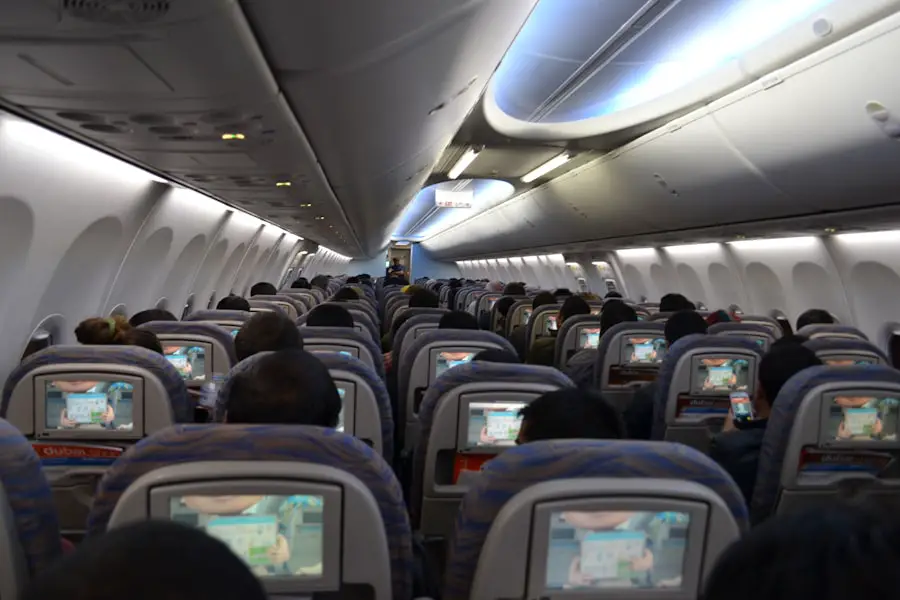
American updates its entertainment lineup regularly. Depending on the aircraft and route, passengers may find:
- Movies, including recent releases and older favorites
- TV shows and selected series
- Audio, including music, podcasts, and audiobooks
- Children’s programming
- Lifestyle, learning, wellness, and travel content
- Games on selected seatback systems
- Selected partner channels, such as Apple TV content
The exact catalog varies by plane and month. American’s entertainment site lets travelers preview the planned content for a specific flight.
Domestic vs. International Entertainment
International flights are more likely to use aircraft with seatback entertainment, especially on long-haul routes. However, not every international flight has a screen, and a domestic flight may still have one. Aircraft type and configuration matter more than the destination alone.
On many domestic flights, the standard setup is personal-device entertainment. You connect to the aircraft network and watch American’s library on your own screen. The entertainment library is stored or delivered through the onboard system, so you can use it without purchasing internet access.
How to Watch on Your Phone, Tablet, or Laptop
- Before the flight, install or update the American Airlines app on a phone or tablet. Laptop users can use a browser.
- Put the device in airplane mode after boarding.
- Turn Wi-Fi back on and connect to the AA-Inflight network.
- If the portal does not open automatically, go to aainflight.com in a browser.
- Select View free entertainment or the entertainment icon.
- Choose a movie, show, or audio program and start watching.
American notes that entertainment may not become available until the aircraft reaches 10,000 feet on some flights.
Warning: Keep larger devices stowed when the crew requires it during taxi, takeoff, landing, or turbulence. Follow all crew instructions even if the entertainment system remains available.
Cost and Accessibility of In-Flight Entertainment
| Service | Typical cost | Important detail |
| American’s onboard movie, TV, and audio library | Free | Available on seatback screens or personal devices, depending on the plane. |
| Internet access for AAdvantage members | Free on eligible flights | High-speed Wi-Fi sponsored by AT&T is available on most domestic and select international flights. Sign-in and aircraft coverage are required. |
| Other internet plans | Varies | May apply when free member access is unavailable or the traveler does not sign in as an AAdvantage member. |
| Apple Music | Subscription may be required | Availability is limited to eligible aircraft and devices; trial terms may apply. |
Free entertainment and internet access are separate services. You can watch American’s onboard library without buying Wi-Fi. Internet access lets you browse, message, work, or use outside streaming services when the connection supports them.
American says its entertainment library includes accessibility features such as multilingual dubbing, English audio descriptions, and dynamic subtitles on supported titles. Availability varies by program and system, so ask a flight attendant for help if you cannot find an accessibility setting.
Headphones, Bluetooth, Power, and Device Preparation
Bring your own headphones. A standard wired pair is the safest choice for many seatback systems, while Bluetooth support is aircraft-specific. American’s premium Boeing 787-9 supports Bluetooth headphones across all cabins, but travelers should not assume every seatback screen does.
Most American aircraft provide AC power, USB power, or both, but the outlet type and availability vary. Charge your device before boarding and download a few offline programs as a backup.
If you are planning a long international trip, this guide to the best carry-on luggage for international travel may help you organize a tablet, charging cable, headphones, and backup battery.
Troubleshooting Personal-Device Entertainment
- The portal does not open: Confirm airplane mode is on, reconnect to AA-Inflight, and enter aainflight.com manually.
- The entertainment button is missing: Wait until the plane is airborne; service may begin only after reaching 10,000 feet.
- A video will not play: Close other apps, refresh the portal, or try another browser. On a phone or tablet, open the American app.
- The connection drops: Rejoin the AA-Inflight network. Satellite coverage, aircraft equipment, and flight location can affect service.
- Your battery is low: Use an available outlet or USB port, reduce screen brightness, and switch on low-power mode.
- No entertainment is listed: The aircraft may not offer the service, or a last-minute plane change may have altered the planned setup.
Customer Experience With American Airlines Entertainment
The experience depends heavily on the aircraft. A working seatback screen is convenient because it does not use the passenger’s battery or storage. Personal-device streaming gives travelers control over screen size and headphones, but it requires a charged, compatible device.
Selection also changes by month and flight. Instead of assuming a specific movie, live channel, or game will be available, preview the lineup for the flight and download backup entertainment before leaving home.
The most reliable plan is to expect free entertainment, but not necessarily a built-in TV.
Future of In-Flight Entertainment on American Airlines

American’s verified upgrades focus on better screens, power, Bluetooth, and connectivity rather than speculative virtual-reality systems. The premium Boeing 787-9 introduced 4K QLED seatback screens, USB-C and AC power, and Bluetooth audio in every cabin. The Airbus A321XLR also brings seatback displays and multiple power options to a new long-range narrowbody aircraft.
Connectivity has also changed quickly. In 2026, American expanded free high-speed Wi-Fi for AAdvantage members across most domestic flights and select international services. Future availability will continue to depend on aircraft installations, satellite coverage, and fleet changes.
Comparison With Other U.S. Airlines
| Airline | Typical entertainment approach |
| American Airlines | Seatback screens on select flights; free personal-device entertainment on most Wi-Fi-equipped flights. |
| Delta Air Lines | A broad seatback-screen program on many aircraft, plus free Delta Studio content. |
| United Airlines | Expanding seatback entertainment through its updated narrowbody interiors, with availability varying by aircraft. |
| Southwest Airlines | A personal-device entertainment portal with movies, TV, live TV, and a flight tracker. |
Airline fleets change often, so compare the exact aircraft and flight rather than choosing only by the airline’s general policy. American’s main strength is broad free streaming availability, while passengers who strongly prefer a built-in screen should verify the aircraft before booking.
Frequently Asked Questions
Do American Airlines planes have TVs?
Some do. Seatback screens are available on select flights, while most other equipped flights provide free entertainment on the passenger’s phone, tablet, or laptop.
Are seatback TVs available on every American Airlines flight?
No. Availability varies by aircraft type and configuration. Even two planes of the same basic model may have different entertainment systems.
How can I tell whether my flight has a screen?
Use the “What’s on my flight” tool at entertainment.aa.com and enter the flight number. Check again close to departure in case the aircraft changes.
Is American Airlines entertainment free?
Yes. American’s onboard movies, TV shows, and audio are free. Some third-party subscriptions, such as Apple Music after a trial, may have separate terms.
Do I need to buy Wi-Fi to watch free movies?
No. Connect to the AA-Inflight network and open the onboard entertainment portal. Buying internet access is not required for American’s free library.
Do I need the American Airlines app?
American recommends the app for phones and tablets. Laptop users can connect to AA-Inflight and open aainflight.com in a browser.
Can I use my own headphones?
Yes, but connection options vary. Bring wired headphones for broad compatibility. Bluetooth works on selected newer aircraft, including American’s premium Boeing 787-9.
Is free internet available on American Airlines?
AAdvantage members can use free high-speed Wi-Fi on most domestic flights and select international flights where eligible equipment and coverage are available.
Do partner-operated American flights have the same entertainment?
Not necessarily. When another airline operates the flight, that carrier’s aircraft, entertainment system, and Wi-Fi rules apply.
Are captions or audio descriptions available?
Supported titles may include dynamic subtitles, multilingual dubbing, or English audio descriptions. Availability varies by title and entertainment system.
Sources
- American Airlines: How to Watch — seatback and personal-device entertainment instructions.
- American Airlines: Entertainment FAQ — costs, flight lookup, device power, and special-assistance information.
- American Airlines: Aircraft and Seat Details — entertainment and power configurations by aircraft.
- American Airlines: Wi-Fi Packages — current free Wi-Fi eligibility and aircraft coverage.
- American Airlines: Premium Boeing 787-9 — 4K QLED screens, power, and Bluetooth details.
- American Airlines: Airbus A321XLR — seatback screens and cabin power details.
