

Last Updated on November 4, 2026 by Caleb Warren
Choosing the best wireless door lock in 2026 starts with understanding the difference between Wi-Fi and Bluetooth smart locks. The Veise VE012W is a strong overall choice if you want built-in Wi-Fi, fingerprint access, and smartphone control without a separate hub. The Philips Wi-Fi Smart Door Lock is another option for remote access and guest management. If you prefer Bluetooth connectivity, the Yamiry, IRONZON, and PHYSEN models offer keyless entry with different access features. This guide compares six wireless smart locks to help you find the right fit for your door, budget, and daily routine.
Disclosure: As an Amazon Associate I earn from qualifying purchases. Some links on this page are affiliate links, at no extra cost to you.
Quick Answer: Which Wireless Door Lock Is Best?
The Veise VE012W is our best overall pick for buyers who want fingerprint entry, built-in 2.4GHz Wi-Fi, and remote management through the KK Home app. It combines multiple access options with a physical backup key and automatic locking.
If remote alerts and guest access are your priorities, consider the Philips Wi-Fi Smart Door Lock. For nearby smartphone control without relying on built-in Wi-Fi, the Yamiry Smart Deadbolt is worth comparing. However, Yamiry requires a compatible Wi-Fi gateway for internet-based remote unlocking.
Important: No smart lock is right for every door. Check your door measurements, connectivity requirements, and backup entry method before ordering.
Key Takeaways
- Best overall: Veise VE012W combines built-in Wi-Fi, fingerprint entry, PIN codes, and physical backup keys.
- Best for remote management: Philips and Veise VE027 offer direct Wi-Fi connectivity without a separate gateway.
- Best for Bluetooth users: Yamiry, IRONZON, and PHYSEN provide app-connected access, but their internet-based remote capabilities differ.
- Check your door: Measure door thickness, backset, and existing bore holes before buying.
- Plan for power problems: Choose a lock with a suitable backup method and replace low batteries promptly.
- Understand security claims: Weather ratings and electronic features do not guarantee protection against forced entry.
Wi-Fi vs. Bluetooth: A lock with built-in Wi-Fi can generally provide internet-based remote control when properly configured. A Bluetooth-only lock usually needs your phone nearby. Some Bluetooth models support remote features through a separately purchased compatible gateway. Always confirm the exact connectivity included with the model you order.
Top Wireless Door Lock Picks
Compare these six connected smart locks by their entry methods, connectivity, and main benefits. Product features are based on published specifications and available documentation, not independent hands-on testing.
| Product | Image | Best For | Unlocking Methods | Connectivity | Auto-Lock | Amazon | Review |
|---|---|---|---|---|---|---|---|
| Veise VE012W WiFi Fingerprint Smart Lock |  |
Best Overall | Methods: Fingerprint, PIN, App, Key, Voice | App: KK Home; built-in 2.4GHz Wi-Fi | Auto-Lock: Yes | Check Price on Amazon | Read Our Analysis |
| Philips Wi-Fi Smart Door Lock with Keyless Entry |  |
Best for Remote Access | Methods: Fingerprint, Passcode, App, Key, Voice | App: Philips Home Access; built-in Wi-Fi | Auto-Lock: Yes | Check Price on Amazon | Read Our Analysis |
| Veise VE027 Smart Lock with Fingerprint Entry | 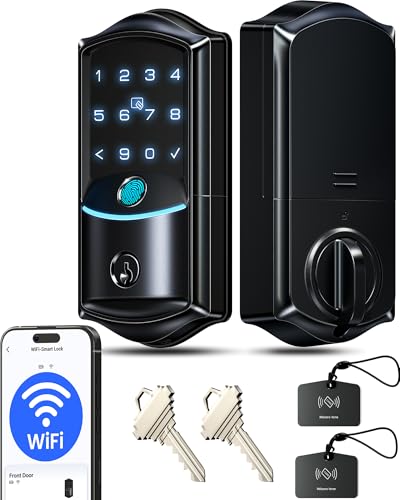 |
Best for Flexible Access | Methods: Fingerprint, PIN, App, Key, Voice, Fob | App: KK Home; built-in 2.4GHz Wi-Fi | Auto-Lock: Yes | Check Price on Amazon | Read Our Analysis |
| Yamiry Smart Deadbolt Door Lock with Keypad |  |
Best for Bluetooth Access | Methods: Fingerprint, Passcode, App, Key, Compatible Fob | App: NICE DIGI; Bluetooth, optional Wi-Fi gateway | Auto-Lock: Yes | Check Price on Amazon | Read Our Analysis |
| IRONZON 5-in-1 Keyless Entry Door Lock |  |
Best for Multiple Entry Methods | Methods: Fingerprint, PIN, IC Card, App, Key | App: Bluetooth connectivity | Auto-Lock: Yes | Check Price on Amazon | Read Our Analysis |
| PHYSEN Keyless Entry Fingerprint Door Lock with App Control |  |
Best for Local App Control | Methods: Fingerprint, App, Codes, Keys | App: Bluetooth; no built-in Wi-Fi | Auto-Lock: Yes | Check Price on Amazon | Read Our Analysis |
Comparison note: Features and accessories can vary by model and package. Check the exact Amazon listing for the lock you select. Bluetooth connectivity alone does not mean a lock can be controlled over the internet.
More Details on Our Top Picks
-
Veise VE012W WiFi Fingerprint Smart Lock
The Veise VE012W WiFi Fingerprint Smart Lock is a strong choice if you want to control your front door without buying a separate Wi-Fi hub. Its built-in 2.4GHz Wi-Fi connects to the KK Home app for remote locking, unlocking, user management, and activity notifications when the network is available.
You can enter using a fingerprint, keypad PIN, smartphone app, physical key, or supported voice assistant. The manufacturer lists storage for approximately 20 fingerprints and support for numerous user codes. These options make it useful for households where different people prefer different entry methods.
The VE012W also offers automatic locking, anti-peeping PIN entry, and a backlit keypad. Its IP55 rating helps protect the exterior hardware against dust and water exposure within that rating’s limits.
Why You’ll Like It: Built-in Wi-Fi is the main benefit. You can manage access without a separate gateway, while local fingerprint, PIN, and key entry provide alternatives when internet service is unavailable.
Best For: Homeowners who want a connected fingerprint deadbolt with remote access, guest codes, and familiar physical keypad buttons.
Who Should Avoid It: Buyers whose doors fall outside the supported dimensions or who only have a 5GHz Wi-Fi network with no usable 2.4GHz connection.
Before You Buy: The manufacturer specifies a typical compatible door thickness of 1-3/8 to 2 inches. Check your bore hole and backset as well. The published warranty includes one year, with an additional year available through qualifying registration. Confirm the current terms.
- Unlocking Methods: Fingerprint, PIN, App, Physical Key, Voice
- Connectivity: Built-in 2.4GHz Wi-Fi
- App Control: KK Home App
- Wi-Fi Gateway: Not required
- Auto-Lock: Yes, adjustable
- Weather Resistance: IP55
- Installation Type: Standard deadbolt replacement
- Warranty: One year included; extension available with registration
- Additional Feature: Fingerprint and PIN management
- Additional Feature: Remote access notifications
- Additional Feature: Physical backup keys
-
Philips Wi-Fi Smart Door Lock with Keyless Entry
The Philips Wi-Fi Smart Door Lock is a good option if you regularly manage access for family members or visitors. Model DDL242X-1HW offers built-in Wi-Fi connectivity and app-based management through Philips Home Access.
You can unlock the door using supported fingerprints, keypad codes, the mobile app, or a physical key. Compatible Alexa and Google Assistant features provide additional control options after setup.
The lock supports multiple user passcodes, automatic locking, and remote activity notifications. Published product information describes support for up to 100 custom passcodes, making it useful for households that need separate access credentials.
Why You’ll Like It: Remote management is useful when you need to change guest access or check lock activity while away from home. You do not need to hand out the same permanent code to everyone.
Best For: Homeowners who want a Wi-Fi-connected deadbolt with app notifications, guest-code management, and several unlocking methods.
Who Should Avoid It: Buyers who cannot provide a compatible 2.4GHz Wi-Fi connection or who want a lock that works without any app setup for remote features.
Before You Buy: Check the exact Philips model and door measurements. The manufacturer documentation specifies 2.4GHz Wi-Fi. Voice features and remote notifications depend on working connectivity and correct account configuration.
- Unlocking Methods: Fingerprint, Passcode, App, Physical Key, Voice
- Connectivity: Built-in Wi-Fi, 2.4GHz
- App Control: Philips Home Access
- Wi-Fi Gateway: Not required for the listed Wi-Fi model
- Auto-Lock: Yes
- Weather Resistance: Confirm model-specific rating
- Installation Type: Standard deadbolt replacement where compatible
- Warranty: Confirm current manufacturer terms
- Additional Feature: Multiple guest and user codes
- Additional Feature: Remote lock activity notifications
- Additional Feature: Voice assistant compatibility
-
Veise VE027 Smart Lock with Fingerprint Entry
The Veise VE027 Smart Lock combines built-in Wi-Fi with fingerprint and keypad entry. It is designed for buyers who want several ways to unlock the same door and manage access through the KK Home app.
With compatible 2.4GHz Wi-Fi, you can manage user codes, check lock activity, and use remote lock controls. The manufacturer also lists fingerprint, physical key, compatible key fob, and voice assistant entry options.
Its IP65-rated exterior offers dust protection and resistance to water jets within the rating’s specified limits. An adjustable auto-lock timer can help reduce the chance of leaving the deadbolt unlocked.
Why You’ll Like It: The combination of Wi-Fi, fingerprints, temporary access codes, and backup entry options makes this model flexible for households with different users.
Best For: Families and property owners who want direct Wi-Fi control with several ways to manage access.
Who Should Avoid It: Buyers seeking a simple mechanical lock or those with door hardware that does not meet its installation requirements.
Before You Buy: The manufacturer specifies a door thickness range of 1-3/8 to 2 inches and an eight-AA-battery design. Verify which accessories are included with the selected package. A second warranty year is available through qualifying registration, rather than automatically being included in every purchase.
- Unlocking Methods: Fingerprint, PIN, App, Physical Key, Voice, Compatible Fob
- Connectivity: Built-in 2.4GHz Wi-Fi
- App Control: KK Home App
- Wi-Fi Gateway: Not required
- Auto-Lock: Yes, adjustable
- Weather Resistance: IP65
- Installation Type: Standard deadbolt replacement
- Warranty: One year included; extension available with registration
- Additional Feature: Scheduled and temporary access codes
- Additional Feature: Type-C emergency power input
- Additional Feature: Remote status and activity management
-
Yamiry Smart Deadbolt Door Lock with Keypad
The Yamiry Smart Deadbolt Door Lock with Keypad offers flexible keyless entry for households that prefer Bluetooth app control. The YR02 model supports fingerprint recognition, keypad codes, a compatible key fob, physical keys, and the NICE DIGI app.
Its Bluetooth connection lets you manage the lock from a nearby smartphone. If you want to unlock your door from another location using the internet, you need a compatible Wi-Fi gateway. The gateway is also required for supported Alexa or Google Assistant integration.
Other useful features include automatic locking, anti-peeping keypad entry, low-battery alerts, and an IP66-rated exterior. Its fingerprint feature offers an alternative to typing a code when arriving home.
Why You’ll Like It: You can start with local Bluetooth features and add compatible gateway-based remote control if your needs change.
Best For: Buyers who want fingerprint and keypad entry with nearby app control, plus the option to add internet-based functions later.
Who Should Avoid It: Anyone expecting built-in Wi-Fi or remote app unlocking immediately without buying additional hardware.
Before You Buy: Check whether compatible key fobs and a Wi-Fi gateway are included. Product documentation identifies key fobs as separately available accessories. Also verify the door dimensions and the current warranty terms.
- Unlocking Methods: Fingerprint, Passcode, App, Compatible Key Fob, Physical Key
- Connectivity: Bluetooth; optional Wi-Fi gateway support
- App Control: NICE DIGI
- Remote Internet Access: Requires compatible gateway
- Auto-Lock: Yes
- Weather Resistance: IP66
- Installation Type: Compatible standard deadbolt doors
- Warranty: Published one-year warranty; confirm current terms
- Additional Feature: Anti-peeping password entry
- Additional Feature: Low-battery alerts
- Additional Feature: Compatible key fob access
-
IRONZON 5-in-1 Keyless Entry Door Lock
The IRONZON 5-in-1 Keyless Entry Door Lock is worth considering if different members of your household prefer different entry methods. The listed model supports fingerprint recognition, keypad PINs, compatible IC cards, app control, and physical keys.
This combination can be helpful when one person prefers using a fingerprint while another wants a PIN or access card. The touchscreen keypad and auto-lock function add convenience for everyday use.
Published specifications identify Bluetooth connectivity. That means you should not assume you can unlock this model over the internet from anywhere without further hardware or specific manufacturer support.
Why You’ll Like It: Several local entry options reduce dependence on a single method. A household can choose the most convenient supported way to unlock the door.
Best For: Families looking for a Bluetooth smart lock with fingerprint, keypad, card, and key access.
Who Should Avoid It: Buyers whose main requirement is verified, built-in Wi-Fi remote control without a gateway.
Before You Buy: Check the exact IRONZON model and package details. Confirm the compatible app, supported door dimensions, included cards, and any gateway requirements before ordering. Do not assume that every app feature works outside Bluetooth range.
- Unlocking Methods: Fingerprint, PIN, Compatible IC Cards, App, Physical Key
- Connectivity: Bluetooth
- App Control: Supported smartphone app; confirm exact app
- Remote Internet Access: Not verified for this package
- Auto-Lock: Yes
- Weather Resistance: Confirm model-specific rating
- Installation Type: DIY installation on compatible doors
- Warranty: Confirm current seller and manufacturer terms
- Additional Feature: Touchscreen keypad
- Additional Feature: IC card compatibility
- Additional Feature: Multiple local entry options
-
PHYSEN Keyless Entry Fingerprint Door Lock with App Control
The PHYSEN Keyless Entry Fingerprint Door Lock with App Control offers a practical combination of fingerprint access, Bluetooth app control, customizable codes, and physical backup keys.
Its fingerprint sensor lets you unlock the door without entering a PIN each time. The keypad provides another option for family members or guests, while the Bluetooth app supports nearby management.
Other listed features include automatic locking, a low-battery indicator, and an external Type-C emergency power input. The Type-C port is intended to provide temporary power for access when the internal batteries are depleted. It should not be treated as a permanent charging connection unless the manufacturer specifies otherwise.
Why You’ll Like It: The main benefit is straightforward fingerprint and local app entry without needing to connect the lock directly to a Wi-Fi network.
Best For: Homeowners who want fingerprint access and nearby Bluetooth app control for a compatible standard deadbolt door.
Who Should Avoid It: Buyers seeking built-in Wi-Fi remote control or a lock for an incompatible metal, mortise, rim-cylinder, or integrated door-lock system.
Before You Buy: This PHYSEN model is recommended for compatible wooden doors and uses adjustable 2-3/8-inch or 2-3/4-inch backsets. Confirm all door dimensions and the manufacturer’s installation restrictions before purchasing.
- Unlocking Methods: Fingerprint, Bluetooth App, Codes, Physical Keys
- Connectivity: Bluetooth
- App Control: Nearby Bluetooth app management
- Built-in Wi-Fi: No
- Auto-Lock: Yes
- Weather Resistance: IP54 listed
- Installation Type: Compatible standard wooden doors
- Warranty: Confirm current manufacturer terms
- Additional Feature: Type-C emergency power port
- Additional Feature: Low-battery indicator
- Additional Feature: Anti-peeping code functionality
Factors to Consider When Choosing a Wireless Door Lock

The best wireless door lock for your home depends on more than its fingerprint scanner or smartphone app. You’ll also want to compare connectivity, door compatibility, battery backup, security features, and everyday convenience.
Wi-Fi vs. Bluetooth Connectivity
Connectivity is one of the most important differences between wireless smart door locks.
A lock with built-in Wi-Fi can connect directly to a compatible home network. When properly configured, you can manage supported remote features through a smartphone app while away from home.
A Bluetooth smart lock normally communicates with your phone over a shorter distance. Some models offer additional internet-based functions through a separate gateway.
| Feature | Built-in Wi-Fi | Bluetooth Only |
|---|---|---|
| Nearby app control | Depends on model | Usually supported |
| Internet remote access | Generally supported | Requires gateway support |
| Extra gateway | Usually unnecessary | May be needed for remote features |
| Internet outage | Remote functions may stop | Local Bluetooth can still work |
Pro Tip: If controlling your door from another city is essential, choose a model with confirmed built-in Wi-Fi or a supported gateway system. Do not rely on the words “smart” or “wireless” alone.
Access Methods Variety
Different smart locks offer different ways to enter your home. Common methods include fingerprints, PIN codes, physical keys, smartphone apps, and compatible access cards.
Fingerprint access can be convenient when you don’t want to remember a code. A keypad is useful for guests who do not have the app installed. Physical backup keys give you another way to enter if the electronic functions become unavailable.
Some locks support temporary or scheduled access codes. These can be useful when you want to give someone limited access without sharing your permanent PIN.
Choose a model that supports the methods you will actually use. More entry methods do not automatically mean better security.
Security Features Importance
When shopping for a wireless door lock, look beyond convenience features and consider how the lock helps protect access.
Useful features may include anti-peeping PIN entry, user-code management, automatic locking, low-battery alerts, and access records.
Check for manufacturer-supported firmware updates and documented electronic security measures. Avoid treating broad phrases such as “military-grade security” as proof that a lock cannot be hacked.
Also review any stated ANSI or BHMA hardware grade. These classifications relate to defined lock performance requirements, but they do not make a door or lock impossible to force open.
Security Note: A smart deadbolt is only one part of home security. Your door, strike plate, frame, hinges, and installation quality also matter. Use strong unique PINs, remove unused guest codes, enable available account protections, and keep your lock firmware updated.
Installation Ease and Compatibility
Many smart deadbolts can be installed with a screwdriver, but not every wireless lock fits every door.
Before ordering, check your existing deadbolt opening and the dimensions listed by the manufacturer.
- Door thickness: Many US-market smart deadbolts are designed for doors around 1-3/8 to 2 inches thick, but compatibility varies.
- Backset: Common US measurements are 2-3/8 inches and 2-3/4 inches.
- Bore hole: Confirm the diameter of the main door hole and any additional mounting holes.
- Door material: Some locks work with standard wooden doors but are not suitable for particular metal or mortise-lock installations.
- Door handing: Check whether the model supports your door’s opening direction.
- Existing hardware: Confirm whether the package includes a deadbolt only or a complete handle set.
Do not force a lock into an incompatible opening. Poor alignment can prevent the deadbolt from extending correctly and may damage the motor.
Battery Life Considerations
Most of the wireless locks in this comparison use replaceable batteries. Depending on the model, they may require four or eight AA batteries.
Battery life depends on several factors, including how often you unlock the door, Wi-Fi activity, motor resistance, temperature, and battery quality. Always use the battery type recommended in the product manual.
Look for low-battery alerts and an accessible battery compartment. An external emergency power port can help with temporary access on certain models, but it should not replace routine battery maintenance.
Pro Tip: Keep a spare set of compatible batteries and know where your backup keys are stored. Do not leave your only backup key inside the house.
App Control Functionality
A useful smart-lock app should make everyday access easier rather than more complicated.
Depending on the model, you may be able to manage user codes, view access history, change auto-lock settings, monitor battery status, or control the deadbolt remotely.
Before buying, check whether the app supports your smartphone’s operating system and whether the functions you need are available without extra hardware or a subscription.
For security, use a strong account password and enable multifactor authentication if the app offers it. Also check whether the manufacturer continues providing app and firmware updates.
Weather Resistance Ratings
If your front door is exposed to rain, dust, or changing temperatures, weather resistance deserves attention.
Some wireless locks advertise IP ratings such as IP54, IP55, IP65, or IP66.
- IP54: Limited dust ingress protection and protection from splashing water.
- IP55: Limited dust ingress protection and protection from water jets.
- IP65: Dust-tight protection and resistance to water jets.
- IP66: Dust-tight protection and resistance to powerful water jets.
An IP rating does not automatically mean a lock is suitable for every climate or fully waterproof under all conditions. Check the manufacturer’s operating-temperature range, installation guidance, and whether the rating applies to the exterior assembly.
Guest Access and Temporary Codes
If you regularly have visitors, cleaners, relatives, or service providers entering your home, temporary access features can be useful.
Some smart locks let you create one-time, scheduled, or recurring PIN codes. This avoids sharing your main access code and makes it easier to cancel access later.
Check how codes are created and deleted. Some functions work locally over Bluetooth, while others require an active internet connection or gateway.
For rental properties, verify the lock’s compatibility with your booking and access-management workflow rather than assuming all smart locks offer rental integrations.
Warranty and Support Options
A clear warranty is important when purchasing an electronic door lock.
Look for details about the length of coverage, what defects are included, registration requirements, and how replacement parts are handled.
Some manufacturers provide extended coverage only after registration. Others offer separate technical support terms that should not be confused with product warranty coverage.
Before purchasing, review the current warranty document and make sure the manufacturer offers support in your country or region.
Before You Buy: Wireless Door Lock Checklist
Check these points before choosing your lock:
- Confirm whether the lock uses built-in Wi-Fi, Bluetooth, or a separate gateway.
- Measure your door thickness, bore hole, and backset.
- Check compatibility with your door material and opening direction.
- Choose suitable backup entry methods.
- Verify the batteries and accessories included in the package.
- Confirm smartphone app and voice assistant compatibility.
- Review the manufacturer’s weather rating and operating-temperature limits.
- Check current warranty coverage and customer support.
- Verify the exact model and package details on Amazon before checkout.
Frequently Asked Questions
How Do I Install a Wireless Door Lock Myself?
First, check your door measurements against the manufacturer’s specifications. Remove the existing deadbolt and install the new latch, exterior assembly, and interior hardware as directed. Insert the batteries, complete any required calibration, and set up the app. Test the lock several times with the door open before closing it to confirm the deadbolt moves freely and all access methods work.
What Is the Battery Life of These Smart Locks?
Battery life varies by model, connectivity type, usage, and environmental conditions. Some locks may operate for several months between battery changes, but manufacturer estimates are not guaranteed. Follow the recommended battery type and replace batteries when the lock reports a low charge.
Can I Use My Smartphone to Unlock the Door Remotely?
Yes, if your lock supports internet-based remote access and is properly connected. Models with built-in Wi-Fi, such as the Veise VE012W, Philips Wi-Fi Smart Door Lock, and Veise VE027, offer remote features through their respective apps. Bluetooth-only models generally require you to be nearby unless compatible gateway hardware provides internet connectivity.
Are These Locks Compatible With Home Automation Systems?
Some are. The listed Wi-Fi models support selected smart home integrations such as Alexa or Google Assistant. Compatibility depends on the exact model, app, and setup. Some Bluetooth locks require an additional gateway for voice assistant features. Always check the current manufacturer’s integration list.
What Happens if the Power Goes Out?
Most battery-powered smart deadbolts continue to support local entry during a household electricity outage, provided their batteries still have charge. However, internet-based features may stop if the router loses power. A depleted lock battery is a different problem. In that case, use the manufacturer’s supported backup method, such as a physical key or temporary external power input.
Do Wireless Door Locks Work Without Wi-Fi?
Many do. Fingerprint sensors, physical keys, and locally stored PIN codes can usually continue working without internet access. Bluetooth functions may also work when your phone is within range. However, remote internet features and some notifications will be unavailable until connectivity returns.
Are Fingerprint Door Locks Secure?
Fingerprint access can be convenient and reduces the need to share a PIN for routine entry. However, its security depends on the sensor, software, lock construction, and proper installation. Use a strong administrator code, keep backup entry available, and follow the manufacturer’s security guidance. No fingerprint lock can guarantee complete protection.
Can I Give Guests Temporary Access?
Many connected smart locks support temporary, scheduled, or one-time access codes. The exact features vary. Check whether codes can be created remotely or only when your phone is near the lock. Delete unused access credentials after visitors no longer need them.
Do I Need a Wi-Fi Gateway for a Bluetooth Smart Lock?
Not for basic local Bluetooth operation. However, a compatible gateway may be required for remote internet unlocking, voice assistant integration, and real-time notifications. The Yamiry YR02 is one example where these functions depend on gateway connectivity. Do not assume all Bluetooth models support the same gateways.
Will a Wireless Door Lock Fit My Existing Door?
Not necessarily. Many US-market smart deadbolts fit common single-cylinder deadbolt preparations, but some doors use different hole sizes, backsets, thicknesses, or mortise hardware. Measure your door and review the exact installation diagram before ordering.
Conclusion: Which Wireless Door Lock Should You Choose?
The best wireless door lock in 2026 depends on how you plan to use it. For a well-rounded combination of built-in Wi-Fi, fingerprint entry, keypad access, and remote management, the Veise VE012W is our overall recommendation based on its published features.
The Philips Wi-Fi Smart Door Lock is another strong option if app-based guest management and remote notifications are your priorities. The Veise VE027 offers flexible access options with direct Wi-Fi connectivity.
If you prefer Bluetooth-based entry, the Yamiry Smart Deadbolt provides fingerprint and keypad access with optional gateway expansion. The IRONZON 5-in-1 is worth considering for multiple local entry methods, while the PHYSEN Fingerprint Door Lock suits buyers who want nearby Bluetooth app control on a compatible door.
Final Recommendation
Choose Veise VE012W if you want built-in Wi-Fi without a separate hub and appreciate several backup entry methods.
Choose Philips if remote access, guest-code management, and app notifications matter most.
Choose Yamiry if you want Bluetooth fingerprint access and are comfortable adding a compatible gateway for remote features.
Final buying tip: Confirm the exact model, door compatibility, current features, and included accessories on the Amazon product page before making your decision. A properly fitted, well-maintained lock is more valuable than an impressive feature list alone.

