

Last Updated on October 28, 2026 by Caleb Warren
Looking for the best smart door locks for 2026? The Yale Assure Lock 2 with Wi-Fi is a strong starting point if you use Samsung SmartThings. The Schlage Encode offers convenient Wi-Fi control, while the eufy C220 adds fingerprint entry without a separate bridge. Other options from Veise, SMONET, and Ulecoce offer keypad access, guest codes, and keyless convenience. However, not every smart lock works with SmartThings. This guide compares seven options, explains their limitations, and helps you find the right lock for your door and smart home setup.
Quick Answer: Which Smart Door Lock Should You Choose?
If SmartThings integration is your priority, start with the Yale Assure Lock 2 with Wi-Fi. Yale documents SmartThings support for its Wi-Fi configuration. If you mainly want fingerprint entry and built-in Wi-Fi, consider the eufy Smart Lock C220. For a smart lever lock rather than a deadbolt, look at the eufy Smart Lock C33.
Important: Alexa, Google Home, Bluetooth, and Wi-Fi support do not automatically mean a lock works with Samsung SmartThings. Always check the exact model and integration before buying.
Key Takeaways
- Best for SmartThings users: Yale Assure Lock 2 with Wi-Fi, subject to the correct configuration and integration setup.
- Best for Wi-Fi deadbolt control: Schlage Encode, although its SmartThings compatibility needs confirmation.
- Best for fingerprint deadbolt entry: eufy Smart Lock C220.
- Best for lever-style doors: eufy Smart Lock C33.
- Best for flexible guest access: Veise RZ07, with an optional gateway for internet-based control.
- Best for a coordinated handle set: SMONET Keyless Entry Smart Lock.
- Best for a keypad-and-knob bundle: Ulecoce U68.
SmartThings Compatibility Note: Yale documents SmartThings integration for the Assure Lock 2 with Wi-Fi. Schlage’s published information about Encode compatibility is inconsistent, so confirm support with Schlage before purchasing it for SmartThings. Direct SmartThings support has not been established for the other models in this comparison. Those locks are included for buyers who want standalone app control, fingerprint access, or other smart-lock features.
| Yale Assure Lock 2 Deadbolt with Wi-Fi Keypad |  |
Best for SmartThings | Access: Keypad, app, key, Auto-Unlock | Type: Smart deadbolt | Connection: Wi-Fi, Bluetooth; SmartThings integration documented | Check Price on Amazon | Read Our Analysis |
| Schlage Encode Smart WiFi Deadbolt Lock – Matte Black | 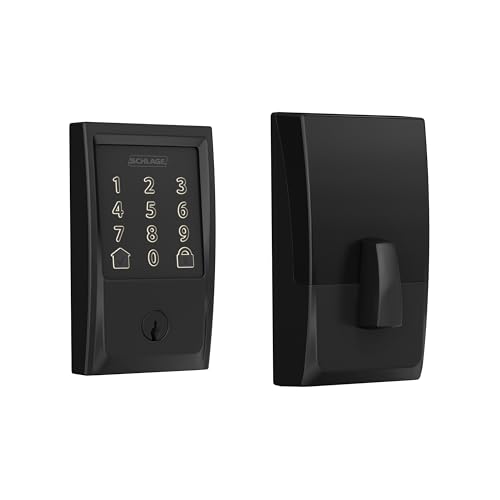 |
Wi-Fi Deadbolt Pick | Access: App, keypad, physical key | Type: Smart deadbolt | Connection: Built-in Wi-Fi; SmartThings support requires verification | Check Price on Amazon | Read Our Analysis |
| eufy Smart Lock C220 with Fingerprint Entry |  |
Fingerprint Deadbolt Pick | Access: Fingerprint, keypad, app, key | Type: Smart deadbolt | Connection: Built-in Wi-Fi; SmartThings not confirmed | Check Price on Amazon | Read Our Analysis |
| eufy Smart Lock C33 with Keypad and Fingerprint |  |
Smart Lever Pick | Access: Fingerprint, keypad, app, key | Type: Smart lever lock | Connection: Built-in Wi-Fi; SmartThings not confirmed | Check Price on Amazon | Read Our Analysis |
| Veise RZ07 Fingerprint Smart Lock with App Control | 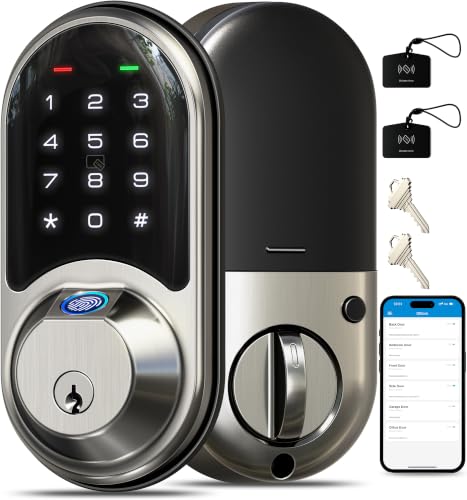 |
Flexible Guest Access | Access: Fingerprint, app, codes, fobs, key | Type: Smart deadbolt | Connection: Bluetooth; optional G2 gateway | Check Price on Amazon | Read Our Analysis |
| SMONET Keyless Entry Smart Lock with Handle | Handle-Set Pick | Access: Fingerprint, keypad, app, fob, key | Type: Deadbolt and handle set | Connection: Bluetooth; optional Wi-Fi gateway | Check Price on Amazon | Read Our Analysis | |
| Ulecoce U68 Fingerprint Keypad Deadbolt with Handle Set |  |
Knob-and-Deadbolt Pick | Access: Fingerprint, keypad, app, key | Type: Deadbolt and knob set | Connection: Bluetooth; SmartThings not confirmed | Check Price on Amazon | Read Our Analysis |
Before You Choose a Smart Lock
Start with these three questions:
- Do you need SmartThings? Choose a model with documented integration for your exact configuration. General Wi-Fi support is not enough.
- What hardware does your door use? A lever lock, deadbolt, and complete handle set serve different installation needs.
- Will you control the lock away from home? Some locks have built-in Wi-Fi, while others need a separate gateway.
Pro Tip: Check your existing door measurements before comparing prices. The wrong lock type can create installation problems even when the electronic features look perfect.
More Details on Our Top Picks
-
Yale Assure Lock 2 Deadbolt with Wi-Fi Keypad
If you already use Samsung SmartThings, the Yale Assure Lock 2 with Wi-Fi deserves your attention. Yale documents SmartThings integration for its Wi-Fi-equipped Assure Lock 2, making this the clearest starting point in our comparison for buyers who want their door lock connected to a wider smart home system.
You can unlock the door using the keypad, physical key, supported app functions, or configured Auto-Unlock. The Yale Access app also lets you manage access, check activity, and control the lock remotely when its Wi-Fi connection is working.
Why You’ll Like It: You get familiar keypad entry with remote management and documented SmartThings integration. That combination is useful when you want to manage the front door alongside other connected devices.
Who Should Buy This: Homeowners who prioritize SmartThings compatibility, guest access management, and a traditional deadbolt replacement.
Who Should Avoid This: Buyers who want fingerprint entry or prefer a lock without Wi-Fi battery demands. The listed keypad model does not offer a fingerprint reader.
Important Limitation: Yale estimates up to three months of battery life under typical Wi-Fi conditions, although actual results vary. SmartThings features can also depend on the connected configuration and integration setup. Verify the exact model before purchasing.
- Unlock Methods: Keypad, app, physical key, configured Auto-Unlock
- Installation Ease: Designed to replace compatible standard deadbolts
- Remote Access: Wi-Fi through Yale Access app
- SmartThings: Manufacturer-documented integration
- Security Features: Auto-Lock, access management, activity notifications
- Battery Consideration: Up to approximately three months under typical Wi-Fi conditions
- Best For: SmartThings-focused households
-
Schlage Encode Smart WiFi Deadbolt Lock – Matte Black
The Schlage Encode Smart WiFi Deadbolt is a practical option if you want remote control without purchasing a separate Wi-Fi bridge. Its built-in Wi-Fi connects to your home network, allowing you to manage the lock through the Schlage Home app.
You can create access codes for family members and visitors, review lock activity, and use supported integrations such as Alexa and Google Assistant. The keypad gives guests another way to enter without sharing a physical key.
Why You’ll Like It: Built-in Wi-Fi keeps the setup straightforward, while scheduled access codes can help when relatives, cleaners, or trusted visitors need entry.
Who Should Buy This: Homeowners who prefer a Wi-Fi deadbolt with keypad entry and app-based access management.
Who Should Avoid This: Anyone buying specifically for SmartThings without first confirming current compatibility. Schlage’s published compatibility resources are inconsistent regarding the Encode series.
Important Limitation: Do not assume the Encode works with your SmartThings hub simply because it connects to Wi-Fi. Confirm supported integrations for the exact model through Schlage before ordering.
- Unlock Methods: Smartphone app, keypad, physical key
- Installation Ease: Screwdriver installation on compatible doors
- Remote Access: Built-in Wi-Fi through Schlage Home app
- Security Features: Encrypted connection and built-in alarm features
- User Management: Scheduled codes and access history
- SmartThings: Conflicting manufacturer information; verify before purchase
- Best For: Wi-Fi-based deadbolt control
-
eufy Smart Lock C220 with Fingerprint Entry
If you often arrive home carrying groceries or bags, the eufy Smart Lock C220 can make entry easier. Its fingerprint reader lets you unlock the door without searching for your keys or typing a code.
The C220 combines fingerprint entry, keypad access, app control, a physical key, and supported voice-assistant functions. Its built-in Wi-Fi connects directly to your home network, so you don’t need an additional bridge for eufy app-based remote management.
With the eufy Security app, you can manage access, check activity records, and receive supported notifications. The self-learning fingerprint system is designed to improve recognition through use, although real-world performance can vary.
Why You’ll Like It: Fingerprint access and integrated Wi-Fi give you two useful conveniences in one deadbolt. You can enter quickly at the door and manage access remotely.
Who Should Buy This: Families seeking a fingerprint deadbolt with Wi-Fi control and several backup entry methods.
Who Should Avoid This: Buyers who require confirmed SmartThings or Matter support. eufy’s published C220 documentation does not establish those integrations.
Important Limitation: eufy’s estimated battery life is around eight months, depending on usage and conditions. Keep the physical backup keys accessible.
- Unlock Methods: Fingerprint, keypad, app, physical key, supported voice control
- Installation Ease: Designed for compatible deadbolt installations
- Remote Access: Built-in Wi-Fi through eufy Security app
- Security Features: Access history, auto-lock, low-battery alerts
- User Management: Up to 50 fingerprints and 100 passcodes according to eufy
- Battery Life: Approximately eight months under stated usage conditions
- SmartThings: Direct support not confirmed
-
eufy Smart Lock C33 with Keypad and Fingerprint
The eufy Smart Lock C33 is worth considering when you want fingerprint access built into a door handle. Unlike a conventional smart deadbolt, this is a smart lever lock, making the installation style an important part of your decision.
The fingerprint sensor is positioned for convenient access while gripping the handle. You can also use a keypad, supported app controls, and backup entry methods. Built-in Wi-Fi supports remote management through the eufy Security app.
The C33 is designed for compatible left- and right-hand doors. eufy describes an installation process that can be completed without drilling when the existing door preparation meets its requirements.
Why You’ll Like It: The integrated handle and fingerprint reader make everyday entry simple. It’s particularly useful for suitable side doors, offices, garage-entry doors, and other lever-style installations.
Who Should Buy This: Buyers who want a smart lever handle with fingerprint entry and remote app management.
Who Should Avoid This: Anyone who specifically needs a drop-in replacement for a deadbolt. The C33 is a different hardware category.
Important Limitation: Measure the door’s bore hole, backset, and thickness before ordering. SmartThings and Matter integration are not established for this model.
- Unlock Methods: Fingerprint, keypad, app, physical key
- Installation Ease: Designed for compatible lever-lock door preparation
- Remote Access: Integrated Wi-Fi through eufy Security app
- Security Features: Auto-lock, access management, activity records
- Power: Eight AA batteries
- Warranty Support: Manufacturer advertises 18-month coverage
- SmartThings: Direct support not confirmed
-
Veise RZ07 Fingerprint Smart Lock with App Control
The Veise RZ07 Fingerprint Smart Lock offers several ways to unlock your door, making it useful when different people need different access methods.
You can use a fingerprint, PIN code, compatible key fob, smartphone app, electronic key sharing, or physical key. Veise also provides a web-based management system for compatible access functions.
The lock supports multiple fingerprints and user codes, so you can organize access for family members, regular visitors, and other authorized users. Features such as automatic locking and anti-peeping code entry add useful control.
Why You’ll Like It: You can share temporary or scheduled access without distributing physical keys. This can be helpful for households with frequent visitors or property managers who need to organize entry permissions.
Who Should Buy This: Buyers who want fingerprint access, flexible guest codes, and local Bluetooth control.
Who Should Avoid This: Buyers who expect built-in Wi-Fi or verified SmartThings compatibility.
Important Limitation: The RZ07 uses built-in Bluetooth. Internet-based remote locking, remote status functions, and supported voice control require the separately sold Veise G2 gateway. Remote code sharing should not be confused with direct internet control of the lock.
- Unlock Methods: Fingerprint, keypad, Bluetooth app, fobs, eKeys, physical key
- Installation Ease: Screwdriver installation on compatible doors
- Remote Access: Requires separately sold Veise G2 gateway for internet-based lock control
- Security Features: Auto-lock, privacy mode, anti-peeping keypad
- User Management: Up to 50 fingerprints and 250+ user codes according to Veise
- SmartThings: Direct support not confirmed
- Best For: Flexible guest access management
-
SMONET Keyless Entry Smart Lock with Handle
The SMONET Keyless Entry Smart Lock with Handle combines a smart deadbolt with matching handle hardware. It’s an option for buyers who want to upgrade both the appearance and access methods of a suitable entry door.
The lock supports fingerprint entry, keypad codes, compatible key fobs, physical keys, and Bluetooth app control. You can create access permissions and use automatic locking to reduce the chance of leaving the door unlocked after entry.
With its included handle hardware, this model may be more suitable than a standalone deadbolt when you want a coordinated exterior door setup. However, you must check the spacing and dimensions of your existing door holes.
Why You’ll Like It: The combination of handle hardware and electronic access can simplify a front-door upgrade when the dimensions match.
Who Should Buy This: Homeowners seeking a fingerprint deadbolt and matching handle set with keypad access.
Who Should Avoid This: Buyers who need confirmed SmartThings support or expect remote internet control without extra equipment.
Important Limitation: Bluetooth app control works locally. Internet-based remote access and supported voice-assistant functions require a compatible gateway, normally sold separately. Confirm the gateway and app version required for the exact lock.
- Unlock Methods: Fingerprint, keypad, app, fob, physical key
- Installation Ease: Requires compatible deadbolt and handle-set measurements
- Remote Access: Optional Wi-Fi gateway required for internet control
- Security Features: Auto-lock and anti-peeping PIN entry
- User Management: App-based codes and electronic key sharing
- SmartThings: Direct support not confirmed
- Best For: Coordinated deadbolt and handle hardware
-
Ulecoce U68 Fingerprint Keypad Deadbolt with Handle Set
The Ulecoce U68 Fingerprint Keypad Deadbolt is designed for buyers who want electronic entry alongside matching knob hardware.
This model combines fingerprint access, a numeric keypad, Bluetooth app control, and physical key backup. The automatic locking function can help when you occasionally forget to secure the door after entering.
The U68 may be useful for households looking to replace an existing deadbolt and knob set. Before ordering, make sure its hardware matches your door’s hole spacing, thickness, and backset.
Why You’ll Like It: You get several entry methods and matching door hardware without relying on a phone every time you come home.
Who Should Buy This: Buyers who want a basic fingerprint-and-keypad lock with knob hardware.
Who Should Avoid This: Anyone who requires documented SmartThings integration or guaranteed internet-based control.
Important Limitation: The model information identifies Bluetooth connectivity. Independent verification of the original article’s precise fingerprint recognition rate, remote-access claims, and warranty terms was not established. Confirm those details directly with the seller or manufacturer before buying.
- Unlock Methods: Fingerprint, keypad, Bluetooth app, physical key
- Installation Ease: Designed for compatible deadbolt and knob replacement
- Remote Access: Local Bluetooth functionality; internet control not verified
- Security Features: Auto-lock and one-touch locking
- User Management: Keypad codes and app-based access settings
- SmartThings: Direct support not confirmed
- Best For: Keypad-and-knob hardware upgrades
How to Choose the Right Smart Door Lock
Choosing the right smart door lock involves more than comparing fingerprint readers and mobile apps. You need a lock that fits your door, supports your preferred connection method, and provides the access controls your household needs. If you use Samsung SmartThings, compatibility should be the first thing you verify.
1. SmartThings Compatibility
Not every smart lock connects to Samsung SmartThings. Some work only with their own mobile apps, while others connect through supported Wi-Fi integrations, Z-Wave, Zigbee, or Matter.
Before you purchase a lock for SmartThings, check whether the exact product model is supported. You should also confirm whether it needs a compatible hub, network module, or other hardware.
The Yale Assure Lock 2 with Wi-Fi is the clearest SmartThings option in this comparison because Yale documents the integration. Yale also offers separate Z-Wave configurations for compatible Assure Lock models. The correct module and setup depend on the hardware version.
Schlage’s official information about SmartThings support for the Encode series is inconsistent. Its support documentation says Encode is not compatible, while a published Schlage integration chart includes the series. Confirm the currently supported integration before choosing Encode for a SmartThings setup.
You can also check Samsung’s SmartThings compatible-device information and Yale’s official Assure Lock 2 FAQ.
Compatibility Warning: A lock advertised as “works with Alexa” or “Wi-Fi enabled” is not automatically compatible with SmartThings. Matter support must also be confirmed for the exact product, not assumed from other models in the same brand’s lineup.
2. Unlocking Methods Available
Smart door locks offer different ways to enter your home. Common options include fingerprint recognition, PIN codes, smartphone apps, physical keys, and compatible key fobs.
Fingerprint entry is useful when your hands are full. Keypad codes are convenient for children, relatives, and visitors who do not want to install another app. Physical keys provide a backup when the electronics stop working.
If several people need access, look for a lock that supports individual codes or fingerprints. Temporary and scheduled codes can be useful for guests or trusted service personnel.
Remember that faster fingerprint recognition does not guarantee every scan will succeed. Wet, dirty, damaged, or poorly positioned fingers may affect performance.
3. Installation Ease and Door Requirements
Many smart deadbolts are designed to fit standard US residential doors. However, compatibility is not universal.
Check your door thickness, backset, bore hole, existing lock type, and handing before ordering. A lock designed for a conventional single-cylinder deadbolt may not fit a mortise lock or a door with unusual hardware.
The eufy C220, Yale Assure Lock 2, Schlage Encode, and Veise RZ07 are deadbolt-style options. The eufy C33 is a lever lock. SMONET and Ulecoce include additional handle or knob hardware that may require matching hole spacing.
Some models can be installed with a screwdriver when the door is already prepared correctly. Do not assume every installation takes 15 minutes. Older doors, alignment problems, or nonstandard hardware may require more work.
Before You Buy: Door Compatibility Checklist
- Measure the door thickness.
- Check whether the backset matches the lock.
- Confirm the bore hole diameter and handle spacing.
- Identify whether the door uses a deadbolt, lever, knob, or mortise mechanism.
- Check the door handing and installation requirements.
- Verify that the deadbolt can extend and retract smoothly without forcing it.
4. Security Features Offered
Security should remain a priority when choosing a smart door lock. Electronic convenience is useful, but it does not replace a strong door, reliable strike plate, and correct installation.
Look for features such as automatic locking, encrypted communication, wrong-code lockout, low-battery alerts, and customizable access permissions.
An anti-peeping keypad can help protect PIN privacy by allowing additional digits around the correct code. Activity records can also help you review when the lock was used, although the information available depends on the model and app.
Consider whether the manufacturer provides firmware updates and account-security features. Use a unique password for the associated app and enable additional account verification when available.
Where independently documented, hardware security grades can provide useful information about strength and durability. Do not assume that every electronic lock provides the same physical resistance to forced entry.
Safety Note: Auto-lock functions and remote notifications are helpful, but they cannot guarantee that a door is physically closed or secure. Test your lock, strike plate, and door alignment after installation. Check whether a separate door-position sensor is needed for reliable closed-door status.
5. Smart Home Integration
If you already use connected lighting, security cameras, or other smart devices, consider how your door lock will fit into that setup.
Some smart locks support Amazon Alexa or Google Assistant. Others provide SmartThings, Matter, Z-Wave, or Zigbee connections. The available controls may differ depending on the integration.
For example, a supported integration might allow you to check lock status or use the lock in an automation. However, not every integration supports PIN management, activity history, or remote unlocking.
When SmartThings matters to you, prioritize a documented connection over general claims of smart home compatibility. Also check whether your existing hub supports the communication protocol required by the lock.
6. Battery Life Considerations
Battery life varies significantly between models. The wireless connection, frequency of use, motor resistance, temperature, and battery quality all affect how long a lock operates.
For example, eufy estimates around eight months of battery life for the C220 under stated conditions. Yale estimates up to three months for the Assure Lock 2 under typical Wi-Fi conditions.
Locks with built-in Wi-Fi may use more power than models that rely primarily on lower-power wireless connections.
Look for low-battery notifications and confirm how to regain access if the batteries become exhausted. Some locks include a mechanical key, while others provide an emergency external power connection.
Pro Tip: Do not wait until the lock stops working. Replace batteries when the manufacturer recommends and keep a backup key in a secure, accessible location.
7. Remote Access Capabilities
Remote access lets you manage certain lock functions while you are away from home. However, the connection method determines what is possible.
Locks such as the Schlage Encode and eufy C220 have built-in Wi-Fi for supported remote app functions. Bluetooth models such as the Veise RZ07 and SMONET handle set need an appropriate gateway for internet-based lock control.
Some Bluetooth-based locks still let you create or share certain access credentials remotely through their app services. That does not necessarily mean you can operate or check the physical lock from anywhere without a gateway.
Before choosing a model, identify whether you need remote locking, live status checks, access history, guest-code creation, or all four. Check which features work without extra equipment.
8. User Management Options
A smart lock can make household access easier when several people regularly use the same door.
Look for options to add and remove users, assign individual codes, set temporary access windows, and review available activity records.
For example, a temporary code may be useful for a guest staying a few days. A scheduled code can help a trusted cleaner enter during agreed hours without giving them permanent access.
Before purchasing, check the number of supported users and whether those settings require an internet connection, gateway, or specific app account.
Delete access credentials when they are no longer needed and avoid sharing your primary administrator code.
9. Choosing Between a Deadbolt and a Smart Lever
Not every electronic door lock performs the same mechanical job.
A smart deadbolt replaces or adds a deadbolt-style locking mechanism. A smart lever lock operates through a handle assembly. A complete smart handle set may combine a deadbolt with matching passage hardware.
For a main exterior entrance, consider your existing door hardware and physical security requirements before selecting a lock. For a side door or office entrance, a lever-style product may be more suitable when its specifications match the installation.
Do not assume a smart lever provides the same physical protection as a separately installed security deadbolt.
10. Price and Extra Equipment
When comparing smart door locks, consider the total setup cost rather than the lock price alone.
A Bluetooth model may cost less initially but require a separately purchased gateway for remote control. A Wi-Fi model may include remote access hardware but need more frequent battery replacement.
Some installations also require updated strike plates, compatible handles, or adjustments to the door.
Compare each product’s included hardware, required accessories, warranty terms, and available support before making your final decision.
Which Smart Door Lock Is Right for You?
Choose based on your main priority:
- SmartThings integration: Start with the Yale Assure Lock 2 Wi-Fi and verify the exact integration setup.
- Wi-Fi keypad deadbolt: Consider Schlage Encode if its supported integrations meet your needs.
- Fingerprint and built-in Wi-Fi: The eufy C220 is a practical fit.
- Smart lever hardware: Choose the eufy C33 if your door preparation is compatible.
- Flexible guest codes: Look at the Veise RZ07 and its optional remote-access gateway.
- Coordinated handle hardware: Compare SMONET’s deadbolt-and-handle set.
- Knob and keypad combination: Consider the Ulecoce U68 after confirming fitment and seller support.
Final Buying Tip: Confirm the exact product model, supported integrations, required accessories, and return terms before placing your order.
Frequently Asked Questions
Are Smart Locks Compatible With All Types of Doors?
No. Smart locks have different installation requirements. Check your door thickness, backset, bore diameter, hardware type, and handing. A smart lever, deadbolt, and complete handle set are not interchangeable. Some doors may require professional modification or a different lock design.
How Secure Are Smart Locks Compared to Traditional Locks?
A well-designed smart lock can provide useful security features such as encrypted communication, access logs, and automatic locking. However, physical security depends on the lock construction, door, strike plate, installation, and maintenance. A smart lock is not automatically stronger than a high-quality traditional deadbolt.
What Happens if the Battery Dies in a Smart Lock?
Electronic entry may stop working when the batteries are depleted. Many smart locks provide backup access through a physical key or an emergency power connection. The available method depends on the model. Check the manufacturer’s instructions and keep your backup access method available.
Can I Control Smart Locks Remotely While Traveling?
Yes, if your lock supports internet-based remote access and the required connection is working. Some models have built-in Wi-Fi, while Bluetooth locks may need an additional gateway. Check whether your chosen model supports remote locking, unlocking, status monitoring, and code management before relying on these features while traveling.
Do Smart Locks Require a Wi-Fi Connection to Function?
No. Many smart locks continue to operate through local keypad entry, fingerprint recognition, mechanical keys, or Bluetooth when Wi-Fi is unavailable. However, internet-dependent features such as remote status updates and remote unlocking may stop working until connectivity returns.
Do All Smart Locks Work With Samsung SmartThings?
No. SmartThings compatibility must be established for the specific lock and configuration. A model that supports Alexa, Google Assistant, or a dedicated Wi-Fi app may not work directly with SmartThings. Check the manufacturer’s compatibility documentation and any required hub or module before buying.
Can I Use a Smart Lock Without a Smart Home Hub?
Many models work without a separate smart home hub for local keypad, fingerprint, or app-based entry. Locks with built-in Wi-Fi may also support remote management without a dedicated bridge. Other models need a gateway or compatible hub for remote functions and ecosystem integration. Always check the exact connection requirements.
Are Fingerprint Door Locks Reliable?
Fingerprint locks can provide convenient daily access, but recognition is not perfect. Wet fingers, worn fingertips, dirt, sensor condition, and incorrect placement may affect results. Choose a model with alternate entry methods, such as a keypad or physical key, so you have another way to unlock the door.
What Is the Difference Between a Smart Deadbolt and a Smart Lever Lock?
A smart deadbolt operates a deadbolt mechanism, while a smart lever lock controls access through a handle assembly. Their installation requirements and physical security functions differ. Choose the hardware type that matches your existing door and intended security needs.
Should I Choose a Wi-Fi or Bluetooth Smart Lock?
Choose Wi-Fi if you want convenient internet-based remote management without buying an additional gateway. Bluetooth can be a practical choice for local app control and may use less power, but many Bluetooth locks require extra hardware for remote operation. Compare battery life, connectivity, supported integrations, and total cost before deciding.
Conclusion
The best smart door lock for 2026 depends on your door, preferred access method, and smart home system. If Samsung SmartThings integration is essential, the Yale Assure Lock 2 with Wi-Fi is the strongest starting point among these picks because Yale documents compatibility. Always confirm the exact model and setup.
For general Wi-Fi control, the Schlage Encode and eufy Smart Lock C220 offer useful alternatives. The eufy C33 is better suited to compatible lever-style doors, while Veise, SMONET, and Ulecoce provide other keypad, fingerprint, and handle-set options.
Before buying, check door compatibility, battery backup, remote-access requirements, and supported integrations. The right lock should fit correctly, provide reliable everyday entry, and offer the features you actually plan to use. Compare current product details and warranty terms before making your final choice.

