

Last Updated on November 4, 2026 by Caleb Warren
Choosing a Matter door lock in 2026 starts with one question: will it work with the smart home equipment you already own? For a keypad and key backup, consider the Yale Smart Lock with Matter in Matte Black or Snow. For fingerprint entry, look at the ULTRALOQ Bolt Fingerprint Matter Edition. The ULTRALOQ Bolt SE is another option if you confirm that the exact listing supports Matter over Thread. Below, you can compare the locks, their setup needs, and the details to check before buying.
Quick Answer: Pick Yale for straightforward keypad entry and a Google Home-focused setup. Choose ULTRALOQ Bolt Fingerprint Matter Edition if fingerprint unlocking is your priority. Choose the Bolt SE only after checking the connectivity variant on its product page.
Important: For Matter over Thread, you generally need a compatible Matter controller and a Thread border router, which may be combined in one smart home device. These are not included with every lock.
Key Takeaways
- Check for the exact Matter edition, not just the brand or product family name.
- The Yale Matte Black and Snow options belong to the same YRD510 Matter lock family; the main distinction here is finish.
- A Thread border router and Matter controller are important for Matter-over-Thread setup and remote control.
- Measure door thickness, bore holes, and backset before ordering.
- Physical keys remain available on these selected models as a backup to smart entry.
Disclosure: As an Amazon Associate I earn from qualifying purchases. Some links on this page are affiliate links, at no extra cost to you.
Top Matter Door Lock Picks
| Yale Matte Black Keyed Smart Lock (YRD510-MT1-BLK) | 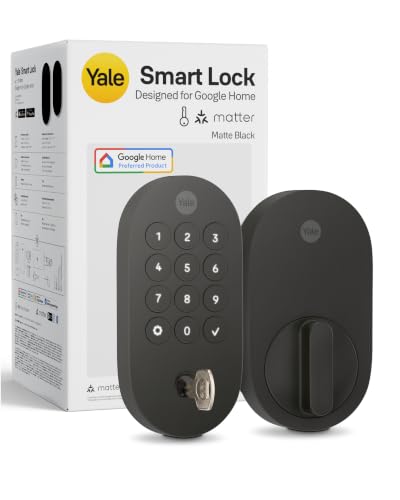 |
Best for Google Home | Connection: Matter over Thread; compatible hub needed | Best feature: Keypad plus physical key in Matte Black | Entry: Code, app, physical key | Check Price on Amazon | Read Our Analysis |
| ULTRALOQ Bolt Fingerprint Smart Lock with Matter | Best for Fingerprint Entry | Connection: Matter over Thread; compatible hub needed | Best feature: Fingerprint access for multiple users | Entry: Fingerprint, PIN, app, physical key | Check Price on Amazon | Read Our Analysis | |
| Yale Smart Lock with Matter – Snow (YRD510-MT1-SNW) | Best Light-Finish Option | Connection: Matter over Thread; compatible hub needed | Best feature: Snow finish on the Yale YRD510 design | Entry: Code, app, physical key | Check Price on Amazon | Read Our Analysis | |
| ULTRALOQ Bolt SE Smart Lock (Matter-listed variant) |  |
Best for Core Smart-Lock Features | Connection: Listing advertises Wi-Fi and Matter; verify the version | Best feature: Fingerprint and keypad access | Entry: Fingerprint, code, app, physical key | Check Price on Amazon | Read Our Analysis |
More Details on Our Top Picks
-
Yale Matte Black Keyed Smart Lock (YRD510-MT1-BLK)
If your home already uses Google Home, the Yale YRD510 Matter smart deadbolt is a practical starting point. It lets you unlock with a keypad code, a compatible app, or a physical key. With the required Matter and Thread hardware, you can manage supported remote features and guest access in your smart home platform.
Why you’ll like it: The Matte Black finish works well with dark door hardware. Yale also lists an ANSI/BHMA Grade 2 rating, IPX5 weather resistance for the exterior, and a keypad designed to resist visible fingerprints. Yale states that the product uses 60% recycled plastic.
Who should buy this: Homeowners wanting keypad entry, key backup, and a Google Home-focused Matter setup.
Who should avoid this: Buyers expecting fingerprint unlocking or remote access without compatible Matter-over-Thread infrastructure.
- Remote Access: Supported through a compatible Matter-enabled home hub and app
- Smart Home Integration: Matter over Thread; designed for Google Home
- Unlocking Options: Entry code, supported app, physical key
- Installation: Replaces a compatible standard deadbolt; measure first
- Security Features: Yale specifies ANSI/BHMA Grade 2 and local code storage
- Battery Life: Replaceable AA batteries; actual runtime depends on use
- Additional Feature: Matte Black finish
- Additional Feature: Fingerprint-resistant keypad surface
- Additional Feature: Recycled-plastic content stated by Yale
-
ULTRALOQ Bolt Fingerprint Smart Lock with Matter
The ULTRALOQ Bolt Fingerprint Matter Edition is a strong fit for households that want to stop entering a code every time they come home. Its fingerprint reader is the main attraction, but PIN codes, supported apps, and physical keys give you backup methods.
Why you’ll like it: ULTRALOQ describes a 360-degree fingerprint reader with support for up to 50 users. The Matter edition uses Thread, which can provide efficient local smart home communication when connected to the required compatible controller and border router. ULTRALOQ advertises extended battery life for this edition, but actual results vary.
Who should buy this: Families and frequent smart-lock users who prefer fingerprint access and want Matter platform integration.
Who should avoid this: Buyers without a compatible Thread setup or anyone who needs native Wi-Fi in the lock itself. For remote control through the ULTRALOQ Xthings Home app, a separate Wi-Fi bridge may be required for this Matter edition.
- Remote Access: Through a supported Matter ecosystem; Xthings remote access may need an ULTRALOQ bridge
- Smart Home Integration: Matter over Thread and Bluetooth
- Unlocking Options: Fingerprint, PIN, supported app, physical key
- Installation: Standard deadbolt preparation required; thick doors may need a kit
- Security Features: Auto-lock settings and platform-specific activity features
- Battery Life: Manufacturer advertises up to 1.5 years for the Matter edition; not guaranteed
- Additional Feature: 360-degree fingerprint reading
- Additional Feature: Fingerprint support for multiple users
- Additional Feature: Matter connectivity requires compatible home hardware
-
Yale Smart Lock with Matter – Made for Google Home – Snow – YRD510-MT1-SNW
Prefer a lighter finish? The Yale Smart Lock with Matter in Snow gives you the same general YRD510 design and core Matter-over-Thread approach as the Matte Black option above. It is a finish choice, not a separate technology upgrade.
Why you’ll like it: You get a keypad, physical key backup, and compatible-app access in a finish that may suit a light door or entryway. Yale specifies ANSI/BHMA Grade 2, IPX5 exterior weather resistance, and a compatible deadbolt design for many standard North American doors.
Who should buy this: Google Home users who want the Yale design in Snow rather than Matte Black.
Who should avoid this: Buyers who want fingerprint entry. Do not choose it expecting more connectivity features than the Matte Black version.
- Remote Access: Via a compatible Matter hub and supported app
- Smart Home Integration: Matter over Thread; Google Home-focused setup
- Unlocking Options: Entry code, supported app, physical key
- Installation: Designed for compatible standard deadbolt openings
- Security Features: Yale specifies ANSI/BHMA Grade 2 and locally stored codes
- Battery Life: Replaceable AA batteries; runtime varies
- Additional Feature: Snow finish
- Additional Feature: Removable battery cover
- Additional Feature: Shares the YRD510 platform with the Matte Black version
-
ULTRALOQ Bolt SE Smart Lock with Wi-Fi and Keyless Entry
The ULTRALOQ Bolt SE focuses on everyday fingerprint and keypad entry. The linked Amazon listing advertises Matter over Thread along with Wi-Fi-related features. However, ULTRALOQ markets the Bolt SE with connectivity choices, so confirm the exact version and supported protocols on the listing before you buy. A Wi-Fi-only configuration should not be treated as a Matter lock.
Why you’ll like it: You can choose from fingerprint, PIN, supported app, and physical-key access. The Bolt SE product family also offers auto-lock and low-battery alerts. Its core feature set may appeal to buyers who do not need every extra feature on a higher-end lock.
Who should buy this: Buyers who want core smart-lock convenience and have verified that the selected Bolt SE SKU includes Matter support.
Who should avoid this: Anyone who needs guaranteed Matter compatibility but cannot confirm which connectivity version the retailer will supply. Native Wi-Fi remote access and Matter-over-Thread control have different setup requirements.
- Remote Access: Depends on exact Wi-Fi or Matter configuration
- Smart Home Integration: Verify Matter-over-Thread support for the selected SKU
- Unlocking Options: Fingerprint, passcode, supported app, physical key
- Installation: Designed for compatible standard deadbolt doors
- Security Features: Auto-lock and low-battery alert features in the Bolt SE family
- Battery Life: Varies by selected version, batteries, and usage
- Additional Feature: Fingerprint and keypad entry
- Additional Feature: Manufacturer offers connectivity variants
- Additional Feature: Confirm exact model before checkout
Factors to Consider When Choosing a Matter Door Lock in 2026

The best Matter smart deadbolt is one that fits your door, connects to your existing smart home system, and offers a reliable way in when a phone or network is unavailable. Check these factors before ordering.
Smart Home Compatibility
Matter is a smart home interoperability standard. Thread is one network technology a Matter device can use. If a lock uses Matter over Thread, you need a compatible Matter controller and Thread border router. Some smart speakers and hubs combine those roles, but not all do. Verify support for your preferred platform, such as Apple Home, Google Home, Alexa, or SmartThings. Not every platform offers the same code-management, notification, or voice features. Check the exact lock edition and the platform’s current device support.
Access Methods Available
Choose the entry method you will use every day. The Yale models offer code, app, and physical-key entry. ULTRALOQ’s fingerprint models add biometric unlocking. For a family, look at how many codes or fingerprints can be enrolled, how temporary guest access works, and whether a mechanical key is provided. Voice unlocking may have extra restrictions depending on the smart home platform.
Installation Simplicity
Do not assume a smart lock will fit just because you have a deadbolt. Measure the door thickness, backset, face bore, and edge bore. Yale lists 1-3/8 to 2-1/4-inch door thickness compatibility for its YRD510; ULTRALOQ lists 1-3/8 to 1-3/4 inches as standard for Bolt Fingerprint, with a separate kit for certain thicker doors. Check clearance around the handle and whether the existing door closes smoothly. Installation time varies with alignment and door preparation.
Security Features Offered
Look for reputable physical lock ratings, strong authentication, access-code controls, and software updates. Yale states that its YRD510 models meet ANSI/BHMA Grade 2. Other models may have different certifications, so confirm the exact rating rather than relying on a broad “secure” claim. Auto-lock can help if you forget to turn the deadbolt, but it is not a substitute for a properly aligned strike plate and a solid door.
Battery Life Considerations
Battery estimates are not guarantees. Usage, temperature, signal conditions, and connectivity affect how long batteries last. Thread models can use less energy than locks that keep Wi-Fi active. Check battery type, low-battery alerts, replacement access, and the backup entry method. Replace batteries before they fail, and follow the manufacturer’s battery recommendations.
Design and Aesthetics
Look at exterior finish, keypad visibility, interior housing size, and clearance around existing hardware. Yale’s Matte Black and Snow options let you choose a finish without changing its basic Matter lock family. A fingerprint sensor may be more convenient for daily use, while a visible keypad can be easier for guests.
Remote Management Options
For remote locking, access sharing, activity alerts, and automation, check which features your chosen ecosystem actually supports. Some features need a Matter hub or a separate manufacturer bridge. For example, ULTRALOQ explains that remote control of its Bolt Fingerprint Matter model from the Xthings Home app requires the ULTRALOQ Bridge Wi-Fi adapter. A lock’s local keypad or physical key can still provide access when internet-dependent features are unavailable.
Warranty and Support
Check the written warranty for the precise model and the country in which you will use it. ULTRALOQ lists lifetime mechanical coverage and 18 months for electronics in its Bolt Fingerprint and Bolt SE series, subject to warranty terms. Confirm which parts, finishes, batteries, and labor are covered before purchasing. Also check access to firmware updates and installation support.
Before You Buy: Quick Compatibility Checklist
- Confirm that the linked SKU is a Matter-compatible edition.
- Identify a working Matter controller and, for Thread locks, a Thread border router.
- Verify the smart home app supports the functions you need.
- Measure door thickness and backset; check for extra mounting kits.
- Check whether the box includes batteries, keys, and all required hardware.
- Read the warranty terms and verify current Amazon listing details and availability.
Manufacturer Compatibility Resources
For setup and model-specific details, see Yale’s Matter setup guide, ULTRALOQ’s Bolt Fingerprint model comparison, and ULTRALOQ’s Bolt SE specifications. Manufacturer information can change, so review the documentation for your exact model.
Frequently Asked Questions
Are Matter Door Locks Compatible With All Smart Home Systems?
No. Matter improves compatibility among supported devices and ecosystems, but you still need the required Matter controller, network hardware, and a platform that supports door locks. Advanced features can vary across apps.
How Do I Install a Matter Door Lock Myself?
Check door measurements first. Follow the maker’s steps to remove the existing deadbolt, install the new hardware, and test that the bolt moves freely. Set up the required Matter controller and Thread border router, then pair the lock in your chosen app. Test the keypad, key, and remote features before relying on it.
What Is the Average Lifespan of a Matter Door Lock?
There is no reliable universal lifespan for every Matter lock. Service life depends on build quality, door alignment, weather exposure, use, maintenance, and continued software support. Check the manufacturer’s warranty and replace worn parts or a failing lock as needed.
Can I Use Traditional Keys With Matter Door Locks?
Yes, if the model has a physical key cylinder. The Yale YRD510 and ULTRALOQ locks listed here offer key backup. Other Matter locks may be key-free, so inspect the individual product specifications before buying.
How Do I Reset a Matter Door Lock if Needed?
Follow the exact model’s manual. Reset-button locations, hold times, and pairing steps vary. A factory reset may erase access codes and smart home connections, so save any needed setup information first. After a reset, you may need to pair the device again.
Conclusion
The right Matter door lock should fit your door and connect to your actual smart home setup. For keypad entry with a physical key, choose the Yale YRD510 in the finish you prefer. For fingerprint convenience, the ULTRALOQ Bolt Fingerprint Matter Edition deserves a close look. The ULTRALOQ Bolt SE can also be worth comparing, provided you verify that the selected version really supports Matter. Check hub requirements, door fit, warranty, and current product details before you buy.

