

Last Updated on November 4, 2026 by Caleb Warren
Looking for the best biometric locks for doors in 2026? A fingerprint door lock can make everyday entry easier while reducing your reliance on traditional keys. The TMEZON Smart Fingerprint Door Lock offers flexible access for bedrooms and home offices, while the eufy Smart Lock C33 adds built-in Wi-Fi for remote management. If you want a fingerprint lock for a compatible exterior entrance, the Veise VE027-L is another option worth comparing. The right choice depends on your door, preferred unlocking methods, connectivity needs, and backup access options.
Quick Answer: The eufy Smart Lock C33 is a strong choice if you want fingerprint entry and built-in Wi-Fi. The Veise VE027-L is worth considering for compatible exterior doors, thanks to its weather-resistant design and multiple access methods. For a bedroom or home office, the TMEZON lock offers fingerprint, keypad, card, key, and Bluetooth app access.
Before buying: Check your door measurements, installation requirements, battery type, emergency entry options, and whether the lock supports remote Wi-Fi access or only local Bluetooth control.
Key Takeaways
- Choose a lock with a fingerprint reader and at least one reliable backup unlocking method.
- Built-in Wi-Fi is useful for managing access when you are away from home.
- Bluetooth-only locks generally require your phone to remain within wireless range.
- Check whether a lock is intended for interior privacy doors or exterior entrances.
- Confirm door thickness, bore diameter, backset, and handing before ordering.
- Register an administrator immediately and test every unlocking method before relying on the lock.
Disclosure: As an Amazon Associate I earn from qualifying purchases. Some links on this page are affiliate links, at no extra cost to you.
How these options were selected: We compared advertised unlocking methods, connectivity, door compatibility, backup access, and practical use cases. Product details were checked against available manufacturer and retail information where possible. These are research-based comparisons, not claims of hands-on testing. Prices, seller terms, and availability may change.
| Biometric Door Lock | Product Image | Best For | Unlocking Methods | Fingerprint Capacity | Installation and Connectivity | Amazon | Review |
|---|---|---|---|---|---|---|---|
| TMEZON Smart Fingerprint Keyless Door Lock |  |
Best for Everyday Bluetooth Access | Methods: Fingerprint, Passcode, App, IC Card, Key | Capacity: 50+ fingerprints | Connection: Bluetooth; check gateway requirements for Wi-Fi | Check Price on Amazon | Read Our Analysis |
| Buoan 5-in-1 Smart Fingerprint Door Lock with Bluetooth | 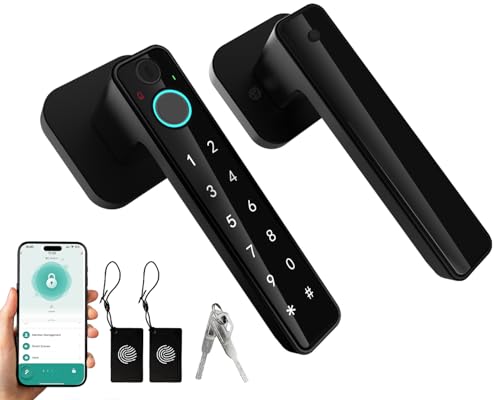 |
Best for Flexible Family Access | Methods: Fingerprint, App, Password, Card, Key | Capacity: Up to 100 fingerprints | Connection: Bluetooth app; verify door fit | Check Price on Amazon | Read Our Analysis |
| hosowe Smart Fingerprint Door Lock with APP Control | Best for Multiple Entry Methods | Methods: Fingerprint, Password, Key, IC Card, App | Capacity: Seller lists 100 fingerprints | Connection: Bluetooth-based TUYA app | Check Price on Amazon | Read Our Analysis | |
| eufy Smart Lock C33 with Keypad and Fingerprint |  |
Best for Built-In Wi-Fi | Methods: Fingerprint, Passcode, App, Backup Key | Capacity: Up to 50 fingerprints | Connection: Built-in Wi-Fi; 8 AA batteries | Check Price on Amazon | Read Our Analysis |
| Evanshow Fingerprint Door Lock Biometric Keyless Entry Knob | Best for Interior Privacy Doors | Methods: Fingerprint, Password, Key, IC Card | Capacity: Up to 100 fingerprints | Connection: No app on this version; interior use | Check Price on Amazon | Read Our Analysis | |
| Veise VE027-L Smart Lock with WiFi and Fingerprint |  |
Best for Connected Exterior Entry | Methods: Fingerprint, App, PIN, Card/Fob, Key, Voice | Capacity: 20+ fingerprints | Connection: Built-in 2.4 GHz Wi-Fi; IP65 | Check Price on Amazon | Read Our Analysis |
| Smart Keypad Door Lock with Fingerprint Entry |  |
Best for Built-In Doorbell Feature | Methods: Fingerprint, Password, IC Card, Key, App | Capacity: Seller lists 100 fingerprints | Connection: App control; check network requirements | Check Price on Amazon | Read Our Analysis |
| Evanshow Smart Door Knob Fingerprint Lock | Best for Simple Keyless Convenience | Methods: Fingerprint, App, Keypad, Key | Capacity: Seller lists 100 fingerprints | Installation: Designed for compatible residential doors | Check Price on Amazon | Read Our Analysis | |
| Evanshow Fingerprint Door Lock with App Control |  |
Best for Interior Access Management | Methods: Fingerprint, Password, Key, IC Card, App | Capacity: Up to 100 fingerprints | Connection: TUYA app; verify remote-access support | Check Price on Amazon | Read Our Analysis |
Important Compatibility Note: A fingerprint door knob is not necessarily an exterior-rated deadbolt. Before replacing your existing lock, check the product’s intended use, latch style, security rating, weather resistance, and installation measurements. For a primary exterior entrance, prioritize suitable security hardware over convenience features alone.
More Details on Our Top Picks
-
TMEZON Smart Fingerprint Keyless Door Lock
If you want to stop carrying keys around your home, the TMEZON Smart Fingerprint Keyless Door Lock offers several convenient ways to enter. It supports fingerprint recognition, passcodes, IC cards, a physical key, and control through the TUYA app.
The manufacturer advertises storage for more than 50 fingerprints and support for multiple access cards. Its quick fingerprint reader can make daily entry convenient for family members who regularly use the same door. An automatic-lock feature also helps reduce the chance of forgetting to secure it, provided it is configured correctly.
Why You’ll Like It: You can give family members different entry methods without relying only on physical keys. Bluetooth app functions also make local access management convenient.
Best For: Bedrooms, home offices, apartments, and compatible interior doors where flexible keyless entry matters.
Consider Before Buying: The regular TUYA connection is Bluetooth-based. Internet-based remote access may require a compatible gateway. Confirm your door dimensions and intended installation location before purchasing.
- Unlocking Methods: Fingerprint, Passcode, TUYA App, IC Cards, Physical Keys
- Fingerprint Capacity: 50+ fingerprints advertised
- Installation: Designed for compatible standard door preparations
- Power Source: 4 AAA batteries, according to the supplied specifications
- Auto-Lock Feature: Yes, with a short automatic-lock delay
- Warranty: Seller lists a 1-year warranty; confirm current terms
- Additional Feature: Bluetooth app management
- Additional Feature: Backup physical keys and IC cards
- Additional Feature: Guided setup instructions
-
Buoan 5-in-1 Smart Fingerprint Door Lock with Bluetooth
The Buoan 5-in-1 Smart Fingerprint Door Lock is designed for households that want different ways to access the same room or entry point. It combines fingerprint unlocking with Bluetooth app control, password entry, card access, and a mechanical key.
The seller advertises capacity for up to 100 fingerprints as part of a larger user-management system. That can be helpful when several family members need regular access. Its zinc-alloy construction, illuminated keypad, and automatic-lock functionality add everyday convenience.
Why You’ll Like It: Family members can choose the entry method they find easiest. Someone can use a fingerprint, while another person can use a code or physical key.
Best For: Families seeking multiple unlocking options and Bluetooth-based local management.
Consider Before Buying: Bluetooth access does not automatically mean you can operate the lock from another city. Also, check the auto-lock configuration, as the seller describes restrictions on disabling the feature.
- Unlocking Methods: Fingerprint, Bluetooth App, Password, Card, Mechanical Key
- Fingerprint Capacity: Up to 100 fingerprints advertised
- Installation: Screwdriver installation on compatible doors
- Power Source: Alkaline batteries; confirm required size with the seller
- Auto-Lock Feature: Yes; check configuration limitations
- Warranty: Confirm current seller warranty terms
- Additional Feature: Bluetooth app access
- Additional Feature: Silent-mode functionality
- Additional Feature: Zinc-alloy construction
-
hosowe Smart Fingerprint Door Lock with APP Control
Best for Multiple Entry Methods
Check Price on AmazonThe hosowe Smart Fingerprint Door Lock offers five advertised unlocking methods: fingerprint, password, physical key, IC card, and TUYA app control. This combination is useful when you want flexible entry without giving every family member a traditional key.
The seller describes support for up to 100 fingerprints and 100 passwords, along with customizable automatic-lock timing. An illuminated keypad can make code entry easier in dim lighting. Its zinc-alloy body and compact handle design are intended for compatible residential door installations.
Why You’ll Like It: Multiple access methods make it easier to accommodate different users. The app can also help manage supported credentials and settings.
Best For: Households or private offices that want several ways to unlock a compatible door.
Consider Before Buying: The advertised TUYA connection uses Bluetooth. Confirm whether a separate gateway is needed for internet-based access. Security, waterproofing, and warranty claims are seller-reported and should be checked against current documentation.
- Unlocking Methods: Fingerprint, Password, Physical Key, IC Card, TUYA App
- Fingerprint Capacity: Seller advertises 100 fingerprints
- Installation: Screwdriver installation on compatible doors
- Power Source: 4 AAA batteries, according to seller information
- Auto-Lock Feature: Adjustable timing advertised
- Warranty: Verify current manufacturer or seller coverage
- Additional Feature: Illuminated keypad
- Additional Feature: Bluetooth-based app management
- Additional Feature: Emergency access options advertised
-
eufy Smart Lock C33 with Keypad and Fingerprint
If you want fingerprint entry with internet-based app management, the eufy Smart Lock C33 is a strong option to compare. It combines a fingerprint reader with keypad access, built-in Wi-Fi, and supported backup entry methods.
The C33 supports up to 50 fingerprints and 100 passcodes, according to eufy’s product documentation. Its integrated Wi-Fi enables remote lock management, access notifications, and activity history without requiring a separate Wi-Fi bridge.
The lock runs on eight AA batteries and offers automatic-lock functionality. Eufy also specifies IP53 protection, an 18-month warranty, and support for compatible left- and right-hand door installations.
Why You’ll Like It: Built-in Wi-Fi is useful when you need to check lock activity or manage supported access settings while away from home.
Best For: Homeowners who prioritize remote app management, fingerprint convenience, and documented manufacturer support.
Consider Before Buying: The C33 does not currently offer native Apple HomeKit or Matter compatibility according to the manufacturer’s published information. Verify the door preparation requirements and remember that IP53 protection is not equivalent to full waterproofing.
- Unlocking Methods: Fingerprint, Passcode, App, Backup Key
- Fingerprint Capacity: Up to 50 fingerprints
- Installation: Designed for compatible left- and right-hand doors
- Power Source: 8 AA batteries
- Auto-Lock Feature: Yes, countdown-based automatic locking
- Warranty: 18-month manufacturer coverage
- Additional Feature: Built-in Wi-Fi with remote app management
- Additional Feature: IP53 weather-protection rating
- Additional Feature: Low-battery notifications and emergency USB-C power
-
Evanshow Fingerprint Door Lock Biometric Keyless Entry Knob
The Evanshow Fingerprint Door Lock is a practical option for private rooms where you want convenient access without carrying a key. This version offers fingerprint recognition, password entry, mechanical keys, and IC card access.
According to the product listing, it supports up to 100 fingerprints and 50 passwords. This makes it useful for a shared home office, bedroom, or another compatible interior room.
Unlike app-connected alternatives, this particular version is intended for direct access through its built-in entry methods rather than remote app management.
Why You’ll Like It: You get several ways to unlock the door without needing Wi-Fi or a smartphone app for routine entry.
Best For: Bedrooms, private offices, and other compatible interior doors.
Consider Before Buying: This is an interior privacy-style lock. Do not assume it provides the security rating or weather resistance needed for a primary exterior entrance. Register the administrator fingerprint before regular use.
- Unlocking Methods: Fingerprint, Password, Mechanical Keys, IC Card
- Fingerprint Capacity: Up to 100 fingerprints
- Installation: Designed for compatible wooden interior doors
- Power Source: Battery powered; confirm current battery specifications
- Auto-Lock Feature: Available according to seller information
- Warranty: Not independently verified
- Additional Feature: Up to 50 passwords advertised
- Additional Feature: Backup mechanical keys
- Additional Feature: Administrator enrollment required during setup
-
Veise VE027-L Smart Lock with WiFi and Fingerprint
The Veise VE027-L Smart Lock is worth comparing if you want a fingerprint-enabled exterior entry system with a matching handle set. It combines a connected deadbolt with lever handles and several convenient unlocking options.
Its built-in 2.4 GHz Wi-Fi allows supported remote management without an additional hub. The lock offers fingerprint access, PIN codes, key fob or card access, physical keys, app control, and supported voice-assistant functions.
Veise specifies storage for more than 20 fingerprints and over 100 access codes. The manufacturer also lists an IP65 weather-resistance rating, adjustable auto-lock timing, eight AA batteries, and an emergency USB-C power input.
Why You’ll Like It: The combination of Wi-Fi access, biometric unlocking, and a coordinated handle set can be convenient when replacing compatible front-door hardware.
Best For: Homeowners who need connected access management for a compatible exterior door.
Consider Before Buying: The manufacturer specifies door thicknesses from 1-3/8 to 2 inches and common 2-3/8-inch or 2-3/4-inch backsets. Confirm bore requirements and compatibility before buying. The advertised second year of warranty coverage requires registration.
- Unlocking Methods: Fingerprint, App, PIN, Key Fob/Card, Physical Key, Voice Control
- Fingerprint Capacity: 20+ fingerprints advertised
- Installation: Compatible door thickness 1-3/8 to 2 inches
- Power Source: 8 AA alkaline batteries
- Auto-Lock Feature: Adjustable 10–180-second timing
- Warranty: 1 year, plus a free 1-year extension with registration
- Additional Feature: Built-in 2.4 GHz Wi-Fi
- Additional Feature: IP65 weather-resistance rating
- Additional Feature: Emergency USB-C power and included lever handles
-
Smart Keypad Door Lock with Fingerprint Entry
If you want a fingerprint door lock with an integrated doorbell, this Smart Keypad Door Lock offers an interesting combination of features. It supports several advertised entry methods, including fingerprint recognition, password entry, IC cards, mechanical keys, and app control.
Its illuminated keypad can make nighttime code entry easier, while temporary access settings may be useful when you need to share entry with a guest. The built-in doorbell provides an additional convenience feature without requiring a separate button at the same entry point.
Why You’ll Like It: The combination of fingerprint entry, keypad access, and a doorbell makes it useful for households that value multiple convenience features.
Best For: Compatible residential doors where fingerprint access and a built-in doorbell are both desirable.
Consider Before Buying: The built-in doorbell should not be confused with a video doorbell or security camera. Confirm the available notification functions, app connectivity requirements, and door compatibility before purchasing.
- Unlocking Methods: Fingerprint, Password, IC Card, Mechanical Keys, App
- Fingerprint Capacity: Seller advertises 100 fingerprints
- Installation: Screwdriver installation on compatible doors
- Power Source: Seller lists 4 AA batteries; confirm current requirements
- Auto-Lock Feature: Available according to seller information
- Warranty: Verify current seller warranty terms
- Additional Feature: Built-in doorbell
- Additional Feature: Illuminated keypad
- Additional Feature: Temporary access settings advertised
-
Evanshow Smart Door Knob Fingerprint Lock – Keyless Entry
The Evanshow Smart Door Knob Fingerprint Lock offers a convenient alternative to a traditional key-operated bedroom or office handle. It combines fingerprint access with app control, keypad entry, and a mechanical key.
The seller advertises support for multiple stored fingerprints and an automatic-lock feature. The presence of backup entry methods can be especially useful when a fingerprint cannot be recognized or the lock needs maintenance.
Why You’ll Like It: You can unlock a compatible door with your fingerprint while keeping other access methods available for family members or backup use.
Best For: Bedrooms, home offices, and compatible residential interior doors where straightforward biometric access is the main priority.
Consider Before Buying: Do not rely on unverified claims about military-grade encryption, complete protection from hacking, or guaranteed fingerprint accuracy. Check the current technical documentation for biometric storage, app security, battery requirements, and exterior-use suitability.
- Unlocking Methods: Fingerprint, App, Keypad, Mechanical Keys
- Fingerprint Capacity: Seller advertises up to 100 fingerprints
- Installation: Designed for compatible residential door preparations
- Power Source: Battery powered; verify current battery requirements
- Auto-Lock Feature: Advertised automatic-lock functionality
- Warranty: Not independently verified
- Additional Feature: Keypad access
- Additional Feature: Backup mechanical entry
- Additional Feature: App-based access features advertised
-
Evanshow Fingerprint Door Lock Biometric Keyless Entry
The Evanshow Fingerprint Door Lock with app control is useful when you want to manage entry to a bedroom, private office, or another compatible interior space. It offers five advertised access methods: fingerprint, password, mechanical key, IC card, and TUYA app.
The product listing describes support for up to 100 fingerprints and 50 passwords. App-based features include access management, temporary credentials, activity logs, and silent mode, subject to the supported connection and settings.
Why You’ll Like It: You can provide access without distributing permanent physical keys to everyone who uses the room.
Best For: Interior doors where shared access and app-based credential management are useful.
Consider Before Buying: Confirm the lock’s Bluetooth or Wi-Fi requirements before assuming remote access is available. Register the administrator fingerprint before normal use and verify that the unit is appropriate for your door’s security requirements.
- Unlocking Methods: Fingerprint, Password, Mechanical Keys, IC Card, TUYA App
- Fingerprint Capacity: Up to 100 fingerprints advertised
- Installation: Designed for compatible interior doors
- Power Source: Battery powered; verify current specifications
- Auto-Lock Feature: Yes, according to seller information
- Warranty: Not independently verified
- Additional Feature: Up to 50 passwords advertised
- Additional Feature: Entry logs and access management
- Additional Feature: Administrator enrollment and silent mode
Factors to Consider When Choosing Biometric Locks for Doors
Choosing the right biometric door lock involves more than comparing fingerprint recognition speeds. You need to know whether the lock fits your door, offers suitable security features, and provides reliable backup access.
Before deciding, compare the following factors to find the best option for your home or office.
Unlocking Methods Variety
A good fingerprint door lock should offer convenient access without making you completely dependent on its biometric scanner.
Common unlocking methods include fingerprint recognition, PIN codes, mobile apps, IC cards, key fobs, and mechanical keys. Not every model supports all these options.
Consider how different people will use the door. For example, you may prefer fingerprint access for daily use while giving a family member a passcode.
Before purchasing, check how many fingerprints and access codes the lock can store. Also, confirm whether users can be added or deleted without resetting the entire device.
Pro Tip: Choose a lock with at least one practical backup method. A mechanical key or supported emergency-power option can help when the fingerprint scanner or batteries fail.
Security Features Importance
Convenience is important, but physical lock security should remain a priority.
Look for appropriate hardware, a suitable locking mechanism, reliable credential management, and clear manufacturer documentation. For exterior entrances, check whether the specific model has a documented ANSI/BHMA security grade or another applicable rating.
Useful features may include:
- Automatic locking after a configurable delay
- Anti-peeping keypad functions
- Administrator-only access settings
- Temporary and permanent user credentials
- Low-battery warnings
- Backup mechanical entry or emergency power
- Documented firmware and app support
Fingerprint access does not automatically make a lock more resistant to forced entry. The strength of the latch, cylinder, strike plate, and door frame also matters.
Safety Note: Some fingerprint locks require an administrator fingerprint to be enrolled before normal operation. Certain models may permit broad fingerprint access during initial setup. Follow the manufacturer’s enrollment instructions immediately, change default credentials, and test the lock before securing an occupied property.
Installation Ease Factors
Installation ease can save you time, but the process depends on the lock and your existing door hardware.
Many biometric knobs and handles are designed to fit common residential door preparations. However, this does not guarantee compatibility with every door.
Check whether the lock requires a screwdriver, drilling, additional wiring, or modifications to the latch opening.
Also, examine whether the model supports left-handed and right-handed door configurations.
Manufacturer installation videos can help you understand the process before buying. If your door has a mortise lock, unusual dimensions, or commercial hardware, you may need a different product or professional installation.
Compatibility With Doors
Door compatibility is one of the most important factors when selecting a biometric lock.
Measure your existing door instead of assuming a lock marked “standard fit” will work.
Check the following specifications:
- Door Thickness: Measure the full thickness and compare it with the manufacturer’s supported range.
- Backset: Measure from the edge of the door to the center of the lock bore.
- Bore Diameter: Confirm the existing hole matches the lock’s installation requirements.
- Door Handing: Check the swing direction and whether the handle can be reversed.
- Door Material: Verify compatibility with wood, metal, or other construction types.
- Lock Type: Make sure you are replacing the correct type of hardware, such as a knob, lever, latch, or deadbolt.
- Intended Location: Confirm whether the product is suitable for bedrooms, offices, exterior entrances, or weather-exposed locations.
Many U.S. residential doors use 2-3/8-inch or 2-3/4-inch backsets, but you should still measure your door and follow the manufacturer’s specifications.
Compatibility Tip: A fingerprint-enabled privacy knob is not automatically an appropriate replacement for a security deadbolt on your primary entrance.
Battery Life Considerations
Most residential biometric locks use replaceable batteries, but the number, size, and expected lifespan vary by model.
Some require AA batteries, while others use AAA batteries or different power arrangements.
Battery life depends on how frequently the door is used, whether Wi-Fi remains active, the operating temperature, and the lock’s power-management design.
Look for low-battery alerts so you can replace batteries before the lock stops responding.
Some models also include a USB-C emergency-power port. This typically provides temporary power for unlocking rather than recharging the installed disposable batteries.
Pro Tip: Follow the manufacturer’s battery recommendations, keep replacement batteries available, and test the backup unlocking method periodically.
Smart Control Options
Smartphone control can make a biometric lock more flexible, especially when you need to manage access for different users.
However, there is an important difference between Bluetooth access and Wi-Fi access.
- Bluetooth: Usually allows local smartphone control while your phone is within wireless range.
- Built-In Wi-Fi: Can support internet-based remote access through a compatible app and network.
- Gateway-Based Wi-Fi: May require a separate bridge or hub to provide remote functionality.
- Smart Home Integration: Depends on the specific lock and supported platforms, such as Alexa, Google Home, Matter, or Apple Home.
Do not assume that every lock advertising an app supports remote unlocking from anywhere.
If remote management is a priority, verify that the specific model supports it without extra accessories or recurring service requirements.
Material Durability Assessment
The materials and construction of a biometric lock affect how well it withstands everyday use.
Metal housings, zinc-alloy components, and corrosion-resistant finishes can help improve durability, but material alone does not establish a lock’s security grade.
For exterior doors, look for a documented weather-resistance rating and confirm which parts of the lock are protected.
For example, an IP65-rated exterior assembly offers a different level of environmental protection from an IP53-rated assembly.
Weather ratings do not mean the entire lock can be submerged or exposed to unlimited moisture.
Check the supported operating temperature, installation requirements, warranty, and available replacement parts before making your decision.
Emergency Access Solutions
Emergency access is essential because fingerprint scanners and electronic components can occasionally fail.
A practical biometric lock should offer a way to enter if the batteries run out or the scanner cannot read your fingerprint.
Common backup methods include:
- Mechanical keys
- Keypad passcodes
- Compatible IC cards or key fobs
- Emergency USB power inputs
- Other manufacturer-supported recovery procedures
Keep physical backup keys in a secure, accessible location outside the locked room when appropriate.
Do not assume app control will work during a battery failure. Many electronic locks require power to operate their motors, even when a smartphone is connected.
Fingerprint Privacy and Data Security
Biometric locks use fingerprint information to recognize authorized users. Because fingerprints cannot be changed like passwords, the way a lock handles biometric data deserves attention.
Before buying, look for clear manufacturer information about whether fingerprint templates are stored locally, whether they are encrypted, and how users can delete their records.
Also, check whether the mobile app requires an online account and whether the manufacturer provides security updates.
A product claiming “military-grade security” or “zero hacking risk” should not automatically be considered safer than another model without independent evidence.
Privacy Tip: Use a strong app password, enable available account-security protections, and remove fingerprints or access codes when someone no longer needs entry.
Before You Buy: Biometric Door Lock Checklist
Check these details before ordering:
- Does the lock fit your door thickness, backset, and bore diameter?
- Is it intended for interior privacy use or exterior security?
- Does it support enough fingerprints and passcodes for your household?
- Does it include a reliable backup entry method?
- Is app control Bluetooth-only or available remotely through Wi-Fi?
- Are any additional hubs, cards, or accessories required?
- Does the manufacturer document its weather-resistance or security rating?
- Can you configure automatic locking and user permissions?
- Are batteries, replacement keys, warranty support, and setup instructions available?
Which Biometric Lock Should You Choose?
Different biometric door locks solve different problems. Instead of choosing only by the number of advertised features, match the product to the door and how you plan to use it.
For Remote Wi-Fi Management
The eufy Smart Lock C33 is worth comparing if you want built-in Wi-Fi, fingerprint recognition, and remote app management. It also offers documented manufacturer support and multiple backup access options.
Choose it when: Internet-based management matters more than simply unlocking a door with your fingerprint.
For a Compatible Exterior Entrance
The Veise VE027-L offers a connected deadbolt, matching lever handles, an IP65 rating, and several access methods. Its documented installation measurements make it easier to assess compatibility.
Choose it when: You want connected exterior-entry hardware and your existing door meets the installation requirements.
For a Bedroom or Home Office
The TMEZON Smart Fingerprint Door Lock is a convenient option for local Bluetooth access and multiple entry methods. It can suit a household where several people need flexible access to an interior room.
Choose it when: Everyday fingerprint convenience is more important than built-in internet connectivity.
For Simple Interior Access Without App Management
The Evanshow four-method fingerprint lock is useful when you want fingerprint, keypad, card, and physical-key access without relying on smartphone controls.
Choose it when: Your main goal is convenient access to a compatible interior privacy door.
Frequently Asked Questions
How Do Biometric Locks Compare to Traditional Locks in Security?
Biometric locks offer convenient entry without requiring a physical key for everyday use. However, they are not automatically more secure than traditional locks. Their security depends on the mechanical hardware, electronic design, installation, access settings, and available backup methods. For exterior doors, an appropriately rated lock and secure door frame remain important.
Can Biometric Locks Be Hacked or Bypassed?
Yes. Like other electronic security products, biometric locks may have vulnerabilities involving fingerprint sensors, software, credentials, wireless connections, or mechanical hardware. Choose a model with clear security documentation, secure your app account, remove unused credentials, and install available firmware updates.
What Happens if the Biometric Scanner Malfunctions?
If the fingerprint scanner stops working, you may still be able to unlock the door using a passcode, physical key, or another supported backup method. The available options depend on the model. Test emergency access methods during installation rather than waiting for a failure.
Are Biometric Locks Compatible With Smart Home Systems?
Some biometric locks support smart home platforms such as Alexa or Google Home, while others provide only Bluetooth app control. Compatibility with Matter, Apple Home, or other services varies by model. Always check the manufacturer’s current integration list before purchasing.
Do Biometric Door Locks Work Without Wi-Fi?
Many biometric door locks can still recognize registered fingerprints and accept locally stored passcodes without Wi-Fi. However, internet-based notifications and remote app features may stop working when the network is unavailable. Check the specific model’s offline operating requirements.
How Long Do Biometric Door Lock Batteries Last?
Battery life varies by model, battery type, usage frequency, and connectivity settings. A Wi-Fi-enabled lock may consume power differently from a basic fingerprint knob. Follow the manufacturer’s estimated replacement schedule, use recommended batteries, and respond promptly to low-battery warnings.
Can I Install a Biometric Lock on Any Door?
No. Biometric locks have specific requirements for door thickness, backset, bore diameter, handing, and hardware type. Some are intended for interior wooden doors, while others are designed for compatible exterior installations. Check the installation diagram before ordering.
What Is the Difference Between a Fingerprint Door Knob and a Biometric Deadbolt?
A fingerprint door knob or lever usually integrates electronic access with a handle-operated latch. A biometric deadbolt uses electronic access to operate a deadbolt mechanism. For a main entrance, assess the lock’s security grade, physical construction, and compatibility rather than assuming every biometric knob provides equivalent protection.
How Do I Maintain and Clean My Biometric Lock?
Wipe the fingerprint sensor and exterior surfaces gently with a soft cloth, following the manufacturer’s cleaning instructions. Avoid abrasive cleaners and excessive moisture. Replace batteries as recommended, check the latch and strike plate, and periodically test backup access. Keep any supported firmware updated.
Do Biometric Locks Store My Actual Fingerprint Image?
Many fingerprint systems use processed biometric templates rather than ordinary fingerprint photographs, but storage methods differ between products. Check the manufacturer’s privacy and security documentation to understand what data is stored, whether it is encrypted, and how it can be deleted.
Conclusion
The best biometric door lock in 2026 is the one that fits your door, supports your preferred unlocking methods, and provides suitable security for its intended location.
For connected home access, the eufy Smart Lock C33 offers fingerprint unlocking with built-in Wi-Fi. The Veise VE027-L is another option for compatible exterior entrances, with weather-resistant hardware and multiple entry methods. If you mainly want convenient fingerprint access for an interior room, the TMEZON Smart Fingerprint Door Lock deserves consideration.
Before placing an order, verify installation measurements, current product specifications, warranty terms, and backup entry options. A well-chosen biometric lock can simplify everyday access, but reliable hardware and proper installation remain essential to home security.

