

Last Updated on November 4, 2026 by Caleb Warren
Looking for the best biometric fingerprint door locks in 2026? The right lock can make everyday entry easier without relying on a physical key. The Anybell Fingerprint Smart Door Lock is a practical option for homeowners who want fingerprint and keypad access. The Foxgard 5-in-1 offers more ways to unlock a door, while the Sifely Bluetooth Smart Lock provides app-based access management. For bedrooms and home offices, compact fingerprint door knobs may be a better fit. Below, you’ll find eight options, their main benefits, and the important details to check before buying.
Quick Answer: Which Fingerprint Door Lock Should You Choose?
For a fingerprint deadbolt: Consider the Anybell Fingerprint Smart Door Lock for its combination of fingerprint, keypad, and physical-key access.
For multiple unlocking methods: The Foxgard 5-in-1 offers fingerprint, keypad, app, IC card, and mechanical-key options.
For Bluetooth access management: The Sifely Smart Door Lock is worth considering, especially if you need temporary guest codes and app management.
For an interior bedroom or office: The ThorBolt MD1 offers fingerprint and keypad access in a door-knob design.
Important: Not every fingerprint lock is suitable for an exterior entrance. Confirm the intended door type, lock mechanism, weather protection, and installation measurements before ordering.
Disclosure: As an Amazon Associate I earn from qualifying purchases. Some links on this page are affiliate links, at no extra cost to you.
Our Top Biometric Fingerprint Door Lock Picks
Use this comparison to find a lock that matches your door and preferred access method. Product features can vary by model and listing variation, so confirm the current specifications on Amazon before purchasing.
| Product | Image | Best For | Unlocking Methods | Installation | Power | Amazon | Review |
|---|---|---|---|---|---|---|---|
| Anybell Fingerprint Smart Door Lock with App Control | Best Fingerprint Deadbolt | Unlocking: Fingerprint, keypad, physical key; app features | Installation: DIY for compatible doors | Power: 4 AA batteries | Check Price on Amazon | Read Our Analysis | |
| Smart Fingerprint Door Lock with APP Control | Most Versatile Access Options | Unlocking: Fingerprint, password, key, IC card, Tuya app | Installation: Screwdriver installation on compatible doors | Power: 4 AAA batteries | Check Price on Amazon | Read Our Analysis | |
| Foxgard 5-in-1 Biometric Smart Door Lock |  |
Best for Guest Access Management | Unlocking: Fingerprint, keypad, app, IC card, mechanical key | Installation: DIY for compatible doors | Power: 4 AA alkaline batteries | Check Price on Amazon | Read Our Analysis |
| Fingerprint Smart Door Lock with Bluetooth Keyless Entry |  |
Best Bluetooth Access Management | Unlocking: Fingerprint, passcode, app, FOB, mechanical key | Installation: DIY for compatible doors | Power: 4 AA batteries | Check Price on Amazon | Read Our Analysis |
| Fingerprint Door Lock with Smart Voice Guidance |  |
Best for Room Rentals | Unlocking: Fingerprint, passwords, IC card, key; app features | Installation: Designed for compatible standard doors | Power: 4 AAA batteries | Check Price on Amazon | Read Our Analysis |
| Fingerprint Door Knob with Keypad and Biometric Access |  |
Best for Interior Doors | Unlocking: Fingerprint, keypad, mechanical key | Installation: DIY interior knob replacement | Power: 4 AA alkaline batteries | Check Price on Amazon | Read Our Analysis |
| Fingerprint Door Lock Biometric Keyless Entry Knob | 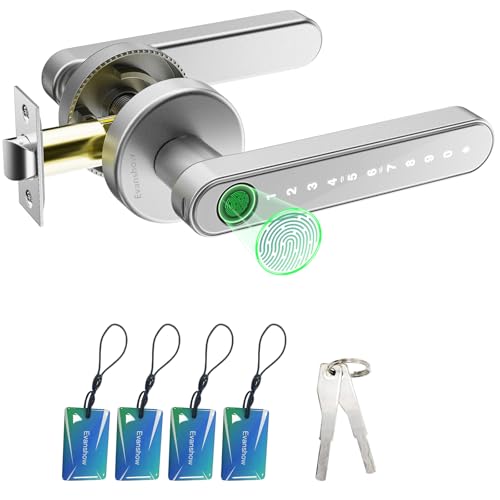 |
Best Multi-Access Privacy Knob | Unlocking: Fingerprint, password, mechanical key, IC card | Installation: Compatible interior knob replacement | Power: Battery-powered | Check Price on Amazon | Read Our Analysis |
| 52HZ Fingerprint Biometric Door Lock with App Control | 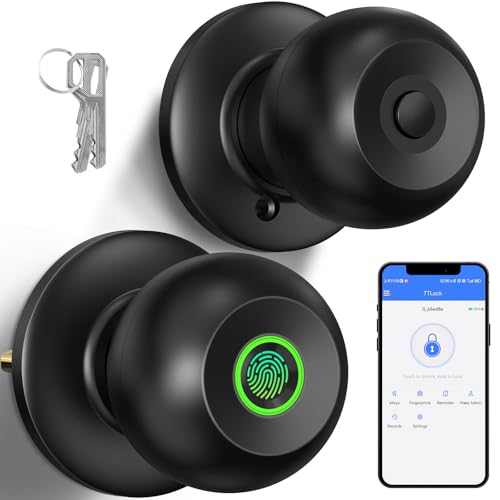 |
Best Bluetooth Room Knob | Unlocking: Fingerprint, Bluetooth app, physical key | Installation: Compatible interior doors | Power: Battery-powered; check exact requirements | Check Price on Amazon | Read Our Analysis |
Before You Buy: Check whether the lock replaces a deadbolt, lever, or door knob. Also confirm door thickness, bore hole, backset, door handing, and any smart-home hub requirements. A fingerprint feature alone does not mean the lock is suitable for an exterior entrance.
More Details on Our Top Picks
-
Anybell Fingerprint Smart Door Lock with App Control
Best Fingerprint Deadbolt
Check Price on AmazonIf you want to stop searching for your keys every time you arrive home, the Anybell Fingerprint Smart Door Lock offers a practical combination of convenience and backup access. Its fingerprint reader lets registered users unlock the door without entering a code, while the keypad and physical key provide alternative entry methods.
The lock also offers app-related access features, customizable PINs, and automatic locking. These functions can be helpful in a household where several people need access at different times. The deadbolt-style design makes it especially worth considering when replacing a compatible entry-door deadbolt.
Why You’ll Like It
You can choose fingerprint access for daily use and keep a PIN or physical key as backup. Auto-lock settings can also reduce the chance of accidentally leaving the door unlocked.
Best For: Homeowners who want a fingerprint deadbolt with keypad access.
Consider Before Buying: Confirm your door measurements, the available app functions, and whether any remote or voice-control features require extra hardware. No-drill installation depends on your existing door preparation.
- Unlocking Methods: Fingerprint, keypad, physical key
- Installation: DIY installation on compatible doors
- Power Source: 4 AA batteries
- Security Features: Auto-lock and interior privacy-related controls
- User Management: Multiple fingerprint and PIN profiles
- App Features: Check current connectivity and management options
- Additional Feature: Physical backup-key access
- Additional Feature: Keypad entry for household members
-
Smart Fingerprint Door Lock with APP Control
Most Versatile Access Options
Check Price on AmazonThe Smart Fingerprint Door Lock with APP Control is designed for buyers who want several ways to enter a room or manage access. It supports fingerprint recognition, passwords, mechanical keys, compatible IC cards, and the Tuya app.
These options can be useful for a family, small office, or shared living space. You can use fingerprints for everyday entry, passwords for approved users, and physical keys as backup. The zinc-alloy construction and keypad design also give the lock a modern appearance.
Why You’ll Like It
The main benefit is flexibility. Different users can choose an entry method that works for them, reducing dependence on one fingerprint scanner or smartphone.
Best For: Households and offices where different people prefer different unlocking methods.
Consider Before Buying: The Tuya integration is described as Bluetooth-based. Do not assume that remote unlocking over the internet is included. Confirm the exact model’s connectivity, included cards, door compatibility, and any required hub.
- Unlocking Methods: Fingerprint, password, mechanical key, IC card, Tuya app
- Installation: Screwdriver installation on compatible doors
- Power Source: 4 AAA batteries
- Construction: Zinc-alloy lock body
- Security Features: Multiple authentication options and auto-lock settings
- App Connectivity: Bluetooth-based Tuya functionality
- Additional Feature: Temporary access options, subject to app support
- Additional Feature: Type-C emergency power connection as described for this model
-
Foxgard 5-in-1 Biometric Smart Door Lock
The Foxgard 5-in-1 Biometric Smart Door Lock provides several ways to manage access to a compatible door. Its fingerprint reader, keypad, app control, IC card support, and mechanical key make it a flexible option for households and indoor shared spaces.
The app includes access-management features such as guest codes and unlock records. Auto-lock settings and anti-peep keypad functionality add convenience for everyday use. Its aluminum-alloy construction provides a sturdy-feeling design, although material alone does not establish a certified security grade.
Why You’ll Like It
If different people need entry at different times, the available access methods make it easier to manage users without handing everyone a permanent physical key.
Best For: Shared spaces, home offices, and properties that need flexible guest access.
Consider Before Buying: Remote unlocking and voice-assistant functionality require a compatible Foxgard gateway sold separately. Confirm suitability before using the lock on an exposed exterior door.
- Unlocking Methods: Fingerprint, keypad, app, IC card, mechanical key
- Installation: DIY installation on compatible doors
- Power Source: 4 AA alkaline batteries
- Construction: Aluminum-alloy body
- Security Features: Auto-lock and anti-peep keypad functionality
- Access Management: Guest codes and app-based access records
- Additional Feature: Interior electronic privacy/deadlock function
- Additional Feature: Optional gateway for remote and voice features
-
Fingerprint Smart Door Lock with Bluetooth Keyless Entry
The Sifely S Fingerprint Smart Door Lock combines biometric entry with Bluetooth app management. It supports fingerprint access, passcodes, compatible key fobs, smartphone control, and a mechanical backup key.
This range of access methods can work well for families and rental property managers. The app allows users to manage supported credentials, while the optional gateway expands internet-based management features. Its reversible handle can also help with installation on compatible left- or right-handed doors.
Why You’ll Like It
You can use fingerprints for everyday entry while managing guest access through supported passcode features. The mechanical key gives you another option if electronic access is unavailable.
Best For: Homeowners and rental hosts who want Bluetooth-based access management with an optional remote-control upgrade.
Consider Before Buying: A separate Sifely Wi-Fi gateway is required for remote lock control and compatible voice-assistant integration. Also verify that the handle assembly fits your door thickness, bore hole, and surrounding trim.
- Unlocking Methods: Fingerprint, passcode, app, FOB, mechanical key
- Installation: DIY installation with compatible door preparation
- Power Source: 4 AA batteries
- Connectivity: Bluetooth; optional Wi-Fi gateway
- Security Features: Auto-lock and access-management functions
- Guest Access: Supported temporary and shared passcodes
- Additional Feature: Reversible handle
- Additional Feature: Optional Alexa and Google integration through a gateway
-
Fingerprint Door Lock with Smart Voice Guidance
The Fingerprint Door Lock with Smart Voice Guidance is designed for convenient entry to bedrooms, offices, apartments, and other compatible rooms. Its voice-guided operation may make setup and day-to-day use easier for people who prefer audible instructions.
The listed access options include fingerprint recognition, passwords, IC cards, mechanical keys, and app-based features. Guest passwords can be helpful when different people need access without receiving a permanent physical key.
Why You’ll Like It
The combination of voice guidance and multiple entry methods can make this lock easier to use in a shared household or room rental.
Best For: Interior room rentals, shared rooms, and buyers who prefer guided operation.
Consider Before Buying: Confirm the current app features, door measurements, emergency power specifications, and manufacturer support terms. Do not assume it is appropriate for every exterior entrance or that an internet connection is included.
- Unlocking Methods: Fingerprint, passwords, IC cards, mechanical keys, app features
- Installation: Designed for compatible standard doors
- Power Source: 4 AAA batteries
- User Management: Multiple fingerprints and passwords
- Security Features: Low-battery warning and backup entry options
- Additional Feature: Smart voice guidance
- Additional Feature: Emergency Type-C power port
- Additional Feature: Guest password support
-
Fingerprint Door Knob with Keypad and Biometric Access
If you want fingerprint access for a bedroom or home office, the ThorBolt MD1 Fingerprint Door Knob offers a simple alternative to a traditional keyed interior knob. It combines fingerprint recognition, keypad entry, and a mechanical backup key.
The lock includes automatic locking and anti-peep keypad functionality. Its compact design is intended for compatible interior doors, making it more appropriate for room-level access than as a replacement for an exterior deadbolt.
Why You’ll Like It
You can open an interior room using your fingerprint while keeping a keypad code available for other authorized users. This reduces the need to carry a separate room key.
Best For: Bedrooms, home offices, pantries, and other compatible interior rooms where controlled access is useful.
Consider Before Buying: This is an interior door knob, not a verified exterior security deadbolt. Check the door’s thickness and existing latch arrangement before purchasing.
- Unlocking Methods: Fingerprint, keypad, mechanical key
- Installation: DIY replacement for compatible interior knobs
- Power Source: 4 AA alkaline batteries
- Security Features: Auto-lock and anti-peep keypad function
- User Management: Multiple fingerprints and passcodes
- Door Type: Interior doors
- Additional Feature: Manual locking control
- Additional Feature: Traditional backup-key access
-
Fingerprint Door Lock Biometric Keyless Entry Knob
The Evanshow Fingerprint Biometric Door Knob is a practical option for buyers who want several unlocking methods on an interior door. Its listed entry options include fingerprint recognition, password entry, mechanical keys, and IC cards.
For shared bedrooms, offices, or other private spaces, this combination offers more flexibility than a basic keyed knob. Different authorized users can choose an access method that suits them.
Why You’ll Like It
The main advantage is having multiple ways to unlock the same door without relying on an internet connection or a smartphone app.
Best For: Interior rooms where fingerprint, keypad, and card access are useful.
Consider Before Buying: The linked variation is not presented as an app-controlled model. Do not assume remote management is available. Verify the included IC cards, exact battery requirements, supported credential limits, and installation dimensions.
- Unlocking Methods: Fingerprint, password, mechanical key, IC card
- Installation: Compatible interior door-knob replacement
- Power Source: Battery-powered; verify the required type
- Lock Type: Biometric privacy knob
- User Management: Multiple fingerprint and password entries
- Connectivity: No app function confirmed for the linked variation
- Additional Feature: Mechanical backup keys
- Additional Feature: IC card access
-
52HZ Fingerprint Biometric Door Lock with App Control
The 52HZ Fingerprint Biometric Door Lock is designed for convenient access to compatible interior rooms. It combines fingerprint recognition with Bluetooth app control and a physical backup key.
The listed app functions include managing fingerprint access, checking unlock records, and adjusting supported settings such as auto-lock and passage mode. These options can be helpful when several authorized users share a room.
Why You’ll Like It
You can manage supported lock settings from a nearby smartphone instead of depending entirely on the lock’s physical controls. Fingerprint entry also makes everyday room access convenient.
Best For: Bedrooms and home offices where Bluetooth-based lock management is useful.
Consider Before Buying: Bluetooth management is limited by connection range. This model should not be described as a verified extreme-weather exterior lock. Confirm the exact power requirements, door fit, and available emergency access options.
- Unlocking Methods: Fingerprint, Bluetooth app, physical key
- Installation: Designed for compatible room doors
- Power Source: Battery-powered; confirm exact requirements
- Connectivity: Bluetooth app control
- Security Features: Auto-lock and privacy-related settings
- App Features: Fingerprint management and unlock records
- Additional Feature: Passage mode settings
- Additional Feature: Mechanical backup-key access
Factors to Consider When Choosing a Biometric Fingerprint Door Lock

Before buying a biometric fingerprint door lock, compare the locking mechanism, door fit, entry methods, and backup access options. App control can be useful, but physical security and reliable access should come first.
Installation Ease and Door Compatibility
Many fingerprint door locks are designed for DIY installation. Some can replace existing hardware using a screwdriver, provided the door preparation matches the lock’s requirements.
Start by measuring the door thickness, bore hole, backset, and available clearance around the handle. Common US residential backsets include 2-3/8 inches and 2-3/4 inches. However, not every smart lock supports both measurements.
Also check whether the product fits left-handed, right-handed, inward-opening, or outward-opening doors. A reversible handle may simplify installation, but it does not guarantee compatibility with every door.
Pro Tip: Measure your existing lock before ordering. If your door has an unusual bore hole, decorative trim, storm door, or multipoint locking system, a standard replacement may not fit without modification.
Security Features and Lock Construction
Security should be a priority when choosing a fingerprint smart door lock. Fingerprint entry makes access convenient, but the scanner alone does not determine how well a lock resists physical attacks.
Consider the lock’s mechanical design, latch or deadbolt construction, strike plate, and installation hardware. For an exterior entry, look for independently documented lock-security ratings or certifications where available.
Useful electronic features may include:
- Auto-lock: Locks the mechanism after a configurable delay, depending on the model.
- Anti-peep keypad: Allows extra digits around a valid PIN on supported models.
- Low-battery alerts: Warn when replacement batteries or charging may be needed.
- Temporary access codes: Help manage access for approved visitors.
- Backup entry: Provides another way to unlock the door if the fingerprint reader fails.
Remember that an auto-lock timer is not necessarily a door-closed sensor. Some locks can extend the bolt while the door is open. Check whether your chosen model can detect door position.
Safety Note: Do not use an interior privacy knob as a substitute for an exterior-rated security lock unless the manufacturer explicitly supports that application. Also follow local building and fire-safety requirements, especially for doors used as emergency exits. Electronic access controls must not prevent safe emergency egress.
Access Methods
Modern biometric door locks may support fingerprint recognition, keypad PINs, traditional keys, smartphone apps, and compatible access cards.
A model with several entry methods can be useful for families or shared workplaces. For example, adults may prefer fingerprints, guests may use temporary codes, and a trusted household member may keep a mechanical backup key.
Check the number of supported users, whether fingerprints are stored locally, and how administrators can delete old credentials. These details matter when someone moves out or no longer needs access.
For rental properties: Choose a model that supports the specific guest access process you need. Temporary codes, scheduled access, remote credential changes, and entry logs are not identical functions.
Battery Life and Emergency Power
Battery life varies with the model, battery quality, usage frequency, environmental conditions, and connectivity settings.
Some fingerprint locks use standard AA or AAA batteries. Others have rechargeable battery systems. Manufacturer estimates are useful for planning, but actual runtime may be shorter under heavy use.
Look for a low-battery warning and a backup access method. Some models also include a USB or Type-C emergency power port.
Important: An emergency USB port does not always recharge the installed batteries. On many locks, it provides temporary external power so you can unlock the door and replace the batteries.
Keep backup keys in a secure, accessible place outside the locked room. Do not store your only backup key behind the door it opens.
Smart App Integration
Smart app integration can make a fingerprint door lock easier to manage. Depending on the model, you may be able to register users, change access permissions, view unlock records, and adjust locking settings.
However, different connectivity methods provide different capabilities:
- Bluetooth: Often supports nearby smartphone control without a Wi-Fi connection.
- Built-in Wi-Fi: May support internet-based functions when connected and configured correctly.
- Separate gateway: Some Bluetooth locks need an additional bridge for remote control or voice-assistant integration.
For example, Sifely smart locks use Bluetooth for many local functions, while a compatible gateway enables additional remote management features.
Before purchasing, confirm which features work locally, which work remotely, and whether extra hardware or an ongoing subscription is required.
Design Compatibility
The best lock for your home depends partly on its design and locking mechanism.
A fingerprint deadbolt may suit an existing exterior deadbolt installation. A fingerprint lever or door knob may be a better match for an interior room that uses a standard latch.
Also consider handle clearance, keypad visibility, finish, physical size, and whether the lock interferes with a screen or storm door.
Popular finishes include matte black, satin nickel, and brushed metal. Choose a finish that matches your hardware, but prioritize correct fit and mechanical reliability over appearance.
Weather Resistance and Durability
If you’re installing a biometric lock on an exterior door, check the manufacturer’s weather-resistance specifications.
Look for information about operating temperature, moisture exposure, and whether the exterior assembly is rated for the location where you plan to install it.
A lock described as waterproof or weather-resistant should not automatically be considered suitable for uncovered gates, direct rain, coastal salt exposure, or freezing conditions.
Also review how the fingerprint sensor performs when fingers are wet, dirty, or unusually dry. Even a functioning scanner can sometimes have trouble reading a fingerprint.
Warranty and Customer Support
A useful warranty can reduce uncertainty when buying an electronic door lock. However, warranty length alone does not prove security or durability.
Check the coverage period, replacement conditions, exclusions, and how the manufacturer handles defective parts.
For app-connected locks, also consider ongoing software support and whether replacement keys or accessories are available. These factors can matter as much as the initial hardware purchase.
Before You Buy: Fingerprint Door Lock Checklist
Check these points before ordering:
- Confirm whether the product is intended for an interior or exterior door.
- Measure the door thickness, bore hole, and backset.
- Check whether you need a knob, lever, or deadbolt replacement.
- Verify left- or right-handed door compatibility.
- Compare fingerprint, PIN, app, card, and backup-key access.
- Check battery requirements and emergency access options.
- Confirm whether remote control requires Wi-Fi or a separate gateway.
- Review weather ratings if the lock will face outdoor conditions.
- Confirm the supported user capacity and guest-code features.
- Check current warranty terms, package contents, and installation instructions.
Frequently Asked Questions
How Secure Are Biometric Fingerprint Door Locks Compared to Traditional Locks?
Biometric fingerprint door locks can improve access convenience and reduce the need to share physical keys. However, they are not automatically more secure than traditional locks. Overall security depends on the mechanical lock, installation quality, credential protection, and resistance to tampering. For exterior doors, prioritize a suitable locking mechanism and independently documented security ratings where available.
What Happens if the Fingerprint Scanner Malfunctions?
If the scanner fails to recognize your fingerprint, you may be able to use a PIN, mechanical key, app, or access card, depending on the model. Choose a lock with at least one reliable backup method. Test that method after installation and keep backup keys accessible.
Can I Use Multiple Fingerprints for Access?
Yes. Many biometric fingerprint locks support multiple registered fingerprints. Some allow different profiles for family members or other authorized users. The exact capacity varies by model. Check whether fingerprints can be added, managed, and deleted without difficulty.
Are Biometric Locks Compatible With Smart Home Systems?
Some biometric locks support smart-home integration, but compatibility is model-specific. Bluetooth control does not automatically provide Wi-Fi access or Alexa and Google Assistant support. Certain models require an optional gateway. Always verify the supported platforms and any required accessories before buying.
How Long Do the Batteries Last in These Door Locks?
Battery life depends on the model, usage, battery type, and environmental conditions. Some manufacturers advertise runtimes approaching a year, but real-world results can vary. Follow the manufacturer’s maintenance guidance, monitor low-battery alerts, and keep replacement batteries available.
Can You Install a Fingerprint Lock on Any Door?
No. Compatibility depends on door thickness, bore-hole size, backset, lock type, handing, and available clearance. Some locks fit common residential doors without drilling, while others require modifications. Measure your door and check the installation template before purchasing.
Do Fingerprint Door Locks Work Without Wi-Fi?
Many fingerprint locks can recognize locally stored fingerprints without Wi-Fi. Keypad and mechanical-key access may also work independently of an internet connection. However, remote management, cloud notifications, and some voice-control functions may need a network connection or gateway.
Can a Fingerprint Door Lock Be Used Outdoors?
Only when the specific model is designed for that environment. Check the manufacturer’s operating temperature, weather-resistance information, and intended installation location. Interior fingerprint knobs should not be assumed suitable for exposed exterior doors or gates.
Conclusion
Choosing the best biometric fingerprint door lock comes down to matching its features to your door and daily needs. The Anybell Fingerprint Smart Door Lock is worth considering for a compatible deadbolt installation, while the Foxgard 5-in-1 provides several access methods for shared spaces. The Sifely Smart Door Lock is an option for buyers interested in Bluetooth app management and guest access.
If you only need fingerprint access for a bedroom or home office, the ThorBolt MD1, Evanshow biometric knob, or 52HZ room lock may offer a more suitable design.
Final Recommendation
For everyday home entry: Start by comparing the Anybell and Sifely models, then confirm their mechanical design and compatibility with your existing door.
For shared access: Consider the Foxgard 5-in-1 or the Tuya-compatible fingerprint lock if multiple entry methods are your priority.
For interior rooms: Consider the ThorBolt MD1 if you want a straightforward fingerprint-and-keypad door knob.
Bottom line: Choose a lock that fits your door, provides dependable backup entry, and offers only the smart features you actually need. Verify the latest product details on Amazon before making your final decision.

