

Last Updated on November 4, 2026 by Caleb Warren
Looking for the best smart lock for your Airbnb in 2026? The Yale Assure Lock 2 with Wi-Fi is a strong choice for eligible hosts who want direct Airbnb integration and automatic guest codes. If you prefer to manage access codes yourself, consider the Philips WiFi Smart Keypad Deadbolt or Sifely Model O. You should prioritize temporary guest codes, reliable keyless entry, remote management, door compatibility, and backup access. This guide compares nine smart locks to help you choose the right option for your rental.
Disclosure: As an Amazon Associate I earn from qualifying purchases. Some links on this page are affiliate links, at no extra cost to you.
Quick Answer: Choose the Yale Assure Lock 2 with Wi-Fi for supported direct Airbnb integration, the Philips WiFi Deadbolt for remote manual PIN management, or the Anona Holo for a compatible retrofit installation.
Key Takeaways: A smart lock with app control does not automatically connect to Airbnb. Check the exact model, Wi-Fi or gateway requirements, temporary-code features, door compatibility, and backup entry before buying.
Our Top Smart Lock Picks
These recommendations focus on guest access, connectivity, installation, and practical rental management. They are based on published product information, not hands-on testing. Check the exact product configuration before ordering.
| Smart Lock | Product Image | Best For | Entry Options | Connectivity | Guest Management | Amazon | Review |
|---|---|---|---|---|---|---|---|
| Yale Assure Lock 2 Deadbolt with Wi-Fi Keypad |  |
Best for Airbnb Integration | Keypad, app | Wi-Fi | Direct Airbnb integration on eligible configurations | Check Price on Amazon | Read Our Analysis |
| Philips WiFi Smart Keypad Deadbolt Lock with App Control |  |
Best Built-In Wi-Fi Deadbolt | Keypad, app, key | Built-in Wi-Fi | Timed and one-time PIN codes | Check Price on Amazon | Read Our Analysis |
| Fingerprint Smart Deadbolt with Keypad – Keyless Entry | Best Multi-Method Deadbolt | Fingerprint, PIN, fob, key | Bluetooth; optional gateway | Temporary PINs and app management | Check Price on Amazon | Read Our Analysis | |
| Anona Holo Wi-Fi Smart Lock with Keypad | Best Retrofit Option | Keypad, app, retained key | Built-in Wi-Fi | Temporary codes through the keypad | Check Price on Amazon | Read Our Analysis | |
| LOCKSTAR Smart Door Lock with Keyless Entry |  |
Best Multiple Entry Methods | PIN, fingerprint, fob, app, key | Bluetooth; gateway-dependent remote features | App-managed codes and access history | Check Price on Amazon | Read Our Analysis |
| Smart Door Lock with WiFi & Fingerprint Access |  |
Best Wi-Fi Fingerprint Option | PIN, fingerprint, card, app, key | Built-in Wi-Fi | Temporary codes and remote monitoring | Check Price on Amazon | Read Our Analysis |
| Veise RZ07 Fingerprint Smart Lock with App Control | 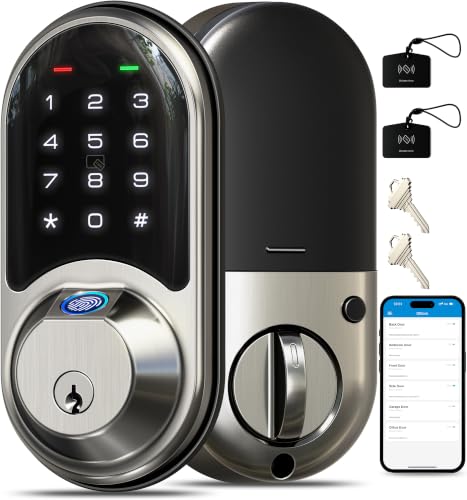 |
Best for Multiple Access Codes | PIN, fingerprint, fob, app, key | Bluetooth; compatible gateway | Guest and staff code management | Check Price on Amazon | Read Our Analysis |
| Yale Smart Lock with Matter – Made for Google Home – Snow – YRD510-MT1-SNW | 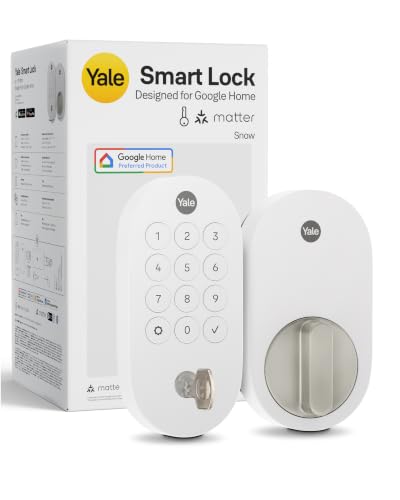 |
Best for Google Home | Keypad, app, physical key | Matter over Thread | App-managed access in compatible systems | Check Price on Amazon | Read Our Analysis |
| Lockin Veno Plus Smart Lock with Security Camera |  |
Best Camera-and-Lock Combination | PIN, palm vein, fingerprint, app, key | Built-in Wi-Fi | Keyless entry with exterior camera features | Check Price on Amazon | Read Our Analysis |
More Details on Our Top Picks
-
Yale Assure Lock 2 Deadbolt with Wi-Fi Keypad
If you want to simplify guest check-in, the Yale Assure Lock 2 with Wi-Fi is an excellent starting point. Airbnb lists supported Wi-Fi versions of this model family among its compatible smart locks. Eligible hosts can connect their lock to Airbnb and automatically generate unique access codes for confirmed bookings.
You can also manage supported lock functions through Yale’s app. This reduces the need to send permanent keys or manually create a new code for every reservation.
Why You’ll Like It: Direct Airbnb integration can save time when your property has frequent guest turnover. The keypad lets guests check in without installing a separate app.
Who Should Buy This: Airbnb hosts with eligible U.S. or Canadian listings who prioritize reservation-based guest-code automation.
Who Should Avoid This: Hosts outside the supported integration regions or anyone whose door cannot accommodate the required hardware.
Before You Buy: Confirm the exact Wi-Fi configuration, firmware, door dimensions, and eligible Airbnb integration requirements. You should also have a backup entry method for unexpected problems.
- Unlocking Methods:Keypad and compatible app; other methods depend on configuration
- Connectivity:Supported Wi-Fi configuration required
- Guest Management:Automatic Airbnb codes on eligible connected listings
- Security Features:Auto-lock and supported access notifications
- Installation:Replacement for compatible deadbolt hardware
- Best For:Direct Airbnb integration
-
Philips WiFi Smart Keypad Deadbolt Lock with App Control
The Philips WiFi Smart Keypad Deadbolt is a practical option if you want remote access management without purchasing a separate Wi-Fi gateway. Its built-in Wi-Fi supports app-based administration, while the keypad makes guest entry simple.
The Philips Home Access app supports different password modes, including temporary and time-limited options. You can create access codes for guests, cleaners, and other authorized visitors.
Why You’ll Like It: Guests can enter using a PIN without downloading an app. Timed codes can help you maintain control between bookings.
Who Should Buy This: Hosts who want a Wi-Fi deadbolt and prefer to manage guest access codes manually.
Who Should Avoid This: Hosts who specifically need automatic Airbnb reservation-code integration.
Before You Buy: Verify the exact model, door compatibility, network requirements, weather exposure, and backup-key arrangement.
- Unlocking Methods:Keypad, app, physical key
- Connectivity:Built-in Wi-Fi
- Guest Management:Timed and one-time access codes
- Battery Power:AA batteries with low-battery indications
- Smart Features:Supported app notifications and voice-assistant functions
- Best For:Remote manual PIN management
-
Fingerprint Smart Deadbolt with Keypad – Keyless Entry
Best Multi-Method Deadbolt
The Sifely Model O Fingerprint Smart Deadbolt is a flexible option for hosts who want several unlocking methods. Guests can use temporary keypad codes, while owners and authorized staff can use fingerprints, fobs, or physical keys.
This flexibility can help when different people need access to your property. Sifely’s app supports several types of guest codes. However, the company explains that expanded remote features, including remote lock control and certain code changes, require a compatible Sifely gateway.
Why You’ll Like It: You can give guests a PIN without requiring fingerprint enrollment or a smartphone app.
Who Should Buy This: Hosts looking for a keypad deadbolt with multiple backup entry methods.
Who Should Avoid This: Anyone who needs complete remote management but does not want to purchase or configure the necessary gateway.
Before You Buy: Check the included accessories, deadbolt dimensions, and gateway requirements. Bluetooth functionality alone does not provide every remote feature.
- Unlocking Methods:Fingerprint, keypad, app, fob, physical key
- Connectivity:Bluetooth; compatible gateway for expanded remote access
- Guest Management:Temporary and scheduled PIN options
- Security Features:Configurable auto-lock and keypad protection features
- Installation:Compatible deadbolt replacement
- Best For:Multiple entry methods
-
Anona Holo Wi-Fi Smart Lock with Keypad
Best Retrofit Option
The Anona Holo Wi-Fi Smart Lock with Keypad offers an appealing solution if you want smart entry without replacing the exterior appearance of your existing compatible deadbolt.
Its retrofit design operates the existing lock mechanism from inside. A companion keypad allows guests to enter a code without carrying a key or using an app. This arrangement can be helpful for approved rental installations where changing the outside door hardware is inconvenient.
Why You’ll Like It: You can add guest PIN access while retaining an existing compatible keyed exterior.
Who Should Buy This: Hosts who have a suitable single-cylinder deadbolt and want a retrofit smart lock.
Who Should Avoid This: Hosts with incompatible existing locks, unusual thumbturn designs, or limited mounting clearance.
Before You Buy: Confirm compatibility with the existing deadbolt, keypad inclusion, app features, and Wi-Fi setup. Retrofit compatibility should never be assumed from appearance alone.
- Unlocking Methods:Keypad, app, retained physical key
- Connectivity:Built-in Wi-Fi
- Guest Management:Temporary access codes
- Installation:Retrofit of a compatible existing deadbolt
- Security Features:Supported lock-status and automatic-locking functions
- Best For:Keeping existing exterior door hardware
-
LOCKSTAR Smart Door Lock with Keyless Entry
The LOCKSTAR Smart Door Lock provides several ways to enter your rental property, including keypad codes, fingerprints, fobs, an app, and physical keys.
For Airbnb hosts, the keypad is the most useful feature because guests can check in without meeting you to collect a key. Additional entry methods can be reserved for owners, cleaners, or other authorized users.
The app supports access-management features, but remote functionality depends on the lock’s connectivity configuration and compatible accessories.
Why You’ll Like It: Different users can choose convenient entry methods while guests continue using ordinary PIN codes.
Who Should Buy This: Hosts who need several practical entry options for recurring staff and short-term visitors.
Who Should Avoid This: Hosts seeking a simple deadbolt-only replacement without checking the complete lockset dimensions.
Before You Buy: Verify the exact package, gateway inclusion, door measurements, and remote notification capabilities.
- Unlocking Methods:App, fingerprint, keypad, fob, key
- Connectivity:Bluetooth; gateway-dependent remote capabilities
- Guest Management:App-supported code administration
- Security Features:Auto-lock and supported access records
- Installation:Check complete lockset and door preparation
- Best For:Flexible entry options
-
Smart Door Lock with WiFi & Fingerprint Access
The Sifely S WiFi Smart Door Lock is worth considering if you prefer a fingerprint lock with built-in Wi-Fi. It combines keypad access, fingerprint recognition, and app-based management in a connected entry system.
The keypad allows guests to enter with a code. Meanwhile, owners and authorized staff can use other unlocking methods. Temporary access-code features can help you manage different reservations without handing out physical keys.
Why You’ll Like It: Built-in Wi-Fi makes remote management more convenient without requiring a separate gateway for the model’s supported Wi-Fi functions.
Who Should Buy This: Hosts looking for fingerprint entry, guest PIN access, and Wi-Fi-connected administration.
Who Should Avoid This: Anyone expecting direct Airbnb booking integration or a simple deadbolt replacement without checking the product’s handle configuration.
Before You Buy: Inspect the exact listing for included handle hardware, door fit, Wi-Fi requirements, and emergency-power instructions.
- Unlocking Methods:PIN, fingerprint, card, app, physical key
- Connectivity:Built-in Wi-Fi
- Guest Management:Temporary codes and supported app administration
- Security Features:Auto-lock and low-power indications
- Installation:Confirm door preparation and handle configuration
- Best For:Wi-Fi-connected fingerprint access
-
Veise RZ07 Fingerprint Smart Lock with App Control
The Veise RZ07 Fingerprint Smart Lock offers flexible access management for rental properties with several authorized users.
You can create different credentials for guests, cleaners, and property managers. The keypad supports guest PIN access, while fingerprints, fobs, and physical keys offer alternatives for frequent users.
Its app-based administration can simplify code management, but some remote functions require a compatible Wi-Fi gateway rather than relying on Bluetooth alone.
Why You’ll Like It: Separate guest and staff codes make it easier to organize access without sharing a single permanent PIN.
Who Should Buy This: Hosts who regularly manage access for different users or service providers.
Who Should Avoid This: Anyone who needs full remote control but does not want to configure compatible gateway hardware.
Before You Buy: Verify the latest app features, gateway requirements, door dimensions, and included accessories.
- Unlocking Methods:Fingerprint, app, fob, PIN, physical key
- Connectivity:Bluetooth; compatible gateway for expanded remote access
- Guest Management:Multiple user codes and credentials
- Security Features:Auto-lock and anti-peep keypad options
- Installation:Compatible door hardware required
- Best For:Organizing guest and staff access
-
Yale Smart Lock with Matter – Made for Google Home – Snow – YRD510-MT1-SNW
The Yale Smart Lock with Matter is a good match for hosts who already use Google Home and want their entry lock connected to a compatible smart home system.
Its keypad provides guest PIN entry, while Matter-over-Thread connectivity supports integration with suitable smart home equipment. This can help you manage the entrance as part of a larger connected property.
Why You’ll Like It: The keypad and Matter support offer convenient access management when you already have compatible infrastructure.
Who Should Buy This: Hosts using Google Home who have a compatible Matter controller and Thread border router.
Who Should Avoid This: Hosts seeking a lock that works remotely without additional compatible smart home equipment.
Before You Buy: Confirm the Yale YRD510 model, supported controller, regional compatibility, and guest-code features. Do not assume this Matter model supports direct Airbnb integration simply because another Yale model does.
- Unlocking Methods:Keypad, compatible app, physical key
- Connectivity:Matter over Thread
- Smart Home Compatibility:Google Home and supported Matter ecosystems
- Required Equipment:Compatible Matter controller and Thread border router
- Guest Management:App-supported access codes where available
- Best For:Existing Google Home setups
-
Lockin Veno Plus Smart Lock with Security Camera
The Lockin Veno Plus Smart Lock combines a keyless entry system with an exterior-facing camera and video doorbell. It is worth considering if you want these functions in one entry-door installation.
The lock supports several access methods, including PIN codes, fingerprints, and palm vein recognition. Guests can use keypad codes without enrolling biometric information. The camera and supported app features can help you monitor the exterior entrance where permitted.
Why You’ll Like It: You can combine a smart lock and video doorbell without installing two separate doorway products.
Who Should Buy This: Hosts who need a combined exterior camera and smart lock and can meet Airbnb’s disclosure and privacy requirements.
Who Should Avoid This: Hosts who cannot position the camera without monitoring indoor spaces or other private areas.
Before You Buy: Confirm camera placement, recording settings, local laws, battery charging, backup access, and disclosure requirements.
- Unlocking Methods:Palm vein, fingerprint, PIN, app, physical key
- Connectivity:Built-in Wi-Fi
- Camera Features:Integrated video doorbell and exterior monitoring
- Battery Powered:Rechargeable battery arrangement
- Guest Management:PIN access with supported app features
- Best For:Combined entry lock and exterior camera
Factors to Consider When Choosing an Airbnb Smart Lock System

Choosing an Airbnb smart lock involves more than comparing fingerprint scanners or smartphone features. You need a system that helps guests enter easily, lets you manage access securely, and fits your existing door. The following factors will help you find the right option.
Direct Airbnb Integration vs. Manual Guest Codes
Some supported smart locks can connect directly to Airbnb and automatically generate unique access codes for confirmed reservations. This feature is available for eligible listings in the United States and Canada using supported models.
Other locks support temporary PINs through their own apps. These can still work well for Airbnb hosting, but you may need to generate, share, and revoke the codes manually.
If you use a property management system, check whether it supports your exact lock model and Airbnb workflow.
Pro Tip: Test the guest code before arrival. Confirm when it becomes active, when it expires, and whether you can revoke it if the reservation changes.
Keyless Entry Options
A reliable keypad is often the most useful entry method for an Airbnb property. Guests can unlock the door without installing a special app or registering their fingerprints.
Fingerprint recognition, key fobs, and smartphone access can be convenient for owners, cleaners, or recurring staff. However, you should not require guests to provide biometric information when an ordinary PIN code can accomplish the same purpose.
Choose a lock that offers the access methods your guests can use easily, especially when arriving late or after a long journey.
Wi-Fi, Bluetooth, Gateways, and Matter
Smart locks use different connectivity technologies, and this directly affects how you manage your property.
- Built-in Wi-Fi: Can support remote app management without a separate bridge, depending on the model.
- Bluetooth: Often provides local smartphone control. Some remote functions require an additional gateway.
- Wi-Fi Gateway: Connects certain Bluetooth locks to your network for remote management.
- Matter over Thread: Requires compatible smart home infrastructure, including a suitable controller and Thread border router.
Before purchasing, confirm which remote features work with the exact configuration. Voice assistant compatibility does not automatically mean Airbnb integration is available.
Installation Ease and Door Compatibility
Choosing a smart lock that fits your door correctly can save time and avoid unnecessary modifications.
Before ordering, check the existing deadbolt, door thickness, backset, bore hole measurements, strike plate, and available clearance. If the product includes a handle, confirm the door handing and full lockset preparation.
Some retrofit models work with existing single-cylinder deadbolts, while others require complete replacement.
Compatibility Note: A manufacturer describing installation as easy or requiring only a screwdriver does not mean the lock will fit every door. Check the official installation instructions first.
Security Features and Backup Entry
Look for features that help you manage guest access and reduce common entry problems.
Useful options include temporary access codes, configurable auto-lock timing, low-battery notifications, failed-entry alerts, and access records.
However, an auto-lock feature does not always confirm that a door is completely closed or that the bolt has engaged properly. Door alignment and correct installation remain important.
Plan an emergency entry method before your first guest arrives. This might involve a backup mechanical key, an approved emergency-power option, or assistance from a trusted local co-host.
Smart Home Compatibility
Compatibility with Alexa, Google Home, Apple Home, or Matter can add convenience, but it should not be your main reason for choosing an Airbnb lock.
Check whether the exact model supports your preferred platform, whether additional hardware is required, and which functions are available in your region.
For rental properties, reliable keypad entry and guest-code management generally matter more than voice control.
User Management Capabilities
Good access management can save you time when dealing with frequent bookings.
Choose a system that lets you create different codes for guests, cleaners, co-hosts, and maintenance staff. Temporary or scheduled PINs are especially useful because access can end when it is no longer needed.
Check whether codes can be changed remotely and whether entry records update in real time or only after the lock reconnects.
Avoid using one permanent guest code across multiple bookings. Separate codes make it easier to manage who has permission to enter.
Battery Life and Internet Outages
Battery life varies depending on the model, frequency of use, connectivity settings, and environmental conditions.
Wi-Fi communication, frequent unlocking, and real-time notifications can affect battery consumption. Monitor battery warnings and replace or recharge batteries before they become critically low.
Some locks can continue accepting previously programmed keypad codes without internet access. However, remote updates and new cloud-generated codes may stop working during an outage.
Always check how your specific lock behaves when Wi-Fi is unavailable or its batteries are depleted.
Camera Locks and Guest Privacy
A camera-equipped smart lock needs additional consideration when used at an Airbnb property.
Airbnb prohibits security cameras monitoring indoor guest spaces. Exterior security cameras must be disclosed and must not monitor locations where guests reasonably expect privacy.
Review Airbnb’s official camera disclosure requirements and applicable local laws before installing a video smart lock.
Check the camera’s field of view, recording settings, storage method, and any audio features before enabling them.
Before You Buy: Smart Lock Checklist
- Confirm the exact model and ASIN.
- Measure the existing door and lock hardware.
- Check whether Wi-Fi or a gateway is required.
- Verify temporary guest-code functionality.
- Determine whether direct Airbnb integration is supported.
- Check battery requirements and emergency entry options.
- Review warranty and support information.
- Confirm any subscription or accessory costs.
- Test guest codes and backup entry before the first booking.
Frequently Asked Questions
How Do Smart Locks Enhance Security for Airbnb Properties?
Smart locks can improve access control by allowing you to create separate entry codes, revoke access after checkout, and manage authorized users without distributing physical keys. Some models also provide access notifications and activity records. Their effectiveness still depends on proper installation, code management, and maintenance.
Can Smart Locks Be Used With Existing Deadbolts?
Yes, some retrofit smart locks are designed to work with compatible existing deadbolts. Other models require replacing the entire deadbolt or lockset. Check the manufacturer’s compatibility requirements before buying.
What Is the Battery Life of Most Smart Locks?
Battery life varies widely by model, connectivity technology, and usage. Some locks may operate for several months between battery changes, while others require more frequent charging or replacement. Check the manufacturer’s specifications and monitor battery alerts regularly.
Are Smart Locks Compatible With Airbnb Management Apps?
Some smart locks can connect directly to Airbnb, but compatibility is limited to supported models and eligible listings. Other smart locks may work through supported third-party property management systems or require manual guest-code management. Always confirm the exact model and integration method.
Which Smart Locks Connect Directly to Airbnb?
Airbnb lists selected Yale, Schlage, and August smart locks for direct integration on eligible listings in the United States and Canada. Supported Yale Assure Lock 2 Wi-Fi configurations are included. Check Airbnb’s current compatibility list before purchasing.
Can I Use a Smart Lock Without Native Airbnb Integration?
Yes. Many smart locks can create temporary PIN codes through their own apps. You can share those codes with guests in your check-in instructions and manage access between bookings. Automatic reservation-based code generation should not be assumed unless the integration is specifically supported.
What Happens if Wi-Fi or the Batteries Fail?
Some locks continue accepting saved keypad codes during internet outages. Others may lose specific connected features until service returns. If batteries fail, electronic entry may become unavailable. Keep a tested backup entry method and follow the manufacturer’s emergency-access instructions.
Do Airbnb Guests Need to Use Fingerprint Entry?
No. With a PIN-enabled smart lock, guests can enter using a temporary code instead of enrolling fingerprints. This is generally easier for short stays and helps avoid unnecessary biometric data collection.
Is an Exterior Camera Lock Allowed at an Airbnb?
Exterior cameras can be allowed when they comply with Airbnb’s disclosure and privacy requirements and applicable laws. Cameras monitoring indoor guest spaces are prohibited. You should review the current Airbnb policy and ensure the device is positioned appropriately.
How Difficult Is It to Install a Smart Lock?
Many smart locks can be installed with basic tools when the door is compatible. However, some doors require adjustments or professional help. Measure the existing hardware, follow the manufacturer’s instructions, and test all entry methods before relying on the lock for guest check-in.
Conclusion
Choosing the right Airbnb smart lock can simplify guest check-in and improve access management. The Yale Assure Lock 2 with Wi-Fi is a strong starting point for eligible hosts who want direct Airbnb integration. The Philips WiFi Smart Keypad Deadbolt suits hosts who prefer remote manual PIN management, while the Anona Holo offers a retrofit option for compatible existing doors.
If you need multiple unlocking methods, consider the Sifely or Veise options. A combined exterior camera and lock, such as the Lockin Veno Plus, may also be useful where privacy and disclosure requirements can be met.
Before making your decision, verify the exact product configuration, door compatibility, connectivity requirements, guest-code features, and backup entry method. A dependable lock with a clear check-in process can make hosting easier for you and arrival more convenient for your guests.

