

Last Updated on November 4, 2026 by Caleb Warren
Looking for the best Z-Wave door locks in 2026? The Yale Assure Lock 2, Kwikset HomeConnect 620, and Yale Assure Lock 2 Touch are strong options for homeowners who want keyless entry and smart home control. The right choice depends on your existing door hardware, preferred unlocking method, and Z-Wave hub. This guide compares six Z-Wave smart locks, explains their limitations, and helps you choose a model that fits your home.
Disclosure: As an Amazon Associate I earn from qualifying purchases. Some links on this page are affiliate links, at no extra cost to you.
Quick Answer: Which Z-Wave Door Lock Should You Buy?
Best Overall: The Yale Assure Lock 2 with Keypad and Z-Wave is a practical choice for a standard entry door. It combines keypad entry, a physical backup key, and smart home integration through a compatible hub.
Best for Guest Codes: The Kwikset HomeConnect 620 supports up to 250 user codes and offers a backlit physical keypad.
Best for Fingerprint Entry: The Yale Assure Lock 2 Touch adds biometric unlocking for people who prefer not to enter a code.
Important: These locks require a compatible Z-Wave hub for remote smart home control. Always check the exact model, included Z-Wave module, hub support, and door dimensions before ordering.
Key Takeaways
- Best everyday option: Yale Assure Lock 2 combines a keypad, backup key, and Z-Wave integration.
- Best for multiple users: Kwikset HomeConnect 620 supports up to 250 access codes.
- Best fingerprint option: Yale Assure Lock 2 Touch provides fingerprint and keypad unlocking.
- Best touchscreen option: Kwikset HomeConnect 918 offers a modern touchscreen design and Z-Wave connectivity.
- Best for single-bore doors: Yale Assure Z-Wave Lever replaces a compatible knob or lever instead of a deadbolt.
- Hub compatibility matters: Z-Wave support alone does not guarantee every app, alarm system, or automation feature will work.
- Check backup access: Look for a mechanical key, emergency battery contacts, or another supported entry method.
Top Z-Wave Door Lock Picks Compared
| Yale Assure Lock 2 Deadbolt with Keypad and Z-Wave |  |
Best Overall | Entry: Keypad, backup key, supported app features | Z-Wave: Compatible module included in specified package | Best For: Standard entry doors | Check Price on Amazon | Read Our Analysis |
| Kwikset HomeConnect 620 Z-Wave Keypad Smart Lock |  |
Best for User Codes | Entry: Backlit 10-button keypad, physical key | Z-Wave: 700-series technology | Best For: Families and guest access | Check Price on Amazon | Read Our Analysis |
| Yale Assure Z-Wave Smart Door Lever – Bronze |  |
Best Smart Lever | Entry: Backlit keypad, physical keys | Z-Wave: Z-Wave Plus | Best For: Compatible single-bore doors | Check Price on Amazon | Read Our Analysis |
| Yale Assure Z-Wave Smart Touchscreen Deadbolt |  |
Best Classic Touchscreen | Entry: Backlit touchscreen, backup keys | Z-Wave: Z-Wave Plus | Best For: Touchscreen entry | Check Price on Amazon | Read Our Analysis |
| Kwikset HomeConnect 918 Touchscreen Lock (Matte Black) | 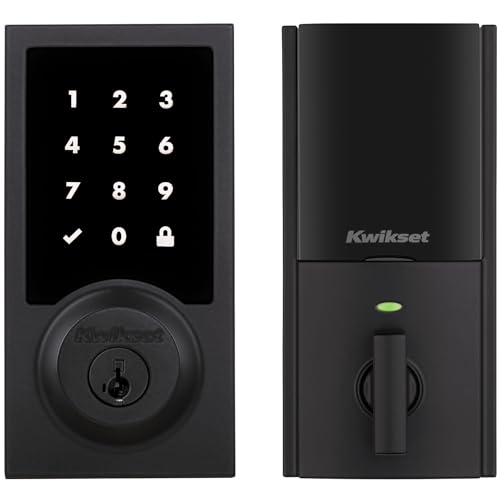 |
Best Modern Touchscreen | Entry: Touchscreen, physical key | Z-Wave: Z-Wave 700 Long Range | Best For: Modern front doors | Check Price on Amazon | Read Our Analysis |
| Yale Assure Lock 2 Touch with Z-Wave – Fingerprint Smart Lock in Black |  |
Best Fingerprint Option | Entry: Fingerprint, keypad, backup key | Z-Wave: 700-series module | Best For: Biometric entry | Check Price on Amazon | Read Our Analysis |
Comparison note: Features such as remote unlocking, guest-code scheduling, activity notifications, and voice control depend on the specific lock and compatible smart home controller. Check your hub’s supported-device list before purchasing.
More Details on Our Top Picks
-
Yale Assure Lock 2 Deadbolt with Keypad and Z-Wave
The Yale Assure Lock 2 Deadbolt with Keypad and Z-Wave is a practical choice if you want a smart lock for a standard front or back door. It combines a physical keypad, key backup, and Z-Wave connectivity in a clean design.
You can enter your home with a personal code instead of searching for keys. The lock also supports Yale’s DoorSense technology, which can help detect whether the door is open or closed. When correctly configured, Auto-Lock can reduce the chance of leaving your door unlocked.
The Z-Wave version connects to compatible smart home systems through its Yale Z-Wave module. Supported features can include remote locking, status checks, and automation using your hub’s app. Yale Access also offers local Bluetooth functions, but its features are not identical to those available through a Z-Wave controller.
Why You’ll Like It: You get several ways to manage everyday entry without depending entirely on a smartphone. The physical key provides another access method if the electronic features are unavailable.
Who Should Buy This: Homeowners with standard deadbolt-prepared entry doors who want keypad access and Z-Wave automation.
Who Should Avoid This: People who do not own or plan to install a compatible Z-Wave hub for remote control, or whose doors do not meet the lock’s installation requirements.
Before You Buy: Confirm that the selected package includes the Z-Wave module. This listing is associated with the YRD410-ZW2-BSP configuration. Verify that your controller supports the exact lock and desired functions.
- Keyless Entry: Physical keypad and supported app access
- Z-Wave Compatibility: Z-Wave-enabled model
- Auto-Lock Feature: Yes, when enabled and configured
- Battery Powered: Four AA batteries
- DIY Installation: Designed for compatible standard deadbolt preparations
- Backup Access: Physical key
- Additional Feature: DoorSense support
- Additional Feature: Configurable access codes
- Additional Feature: Compatible hub required for remote Z-Wave functions
-
Kwikset HomeConnect 620 Z-Wave Keypad Smart Lock
If several people need regular or occasional access to your home, the Kwikset HomeConnect 620 Z-Wave Keypad Smart Lock deserves a close look. It supports up to 250 user codes, making access management easier for households with family members, guests, or trusted service providers.
Unlike touchscreen locks, the HomeConnect 620 uses a backlit 10-button physical keypad. This is useful if you prefer distinct buttons that you can press instead of a flat touch surface.
The lock uses Z-Wave 700 technology and supports compatible smart home hubs. Its S2 security and SmartStart capabilities can help with secure pairing and network integration when your controller supports those features.
You can configure automatic locking intervals from 30 seconds to 10 minutes. The lock also includes Kwikset SmartKey Security, which lets you rekey its compatible mechanical cylinder without replacing the entire lock.
Why You’ll Like It: The combination of multiple access codes, physical buttons, scheduled access features through supported controllers, and a rekeyable cylinder makes it flexible for everyday household use.
Who Should Buy This: Families and homeowners who need multiple entry codes and prefer physical keypad buttons.
Who Should Avoid This: Buyers looking specifically for a touchscreen or fingerprint reader.
Before You Buy: Check that your door is between 1-3/8 and 2 inches thick. Confirm the backset and bore dimensions. The manufacturer specifies an adjustable 2-3/8-inch or 2-3/4-inch backset for the HomeConnect 620.
- Keyless Entry: Backlit 10-button keypad
- Z-Wave Compatibility: Z-Wave 700 technology
- Auto-Lock Feature: Configurable locking delay
- Battery Powered: Four AA batteries
- DIY Installation: Designed for compatible standard deadbolt preparations
- Backup Access: Mechanical key with SmartKey Security
- Additional Feature: Up to 250 user codes
- Additional Feature: S2 secure network enrollment
- Additional Feature: SmartStart support with compatible controllers
-
Yale Assure Z-Wave Smart Door Lever – Bronze
Not every door has a separate deadbolt. If your door uses a single knob or lever opening, the Yale Assure Z-Wave Smart Door Lever may be a better fit than a standard smart deadbolt.
This model replaces a compatible lever or knob and provides a backlit keypad for code-based entry. It is particularly useful for certain side entries, garage-entry doors, home offices, and other doors with a suitable single-bore preparation.
The lock supports Z-Wave Plus integration through a compatible hub. Depending on your system, you may be able to manage entry codes, check lock status, and create automations from your smart home app.
Its bronze finish offers a traditional appearance. The keyed configuration also provides a mechanical backup method. A 9V emergency power connection can help operate the electronic keypad if the installed batteries become depleted.
Why You’ll Like It: You can add smart access to a suitable single-bore door without converting it to a conventional deadbolt setup.
Who Should Buy This: Homeowners who want a Z-Wave keypad lever for a compatible knob-only or lever-only door.
Who Should Avoid This: Anyone who needs a replacement for an existing deadbolt or has a multipoint locking system.
Before You Buy: Yale specifies a standard single-bore preparation and door thickness of approximately 1-3/8 to 1-3/4 inches for its Assure Lever range. Check the door handing, latch dimensions, and exact model before ordering.
Compatibility Note: This is a lever lock, not a deadbolt. Do not purchase it as a direct replacement for a standard deadbolt assembly.
- Keyless Entry: Backlit keypad
- Z-Wave Compatibility: Z-Wave Plus
- Auto-Lock Feature: Configurable auto-relock
- Battery Powered: Four AA batteries
- DIY Installation: Compatible single-bore knob or lever preparation
- Backup Access: Mechanical keys and 9V emergency power contacts
- Additional Feature: Bronze finish
- Additional Feature: Suitable for selected side and interior entry doors
- Additional Feature: Hub-based smart home integration
-
Yale Assure Z-Wave Smart Touchscreen Deadbolt
The Yale Assure Z-Wave Smart Touchscreen Deadbolt is a useful option if you prefer a flat, backlit touchscreen instead of physical keypad buttons.
You can unlock the door using a personal access code. The touchscreen provides a clean appearance and can be easier to maintain than a lock with several raised buttons. Its keypad also remains useful when you do not want to take out your phone.
With a compatible Z-Wave smart home system, supported features can include remote locking, lock-status checks, entry-code management, and activity notifications. The available functions depend on your hub and its integration with the lock.
This older-generation Yale Assure model also includes physical backup keys in the specified keyed configuration. You can enable automatic relocking to reduce the chance of forgetting to secure the door.
Why You’ll Like It: The touchscreen provides simple everyday entry, while the backup key adds another way to access your home.
Who Should Buy This: Homeowners who prefer a traditional Yale Assure touchscreen design and already use a compatible Z-Wave hub.
Who Should Avoid This: Buyers looking for fingerprint unlocking or the updated design and connectivity options found in newer Assure Lock 2 models.
Before You Buy: This listing is associated with the YRD226-ZW2-BSP model. Confirm support for this older-generation lock in your hub’s compatibility list. Also check the included Z-Wave module and mechanical key configuration.
- Keyless Entry: Backlit touchscreen keypad
- Z-Wave Compatibility: Z-Wave Plus
- Auto-Lock Feature: Configurable auto-relock
- Battery Powered: Four AA batteries
- DIY Installation: Compatible standard deadbolt preparation
- Backup Access: Physical keys
- Additional Feature: Individual entry codes
- Additional Feature: Hub-dependent remote management
- Additional Feature: Black Suede finish
-
Kwikset HomeConnect 918 Touchscreen Lock (Matte Black)
If you want a modern-looking smart deadbolt with Z-Wave connectivity, consider the Kwikset HomeConnect 918 Touchscreen Lock in Matte Black.
Its touchscreen lets you unlock your door with an access code instead of using a physical key every time. The contemporary exterior works well with modern door hardware and darker finishes.
The HomeConnect 918 uses Z-Wave technology for integration with compatible controllers. Its Z-Wave 700 Long Range platform supports modern network features, including S2 security and simplified enrollment through supported hubs.
Kwikset specifies support for up to 250 user codes on the HomeConnect 918 platform. This can help you organize access for family members and trusted guests. Supported controllers may also provide remote management and automation.
A mechanical key provides backup entry, while the SmartKey cylinder allows compatible rekeying. Automatic locking can provide additional convenience when configured correctly.
Why You’ll Like It: You get a modern touchscreen appearance without giving up the option of a physical backup key.
Who Should Buy This: Homeowners who want a contemporary touchscreen deadbolt and already use, or plan to install, a suitable Z-Wave smart home hub.
Who Should Avoid This: Buyers who prefer physical keypad buttons or need fingerprint access.
Before You Buy: Confirm the exact HomeConnect 918 variant, door dimensions, hub compatibility, and supported Z-Wave features. Smart home platform compatibility may depend on the controller and its software.
- Keyless Entry: Touchscreen keypad
- Z-Wave Compatibility: Z-Wave 700 Long Range platform
- Auto-Lock Feature: Supported
- Battery Powered: Four AA batteries
- DIY Installation: Designed for compatible deadbolt-prepared doors
- Backup Access: Mechanical key
- Additional Feature: Up to 250 user codes
- Additional Feature: S2 security support
- Additional Feature: Contemporary matte black finish
-
Yale Assure Lock 2 Touch with Z-Wave – Fingerprint Smart Lock in Black
The Yale Assure Lock 2 Touch with Z-Wave is a strong option if your main priority is fingerprint unlocking. Instead of entering a code each time, you can use a registered fingerprint to open your door.
Fingerprint access is especially convenient when you arrive carrying groceries, bags, or other items. You can also use the keypad and the physical backup key included with the specified keyed version.
The lock supports Z-Wave integration with compatible smart home systems. However, it uses a different Z-Wave module from some other Yale Assure models.
For the Assure Lock 2 Touch models YRD420-F and YRD450-F, Yale specifies the AYR-MOD-ZW3-USA Z-Wave 700-series module. Older Yale Z-Wave modules are not interchangeable with this configuration.
You can register fingerprints through the Yale Access app. Z-Wave activity reports depend on the connected controller, and a third-party hub may report that the lock was opened without identifying the fingerprint used.
Why You’ll Like It: Fingerprint entry reduces the need to remember and enter a code during daily use, while the keypad and backup key provide alternatives.
Who Should Buy This: Homeowners who want biometric entry and have a compatible Z-Wave system.
Who Should Avoid This: Buyers who do not need fingerprint access or whose current hub does not support the required Yale integration.
Before You Buy: Verify that the selected package includes the correct Z-Wave module. Yale confirms compatibility with SmartThings and Hubitat for this lock family. Ring integration may offer fewer supported features, so confirm your exact requirements before ordering.
Pro Tip: Register more than one suitable fingerprint for your authorized users and keep an alternative entry method available. Fingerprint recognition may be affected by moisture, dirt, skin condition, or sensor condition.
- Keyless Entry: Fingerprint and keypad
- Z-Wave Compatibility: Z-Wave 700-series module
- Auto-Lock Feature: Configurable automatic locking
- Battery Powered: Four AA batteries
- DIY Installation: Designed for compatible standard deadbolt preparations
- Backup Access: Keypad and physical key in the specified keyed configuration
- Additional Feature: Fingerprint registration through Yale Access
- Additional Feature: Compatible smart home notifications
- Additional Feature: Model-specific Z-Wave hub requirements
How to Choose the Best Z-Wave Door Lock
Choosing a Z-Wave smart door lock involves more than finding an attractive keypad. You need to check your door preparation, hub compatibility, security features, access methods, and backup options.
Use the following factors to narrow your choices before buying.
1. Choose the Right Keyless Entry Method
Different Z-Wave door locks provide different ways to unlock your home. The best option depends on how you prefer to enter and who needs access.
- Physical keypad: A practical choice if you prefer raised buttons. The Kwikset HomeConnect 620 is an example.
- Touchscreen: Offers a smooth exterior and code-based unlocking. Consider the Kwikset HomeConnect 918 or Yale Assure touchscreen models.
- Fingerprint: Lets registered users unlock without entering a code. The Yale Assure Lock 2 Touch provides this option.
- Smartphone access: Available through supported Bluetooth connections or a compatible smart home hub and application.
- Mechanical key: Provides an alternative to electronic unlocking on models that include a keyed cylinder.
Buying Tip: If several people use your door, choose a lock that supports separate entry codes. This makes it easier to change someone’s access without replacing the main lock.
2. Compare Security Features and Certifications
A smart door lock should provide both physical protection and secure electronic communication.
Look for a model with appropriate ANSI/BHMA security certification, secure Z-Wave communication, and a reliable mechanical locking system.
Some Kwikset HomeConnect models use Z-Wave S2 security and SmartStart enrollment. These features help protect and simplify supported network connections, but they do not guarantee protection against every cyberattack.
For physical security, consider the lock’s certification, strike plate, door frame, and installation quality. A stronger lock cannot fully compensate for a weak door or damaged frame.
Auto-lock is useful, but it should not replace checking that your door closes and latches correctly. Some auto-lock functions operate after a timer, while supported door sensors can provide additional information about whether the door is closed.
Security Note: A Z-Wave lock is only one part of home security. Use a properly installed strike plate, a sound door frame, secure hub credentials, and updated controller software. Do not assume that an electronic lock makes a door resistant to every type of forced entry.
3. Verify Compatibility With Your Smart Home Hub
Hub compatibility is one of the most important factors when purchasing a Z-Wave lock.
Z-Wave is a wireless smart home communication technology. It is not the same as Wi-Fi or Bluetooth.
Most Z-Wave door locks require a compatible hub or controller to provide remote access, automations, and internet-based notifications.
Common smart home platforms that support selected Z-Wave locks include:
- Samsung SmartThings
- Ring Alarm with a compatible Ring Alarm Base Station
- Hubitat
- Selected Alarm.com systems
- Other compatible Z-Wave controllers
However, not every Z-Wave lock works with every Z-Wave hub. Some integrations support basic locking but lack advanced features such as scheduled codes, fingerprint-related information, or detailed access history.
Check the exact model number and hub compatibility list. If you use Yale, also check the required Yale Z-Wave module.
For manufacturer guidance, see the Yale Z-Wave compatibility information and the Kwikset HomeConnect 620 specifications.
4. Check Door Fitment and Installation Requirements
Even a high-quality smart lock will not work correctly if it does not fit your door.
Before buying, measure and inspect your existing door hardware.
- Door thickness: Check the manufacturer’s supported thickness range.
- Bore hole: Confirm the main hole diameter and edge hole dimensions.
- Backset: Common residential backsets are 2-3/8 inches and 2-3/4 inches.
- Door handing: Verify any left-hand or right-hand requirements.
- Lock type: Identify whether the door uses a deadbolt, lever, mortise lock, or multipoint locking system.
- Door alignment: Make sure the latch or bolt moves freely into the strike plate.
Many residential smart deadbolts are designed for screwdriver-based installation on compatible standard doors. However, unusual door preparations, damaged hardware, and specialty locks may require professional installation.
Pro Tip: Test the mechanical operation with the door open before enabling automatic locking. A misaligned deadbolt can cause motor strain, unnecessary battery use, and locking problems.
5. Consider User Codes and Access Management
If you share your home with family members or regularly welcome guests, customizable entry codes can make access management much easier.
The Kwikset HomeConnect 620 supports up to 250 user codes. This may be more than a typical household needs, but it gives you room to manage multiple authorized users.
Depending on the model and connected controller, you may be able to:
- Create individual access codes.
- Delete codes when access is no longer needed.
- Assign schedules to selected users.
- Review supported entry activity.
- Receive notifications when the lock is used.
Do not assume all code-management functions are available in every app. Some Yale and Kwikset features depend on the connected hub.
Use different codes for different people whenever possible. Remove temporary codes promptly and avoid sharing your master programming code.
6. Understand Battery Life and Emergency Access
Most Z-Wave smart locks use replaceable batteries, commonly four AA alkaline batteries.
Many manufacturers describe battery life of up to approximately one year under typical conditions. Actual performance varies with usage, temperature, radio communication, door alignment, and battery quality.
Before choosing a lock, check its backup method:
- Physical key: Lets you operate the mechanical lock when electronic access is unavailable.
- Emergency battery contacts: Allow temporary external power on supported models.
- Low-battery alerts: Provide warning before the installed batteries become depleted.
- Local keypad operation: Usually works independently of your internet connection while the lock has sufficient power.
Replace batteries when the lock reports low power. Do not wait until it stops responding.
7. Check Z-Wave Range and Network Reliability
A Z-Wave lock communicates through a compatible Z-Wave network. Your experience depends on the controller, distance, walls, interference, and network configuration.
Newer Z-Wave hardware may support longer-range communication and additional security features. However, the benefits depend on whether your hub supports the same technology.
A lock with Z-Wave Long Range support does not automatically guarantee long-range operation with an older controller.
For more reliable results, confirm:
- The lock is within the supported communication range.
- Your hub supports the lock’s Z-Wave generation and required security mode.
- The installation location does not create excessive signal interference.
- Any required pairing or inclusion procedure is completed correctly.
- The controller firmware supports the features you want to use.
Important: Z-Wave repeaters and mesh behavior depend on network configuration. Battery-powered locks do not generally function as ordinary always-on Z-Wave repeaters.
Before You Buy: Z-Wave Door Lock Checklist
Use this checklist before placing your order:
- Confirm the lock matches your existing door hardware.
- Measure the door thickness, bore hole, and backset.
- Verify compatibility with your specific Z-Wave hub.
- Check whether the correct Z-Wave module is included.
- Choose your preferred entry method: keypad, touchscreen, or fingerprint.
- Check how many access codes you need.
- Confirm that your required smart home features are supported.
- Review the emergency unlocking method.
- Check the manufacturer’s current warranty terms.
- Confirm the exact product model and selected finish on Amazon before ordering.
Which Z-Wave Door Lock Should You Choose?
Each lock in this guide solves a slightly different problem. Your best choice depends on your door and daily routine.
Choose Yale Assure Lock 2 for Everyday Smart Home Entry
The Yale Assure Lock 2 is a practical starting point for a standard entry door. Its keypad, backup key, and supported Z-Wave features suit homeowners who want convenient access without changing their entire door setup.
Choose Kwikset HomeConnect 620 for Multiple User Codes
The HomeConnect 620 is a good match for households that need flexible code management. Its backlit physical keypad and SmartKey cylinder are useful if you prefer straightforward operation.
Choose Yale Assure Lever for a Compatible Single-Bore Door
The Yale Assure Lever is the more appropriate choice when you need to replace a standard lever or knob rather than a deadbolt. Make sure your existing door preparation matches the manufacturer’s requirements.
Choose Kwikset HomeConnect 918 for a Modern Touchscreen
The HomeConnect 918 combines a contemporary appearance with Z-Wave connectivity and access-code management. It is worth considering when you want a flat touchscreen instead of physical buttons.
Choose Yale Assure Lock 2 Touch for Fingerprint Access
The Yale Assure Lock 2 Touch is designed for homeowners who want to unlock using registered fingerprints. Confirm the required Z-Wave module and hub support before choosing it.
Frequently Asked Questions
How Do Z-Wave Door Locks Integrate With Smart Home Systems?
Z-Wave door locks communicate with a compatible smart home hub or controller. Depending on the lock and platform, you can manage access codes, check lock status, create automations, and receive notifications. Remote access generally requires a hub with an active internet connection.
What Is the Average Battery Life for Z-Wave Door Locks?
Many Z-Wave door locks are designed to operate for several months to around one year on a set of batteries. Actual battery life depends on the model, usage, operating temperature, wireless communication, and door alignment. Follow the manufacturer’s replacement guidance.
Can Z-Wave Locks Be Controlled Remotely?
Yes. A compatible Z-Wave hub with remote access capabilities can let you control supported locks while away from home. The available functions depend on the specific lock, controller, and app. Z-Wave connectivity alone does not provide internet access.
Are Z-Wave Door Locks Compatible With All Door Types?
No. Z-Wave deadbolts, lever locks, and specialty locking systems have different installation requirements. Check the door thickness, backset, bore diameter, handing, and existing lock type before purchasing.
What Happens if the Wi-Fi Goes Down?
Your Z-Wave lock can usually continue operating through its local keypad, fingerprint reader, or mechanical key, depending on the model and available battery power. Local Z-Wave communication may also continue when the controller remains powered. However, internet-based remote control and notifications may stop working until connectivity is restored.
Do Z-Wave Door Locks Require a Hub?
A compatible Z-Wave hub or controller is generally required to use Z-Wave smart home functions such as remote control, automations, and connected notifications. Many locks can still operate locally through their keypad without a hub.
Can I Use a Z-Wave Door Lock With Ring Alarm?
Some Z-Wave locks work with Ring Alarm, but compatibility is model-specific. You need a compatible Ring Alarm Base Station and a lock supported by Ring. Features may vary, and some Yale models may not offer full Ring integration. Check Ring’s current compatibility information before buying.
Is Z-Wave Better Than Wi-Fi for Door Locks?
Both technologies can work well, but they suit different setups. Z-Wave is designed for smart home device communication through a compatible controller and can offer efficient, low-power operation. Wi-Fi locks may connect more directly to an existing home network, although their setup and power needs vary. Z-Wave is especially useful if you already have a compatible smart home hub.
Can I Change Z-Wave Lock User Codes From My Phone?
Often, yes. Many Z-Wave lock systems support code creation, editing, or deletion through a compatible hub app. However, code-management support varies by lock and controller. Some models also provide local programming options.
What Should I Do if My Z-Wave Lock Battery Dies?
Use the emergency access method supported by your specific lock. This may be a physical backup key or external battery terminals. Once you gain access, replace the depleted batteries and check that the lock operates correctly.
Conclusion
The best Z-Wave door lock in 2026 is the one that matches your door, smart home hub, and everyday access needs.
For most standard deadbolt installations, the Yale Assure Lock 2 with Keypad and Z-Wave is a well-rounded starting point. The Kwikset HomeConnect 620 is appealing if you need multiple user codes and prefer physical keypad buttons. If fingerprint entry matters most, consider the Yale Assure Lock 2 Touch with its compatible Z-Wave module.
The Kwikset HomeConnect 918 offers a modern touchscreen option, while the Yale Assure Lever suits certain doors without a separate deadbolt. The older Yale Assure touchscreen deadbolt remains another choice for compatible Z-Wave systems.
Before ordering, confirm your door measurements, the exact lock model, hub compatibility, and backup access method. A suitable Z-Wave lock can make daily entry more convenient while giving you better control over who can access your home.

